


Securing OpenClaw on a VPS requires a structured hardening strategy that reduces the attack surface, enforces strict access control, and strengthens server-level defenses before the application is exposed to public traffic. When OpenClaw runs on a VPS without proper security configuration, even a minor misconfiguration can lead to privilege escalation, fuites de données, or service disruption. This guide explains the exact steps to harden OpenClaw security on a VPS in a production-ready environment.
Why Hardening OpenClaw Security on a VPS Is Critical
Learning how to harden OpenClaw security on a VPS is essential because VPS environments are directly reachable over the internet and are frequent targets of automated attacks. Without systematic protection, attackers can exploit:
- open ports
- weak authentication mechanisms
- outdated packages
- insecure service permissions.
Contrairement à l'hébergement partagé, a VPS gives full administrative control, which increases flexibility but also increases responsibility. Properly configuring the operating system, access layers, and network rules creates a strong foundation for OpenClaw security.

Initial Server-Level Security Configuration Before Deploying OpenClaw
The first and most important phase of improving OpenClaw security on a VPS is securing the server itself before installing or exposing the application. Application-level protection cannot compensate for a weak operating system configuration. The following measures establish a secure baseline for the VPS environment.
To create a hardened VPS foundation, apply these essential configurations:

Hébergement Web WordPress
À partir de 3,99 $ / mensuel
- Disable root SSH login and create a dedicated sudo user: Direct root access increases brute-force risk and allows full system compromise if credentials are exposed. Using a non-root administrative account limits immediate damage in case of intrusion.
- Change the default SSH port and enforce key-based authentication: Moving SSH away from port 22 does not eliminate attacks, but it significantly reduces automated scanning attempts. SSH key authentication removes password-based vulnerabilities and prevents credential-guessing attacks.
- Enable a firewall such as UFW or iptables and allow only required ports: Typiquement, this includes SSH, Https, and specific OpenClaw service ports. All other inbound connections must be denied by default to reduce exposure.
- Keep the operating system and installed packages updated: Security patches close known vulnerabilities that attackers actively scan for. Regular updates play a direct role in maintaining long-term OpenClaw security on a VPS.
These server-level steps form the structural backbone of OpenClaw security and must be completed before moving to application hardening.
5 Foundational Infrastructure Measures to Harden OpenClaw Security on a VPS
Before refining automation logic or enabling integrations, you must secure the VPS environment itself. The following five foundational measures establish the infrastructure layer required to harden OpenClaw security on a VPS and significantly reduce the attack surface before agent-level configuration begins.
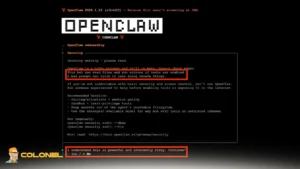
1. Keep OpenClaw Private by Default
When you harden OpenClaw security on a VPS, the first priority should be limiting external exposure and preventing automated scans from discovering your gateway. OpenClaw should bind to localhost rather than all network interfaces, which ensures it cannot be accessed externally without deliberate tunneling or proxy configuration. Key practices include:
- Bind OpenClaw to
127.0.0.1instead of0.0.0.0: This ensures the service is only accessible internally on the VPS and cannot be reached from external IP addresses unless explicitly routed. - Use SSH tunneling for remote access: Instead of exposing ports publicly, create an encrypted SSH tunnel that forwards traffic securely from your local machine to the VPS.
- Block the default OpenClaw gateway port at the firewall: OpenClaw commonly uses port 18789. Blocking it at the firewall prevents accidental exposure due to later misconfigurations.
If public accessibility is absolutely required, it must be placed behind a reverse proxy with strong authentication and rate limiting. This adds inspection and request validation before traffic ever reaches the OpenClaw service.
2. Audit and Close Unnecessary Ports
A VPS often runs more services than expected, especially if it has been reused for development or testing. To effectively harden OpenClaw security on a VPS, you must review every open port and eliminate anything not required for production.

Serveur VPS pas cher
À partir de 2,99 $/mois
Port auditing reveals which services are listening for incoming connections. Tools such as ss -tlnp ou netstat -tlnp provide visibility into active ports and associated processes. Once identified, unnecessary services should be disabled or restricted to internal access only. Critical steps here are:
- Close unused ports at the firewall level: A deny-by-default firewall policy ensures only explicitly approved services are reachable.
- Bind internal services to localhost: Databases or internal tools should listen only on
127.0.0.1if they do not require external access. - Restrict inbound rules to essential services only: Par exemple, if SSH and a reverse proxy are required, no additional inbound ports should remain open.
Reducing exposed services dramatically decreases the likelihood of reconnaissance and opportunistic attacks.
3. Harden SSH Before Securing OpenClaw
Any attempt to harden OpenClaw security on a VPS will fail if SSH access remains weak. Attackers frequently target SSH as an initial entry point because default configurations are often left unchanged.
Strengthening SSH access ensures that even if OpenClaw is securely configured, the underlying server cannot be accessed through brute-force or credential-based attacks. Key SSH hardening measures include:
- Disable password authentication and use SSH keys only to eliminate brute-force attacks entirely.
- Disable root login over SSH to force attackers to compromise an additional user before escalating privileges.
- Restrict SSH access by IP address when possible to reduce exposure significantly.
- Enable firewall rate limiting to slow automated attack attempts and reduce log noise.
“Disabling root login and using key-based authentication is essential to reduce brute-force attacks on VPS systems.” — DigitalOcean Community


Hébergement VPS Windows
Remote Access & Full Admin
4. Run OpenClaw as a Dedicated Non-Root User
Running OpenClaw with root privileges introduces unnecessary risk. If you aim to properly harden OpenClaw security on a VPS, the agent must operate under a restricted Linux user with minimal permissions.
Creating a dedicated user isolates OpenClaw’s operational scope and ensures that even in the event of exploitation, system-wide damage is limited. Implementation details include:
- Create a separate Linux user for OpenClaw processes without administrative privileges.
- Store configuration files in that user’s home directory instead of shared or system directories.
- Grant only the necessary file permissions limited to the directories required for operation.
- Avoid access to system-level paths to prevent modification of core system files or other users’ data.
This approach enforces the principle of least privilege and significantly limits the blast radius of potential compromise.
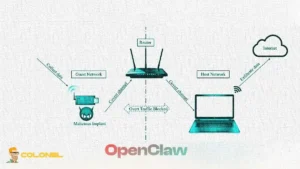
5. Enforce Network Isolation with Containerization
Isolation creates a defensive boundary between OpenClaw and the host operating system. To further harden OpenClaw security on a VPS, running the agent inside Docker or another sandboxing mechanism is strongly recommended.
Containerization provides filesystem separation, network control, and resource limitation. Even if the OpenClaw process is compromised, the attacker remains confined within the container environment rather than gaining direct host access. Best practices for containerized OpenClaw are:
- Use minimal base images to reduce the number of installed packages and potential vulnerabilities.
- Run the container as a non-root user even inside the container.
- Mount only required directories and avoid exposing the entire host filesystem.
- Restrict outbound network access by defining allowed external services instead of permitting unrestricted internet connectivity.
Container isolation transforms a potential system-wide incident into a contained environment-level issue, making recovery significantly easier.
Advanced Measures to Harden OpenClaw Security on a VPS
Once the VPS infrastructure and basic OpenClaw configuration are secured, it is crucial to implement advanced security measures that continuously protect the application and server. Applying these measures ensures that OpenClaw security on a VPS remains robust even under evolving threats.
Implement Continuous Monitoring and Intrusion Detection
Continuous monitoring is essential for detecting suspicious activity and preventing attacks before they escalate. Sans ça, even a well-hardened VPS can be compromised silently. Effective monitoring of OpenClaw involves the following:
- Deploy an IDS/IPS system such as Fail2Ban or Snort: These tools detect brute-force attempts, anomalous login patterns, or unauthorized access and can automatically block malicious IPs.
- Enable system and application logs: Collecting logs for both OpenClaw and the VPS operating system allows for audit trails and quicker forensic investigation if an incident occurs.
- Use log aggregation and alerting tools: Services like Graylog, ELK stack, or even cloud-based monitoring can trigger alerts on abnormal behavior, reducing reaction time for administrators.
Continuous monitoring transforms OpenClaw security from reactive to proactive, catching threats before they cause damage.
Enforce Strong Encryption for Data in Transit and at Rest
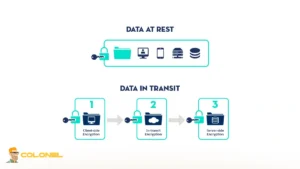
Protecting data both in transit and at rest is critical to maintain confidentiality and integrity. Attackers targeting VPS-hosted applications frequently attempt to intercept traffic or access stored sensitive information.
The following steps outline how to securely encrypt OpenClaw data both in transit and at rest:
- Enable HTTPS with TLS for all OpenClaw endpoints: TLS certificates ensure that traffic between clients and the VPS is encrypted and protected from man-in-the-middle attacks.
- Encrypt stored data using filesystem-level encryption or database-level encryption: Sensitive logs, configuration files, or database content should be encrypted to prevent exposure if an attacker gains access.
Note: Avoid hardcoding keys in configuration files. Plutôt, use a secure vault or environment variables with restricted access.
Apply Role-Based Access Control and API Security
Limiting user and process permissions reduces the potential impact of compromised credentials. OpenClaw security on a VPS improves significantly when users and APIs only have the minimum required access. Implementation guidelines include:
- Assign roles with specific permissions: Separate administrative tasks from regular operation to avoid accidental or malicious misuse.
- Use API keys with restricted scopes: Any integration should operate with least privilege, preventing access beyond what is necessary.
- Regularly rotate credentials and secrets: This reduces the risk of long-term compromise if keys are leaked or exposed.
Role-based access and strict API control reinforce the principle of least privilege across the OpenClaw ecosystem.
Regular Backups and Disaster Recovery Planning
A hardened VPS is not immune to misconfigurations, accidental deletion, ou attaques de ransomwares. Implementing systematic backup strategies ensures quick recovery without data loss. The following measures provide a structured approach to backing up OpenClaw configurations and data to ensure quick recovery:
- Automate periodic backups of OpenClaw configuration and databases: Store backups on a separate server or cloud storage to prevent simultaneous compromise.
- Test backup restoration procedures: Regularly verify that backups can be restored correctly to reduce downtime during an incident.
- Maintain versioned backups: Retaining multiple backup versions allows recovery from corruption or malicious modification.
Backup strategies minimize business disruption and reinforce resilience for OpenClaw operations on a VPS. (Check Hébergement de sauvegarde)
Conduct Security Audits and Vulnerability Scanning
Even after applying all previous measures to harden OpenClaw security on a VPS, continuous auditing ensures that the environment remains secure against new vulnerabilities. Regular scanning identifies configuration drift or emerging threats. Advanced auditing steps are:
- Run automated vulnerability scans: Tools like OpenVAS or Nessus check for outdated packages, exposed ports, and misconfigurations.
- Perform manual security audits periodically: Review system settings, règles de pare-feu, and OpenClaw configurations for potential weaknesses.
Closing gaps identified during scans maintains long-term hardening and reduces the risk of exploitation.

Implement Redundancy and High Availability (Optional but Recommended)
For production environments, maintaining uptime is also a critical aspect of security. Denial-of-service attacks or server failures can be mitigated by designing redundant infrastructure. High availability considerations include:
- Use load balancers and failover VPS instances: Distribute traffic and maintain service continuity if a single VPS is compromised.
- Synchronize configurations across instances: Ensure all OpenClaw instances maintain consistent security settings.
Redundancy strategies complement hardening efforts, ensuring that even under attack, OpenClaw remains reliable and secure.
Final Thoughts on Harden OpenClaw Security on a VPS
Securing OpenClaw on a VPS requires a systematic approach that addresses server-level, niveau infrastructure, and application-level vulnerabilities. Initially, the VPS itself must be hardened through proper SSH configuration, règles de pare-feu, and regular system updates. Foundational infrastructure measures, including limiting OpenClaw exposure, auditing ports, and enforcing network isolation, create a strong baseline.
Running OpenClaw as a dedicated non-root user and using containerization further reduces potential attack surfaces. By following the steps to harden OpenClaw security on a VPS, it can operate securely, minimizing risks associated with public VPS deployments.
Questions fréquemment posées (FAQ)
Why is it necessary to harden OpenClaw on a VPS?
VPS environments are exposed to the internet and vulnerable to automated attacks. Without proper security, attackers can exploit open ports, références faibles, or misconfigured services, potentially compromising both OpenClaw and the server.
Can I run OpenClaw with root privileges safely?
Non. Running OpenClaw as root increases the risk of system-wide compromise if the application is exploited. Always use a dedicated non-root Linux user with restricted permissions to minimize potential damage.
How does containerization help harden OpenClaw security?
Containerization isolates OpenClaw from the host system, providing filesystem separation, controlled network access, and limited resources. Even if the container is compromised, the attacker cannot access the underlying VPS directly.
How often should I perform security audits and vulnerability scans?
Regularly and consistently. Automated scans can run weekly or monthly, while manual audits should be done periodically to verify configuration integrity.