


La propagation DNS fait référence au processus par lequel les mises à jour de votre domaine’s enregistrements DNS répartis sur le réseau mondial de serveurs DNS. Si votre site Web ou votre domaine ne fonctionne pas comme prévu après avoir apporté des modifications DNS, vous rencontrez probablement des problèmes de propagation DNS. Comprendre ce processus est essentiel pour diagnostiquer efficacement les problèmes et garantir que votre site Web reste accessible à tous les utilisateurs..
Comprendre la propagation DNS
La propagation DNS est le processus par lequel les mises à jour des enregistrements DNS, comme A, CNAME, ou enregistrements MX, sont distribués sur les serveurs DNS du monde entier. Lorsque vous modifiez vos paramètres DNS, ces mises à jour ne se reflètent pas immédiatement partout. Plutôt, ils se propagent progressivement à mesure que chaque serveur met à jour ses informations mises en cache en fonction de sa durée de vie configurée (Durée de vie).
Le processus de propagation implique plusieurs couches de mise en cache, y compris votre navigateur, système opérateur, et serveurs DNS des FAI. Parce que ces caches s'actualisent à des intervalles différents, vos enregistrements DNS mis à jour peuvent être visibles dans une région tout en affichant des informations obsolètes ailleurs. Des outils comme Le DNS simplifié offrir des informations sur l'état de propagation et faciliter une gestion plus fluide des mises à jour DNS.

Pourquoi la mise en cache DNS provoque la plupart des problèmes de propagation DNS
La mise en cache DNS est le facteur le plus courant à l'origine des problèmes de propagation DNS, surtout après des changements que les utilisateurs s'attendent à être instantanés. La mise en cache améliore les performances, mais cela retarde également la visibilité des mises à jour.
Chaque enregistrement DNS comprend un TTL (Il est temps de vivre) valeur qui définit la durée pendant laquelle les résolveurs doivent mettre en cache l'enregistrement avant de demander de nouvelles données. Alors que de nombreux administrateurs fixent les valeurs TTL à quelques heures, tous les résolveurs n'honorent pas strictement les TTL courts. Certains résolveurs à fort trafic appliquent des durées minimales de mise en cache pour réduire la charge.
Résoudre les problèmes de propagation DNS
La résolution des problèmes de propagation DNS implique une combinaison de patience, vérification, et dépannage ciblé. Même si certains retards de propagation sont inévitables, plusieurs étapes proactives peuvent réduire considérablement les temps d'arrêt et garantir que votre domaine fonctionne comme prévu dans toutes les régions. Ces problèmes se répartissent généralement en quatre catégories principales:
Vider le cache DNS
Les fichiers de cache obsolètes sont une cause fréquente de problèmes de propagation DNS. Même après que vos enregistrements DNS ont été mis à jour sur des serveurs faisant autorité, les navigateurs et les systèmes d'exploitation peuvent continuer à utiliser les informations mises en cache, conduisant à des erreurs de connexion.
Voici les étapes pour vider le cache DNS:
- Cache du navigateur: Videz le cache de votre navigateur via son menu de paramètres. Cela garantit que votre navigateur demande de nouvelles informations DNS au lieu d'utiliser les enregistrements stockés..
- Cache du système d'exploitation: Vider le cache DNS de votre ordinateur. Pour Windows, utilisez la commande ipconfig /flushdns. Sur macOS, la commande est sudo mensuellement -HUP mDNSResponder. Cela force le système à récupérer les enregistrements DNS mis à jour.
- Cache spécifique au périphérique: Les appareils mobiles peuvent également stocker des données DNS mises en cache. Le redémarrage de l'appareil ou le passage en mode avion peuvent souvent forcer une actualisation.
Le vidage des caches garantit que les systèmes locaux n'affichent pas d'informations DNS obsolètes, rendant le dépannage plus précis et reflétant l'état réel de la propagation.

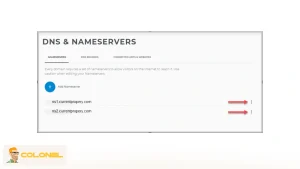
Vérification des paramètres du serveur de noms
Serveur de noms incorrect ou mal configuré (N.-É.) les paramètres sont une raison courante des retards de propagation DNS. Si les serveurs de noms de votre domaine pointent vers des serveurs obsolètes ou erronés, Les mises à jour DNS peuvent ne pas se propager correctement, entraînant des temps d'arrêt ou des erreurs du site. Les étapes de vérification incluent:
- Utilisez un outil de recherche NS: Des outils comme MXToolbox NS Lookup vous permettent de voir les serveurs de noms actuellement propagés pour votre domaine.
- Comparez avec les enregistrements du registraire: Assurez-vous que les serveurs de noms répertoriés par votre registraire correspondent à ceux de l'outil de recherche NS. Toute divergence doit être corrigée immédiatement.
- Mettre à jour si nécessaire: Si des erreurs sont trouvées, connectez-vous à votre tableau de bord de registraire et mettez à jour les serveurs de noms avec précision. Notez que les changements de serveur de noms eux-mêmes peuvent prendre jusqu'à 48 heures pour se propager complètement.
Garantir une configuration précise du serveur de noms est crucial pour des mises à jour DNS transparentes et minimise le risque de connectivité de domaine intermittente..
Utilisation des outils de vérification de la propagation DNS globale
Pour évaluer la manière dont vos modifications DNS sont reconnues dans le monde entier, les outils de propagation en ligne sont inestimables. Ces outils interrogent plusieurs serveurs dans le monde et fournissent un rapport visuel de l'état DNS actuel de votre domaine.. Voici les outils les plus pratiques:
- Quel est mon DNS: Propose des contrôles en temps réel pour A, CNAME, MX, et enregistrements NS dans le monde entier.
- Vérificateur DNS: Affiche la résolution DNS dans différentes régions, aider à identifier les incohérences de propagation.
- Boîte à outils MX: Fournit des rapports de diagnostic détaillés pour les enregistrements DNS, y compris les données de propagation historiques.
L'utilisation régulière de ces outils vous permet de suivre les progrès, détecter les erreurs persistantes, et validez si votre domaine est résolu correctement pour tous les utilisateurs.
Optimisation des valeurs TTL
Il est temps de vivre (Durée de vie) détermine la durée pendant laquelle un enregistrement DNS est mis en cache par les serveurs avant d'être actualisé. Des valeurs TTL élevées peuvent entraîner une propagation plus lente, alors que des TTL très faibles peuvent être ignorés par certains serveurs. Considérez les pratiques suivantes:
- Avant les mises à jour majeures: Réduisez le TTL à une valeur telle que 300 secondes (5 minutes) pour accélérer la propagation des changements à venir.
- Post-mise à jour: Une fois le DNS propagé, envisagez de restaurer une durée de vie plus élevée pour plus de stabilité et réduire la charge de requête sur les serveurs faisant autorité.
- Surveiller le comportement du serveur: Observez si votre FAI ou fournisseur DNS respecte les paramètres TTL, car certains peuvent remplacer des valeurs très faibles.
L'optimisation TTL permet de mieux contrôler la rapidité avec laquelle les mises à jour prennent effet tout en équilibrant les performances du serveur et la vitesse de propagation..
Pourquoi réduire la durée de vie avant les changements est important
Réduire à l'avance les valeurs TTL est l'un des moyens les plus efficaces de minimiser les problèmes de propagation DNS.. Une durée de vie inférieure demande aux résolveurs d'actualiser les données mises en cache plus fréquemment, réduire la fenêtre pendant laquelle les anciens enregistrements persistent.
Les ajustements TTL doivent être effectués au moins un cycle TTL complet avant les changements DNS majeurs. Réduire la durée de vie juste avant une modification n'invalide pas les caches existants; cela n'affecte que le futur comportement de mise en cache.
Une fois la propagation terminée, Les valeurs TTL peuvent être à nouveau augmentées en toute sécurité pour réduire la charge des requêtes et améliorer l'efficacité de la résolution..

Pourquoi la propagation DNS prend du temps
La propagation du DNS n'est pas instantanée en raison des mécanismes de mise en cache à différents niveaux de l'infrastructure Internet.. Chaque serveur DNS stocke une copie de votre domaine’s informations pour améliorer les délais de réponse. Lorsque vous mettez à jour votre domaine’les enregistrements, les données mises en cache doivent expirer avant que le serveur récupère les nouvelles informations.
Les principaux facteurs influençant la vitesse de propagation comprennent:
- Il est temps de vivre (Durée de vie) valeurs: De faibles TTL garantissent des mises à jour plus rapides, tandis que des TTL élevés étendent la rétention du cache, retarder la propagation.
- Distribution mondiale des serveurs: Les modifications peuvent se propager plus rapidement dans certaines régions que dans d'autres en raison de l'emplacement du serveur et de la latence du réseau..
- Politiques de mise en cache du FAI: Certains fournisseurs d'accès Internet mettent à jour leurs caches DNS moins fréquemment, provoquant des retards même si d'autres serveurs ont été mis à jour.
"Les modifications DNS peuvent prendre jusqu'à 48 heures pour se propager à l'échelle mondiale en raison de la mise en cache sur plusieurs couches du système DNS, même après que les mises à jour ont été effectuées sur des serveurs faisant autorité.
Outils pour vérifier l'état de la propagation DNS
La surveillance de la propagation DNS est cruciale pour identifier les mises à jour incomplètes et résoudre efficacement les problèmes.. Plusieurs outils en ligne vous permettent de vérifier comment vos modifications DNS sont résolues dans le monde entier:
- WhatsMyDNS.net: Fournit une vue en temps réel de la propagation DNS de votre domaine dans plusieurs régions.
- DNSChecker.org: Propose des rapports détaillés pour différents types d'enregistrements DNS.
- Boîte à outils MX: Chèques A, MX, CNAME, et autres enregistrements, mettant en évidence l'état de propagation et les problèmes potentiels.
Pour utiliser ces outils, entrez votre domaine, sélectionnez le type d'enregistrement, et affichez les résultats de plusieurs serveurs mondiaux. Cela permet d'identifier les régions dans lesquelles les mises à jour ne se sont pas encore propagées et indique si des mesures supplémentaires sont nécessaires..

Quand les problèmes de propagation DNS ne sont pas le vrai problème
Tous les problèmes de connectivité suite à un changement DNS ne sont pas causés par la propagation DNS. Cette distinction est essentielle, car un mauvais diagnostic de la cause première entraîne des changements inutiles et des temps d'arrêt prolongés.
Si les outils de recherche DNS affichent des résultats cohérents à l'échelle mondiale mais que les utilisateurs rencontrent toujours des erreurs, le problème peut impliquer:
- Configuration du serveur Web
- Politiques de pare-feu ou de réseau
- Certificat SSL inadéquation
- Redirections au niveau de l'application
Un dépannage efficace commence par confirmer si la propagation DNS est toujours en cours ou déjà terminée..
Conclusion
Réussir à résoudre les problèmes de propagation DNS nécessite une combinaison de connaissances techniques, gestion proactive, et patience. En surveillant l'état de propagation avec des outils mondiaux, vérification des configurations du serveur de noms, vider les caches locaux, et optimisation des paramètres TTL, vous pouvez minimiser les temps d'arrêt et garantir une accessibilité cohérente à votre site Web dans toutes les régions.
Reconnaître que les retards sont souvent causés par des mécanismes de mise en cache plutôt que par des erreurs vous permet de dépanner efficacement et de maintenir des fonctionnalités de domaine fiables.. Avec une planification minutieuse et la bonne approche, Les défis de propagation DNS peuvent être gérés efficacement, garder vos services en ligne fluides et ininterrompus.
Questions fréquemment posées sur la propagation DNS
Combien de temps prend habituellement la propagation DNS?
La propagation varie généralement de 2 à 48 heures, en fonction des paramètres TTL, politiques d'actualisation du serveur, et différences géographiques.
Puis-je accélérer la propagation DNS?
Bien que vous ne puissiez pas forcer la propagation mondiale, réduire les valeurs TTL avant les mises à jour et vider les caches localement peut accélérer les changements visibles.
Pourquoi certains utilisateurs voient mon site alors que d'autres ne le voient pas?
Cette différence est causée par les enregistrements DNS mis en cache chez les FAI, appareils locaux, et navigateurs qui n'ont pas encore été actualisés.
Pourquoi est-ce que je reçois des erreurs SSL lors de la propagation?
Des erreurs SSL se produisent lorsque le trafic est dirigé vers des serveurs obsolètes qui ne correspondent pas au certificat installé. Attendre la propagation complète résout ce problème.
La propagation DNS peut-elle provoquer des problèmes de livraison des e-mails?
Oui, une propagation incorrecte des enregistrements MX peut affecter temporairement la livraison des e-mails jusqu'à ce que tous les serveurs soient mis à jour.
Méta-titre:
Comment diagnostiquer et résoudre les problèmes de propagation DNS
Méta-description:
Découvrez comment identifier et résoudre les problèmes de propagation DNS. Vider les caches, vérifier les enregistrements, optimiser le TTL, et assurez-vous que votre domaine fonctionne à l'échelle mondiale avec notre guide expert.