
Understanding VMware vSAN
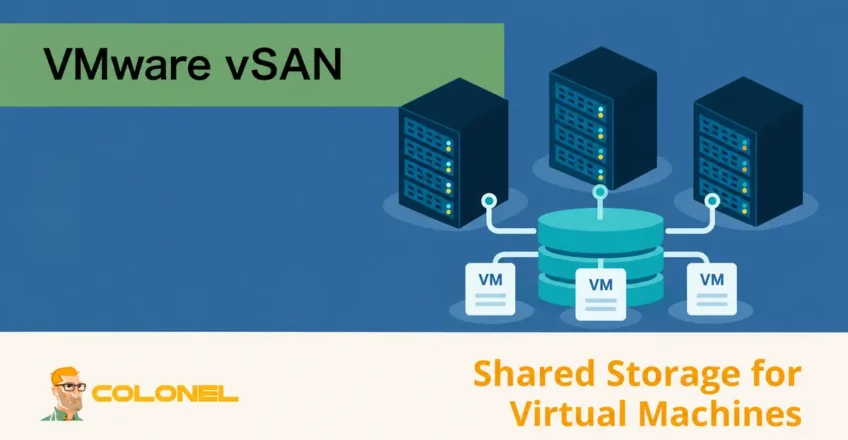
VMware vSAN is a software-defined storage platform that transforms the local storage resources of VMware ESXi hosts into a shared storage pool managed directly through VMware vSphere.
Rather than relying on traditional external storage arrays, vSAN combines the storage devices attached to multiple ESXi hosts and presents them as a single distributed datastore for virtual machines.
This approach simplifies storage management, improves scalability, and enables organizations to build hyper-converged infrastructure (HCI) environments using industry-standard server hardware.
What Does VMware vSAN Do?
VMware vSAN aggregates storage resources from multiple hosts within a vSphere cluster and distributes data across those hosts.
This creates a highly available storage platform capable of supporting:
- Machines virtuelles
- Infrastructure de bureau virtuel (VDI)
- Bases de données
- Applications d'entreprise
- Private cloud environments
- Disaster recovery deployments
The primary goal of vSAN is to simplify storage management while maintaining high performance, évolutivité, and fault tolerance.

Hébergement Web WordPress
À partir de €2.99/Mensuel
How VMware vSAN Works
Traditional virtualization environments often rely on external storage arrays connected through:
- Fibre Channel
- iSCSI
- Dedicated SAN infrastructure
vSAN removes the need for separate storage arrays by utilizing storage devices already installed within ESXi hosts.
Each host contributes storage resources to the cluster.
These resources are then combined into a shared datastore that all hosts can access.
Administrators manage storage directly through:
VMware vCenter Server
without requiring separate storage management interfaces.

Serveur VPS pas cher
À partir de €8/Mensuel
Benefits of VMware vSAN
VMware vSAN offers several advantages for organizations running virtualized environments.
Simplified Storage Management
Because storage is fully integrated with VMware vSphere, administrators manage:
- Ressources de calcul
- Machines virtuelles
- Storage resources
from a single management platform.
This reduces complexity and improves operational efficiency.
Improved Scalability
Storage capacity and performance can be expanded by simply adding additional hosts or storage devices.
Organizations can scale gradually as requirements grow.
Hébergement VPS Windows
Accès à distance et administrateur complet
Reduced Infrastructure Costs
Since vSAN leverages local storage devices within existing servers, organizations can reduce reliance on expensive external storage systems.
This can lower:
- Hardware costs
- Licensing costs
- Management overhead
Haute disponibilité
vSAN distributes data across multiple hosts and supports advanced protection mechanisms to maintain availability during hardware failures.
Support for Modern Workloads
Modern applications frequently require scalable, flexible infrastructure.
vSAN supports:
- Conteneurs
- Kubernetes environments
- Big data platforms
- Virtual desktop deployments
- Cloud-native applications
Key Features of VMware vSAN
Several capabilities distinguish VMware vSAN from traditional storage platforms.
Storage Policy Based Management (SPBM)
Storage Policy Based Management allows administrators to define storage requirements using policies.
Policies can specify:
- Exigences de performances
- Availability requirements
- Redundancy levels
- Storage efficiency settings
These policies are applied directly to virtual machines.
This simplifies provisioning and ensures workloads receive the appropriate level of protection.
Deduplication and Compression
vSAN can reduce storage consumption through:
- Data deduplication
- Data compression
These technologies help optimize storage utilization and lower capacity requirements.
Avantages
- Reduced storage footprint
- Efficacité améliorée
- Lower storage costs
Data Encryption
vSAN supports encryption at rest.
Data is encrypted before being written to storage devices, helping protect sensitive information from unauthorized access.
Les avantages incluent:
- Sécurité améliorée
- Regulatory compliance support
- Simplified encryption management
Stretched Clusters
Stretched clusters extend a single vSAN cluster across multiple geographic locations.
This provides:
- Haute disponibilité
- Disaster recovery capabilities
- Site-level fault tolerance
If one site becomes unavailable, workloads can continue operating from the surviving location.
VMware vSAN Architecture
The disk groups and separate cache and capacity tiers described below apply to vSAN Original Storage Architecture (OSA). Express Storage Architecture (ESA) uses a single storage tier without dedicated cache devices or disk groups.
Disk Groups
Disk groups form the foundation of vSAN storage architecture.
Each disk group contains:
- One cache device
- One or more capacity devices
Disk groups are contributed by each ESXi host within the cluster.
Disk Group Types
VMware vSAN supports:
Hybrid Configuration
Utilisations:
- SSDs for cache
- HDDs for capacity
Provides a balance between performance and cost.
All-Flash Configuration
Uses SSD or NVMe devices for both cache and capacity tiers.
Delivers significantly higher performance and lower latency.
Cache Tier
The cache tier accelerates storage operations.
High-performance devices such as:
- SSD
- Disques NVMe
are used to improve:
- Read performance
- Write performance
- Réactivité des applications
In hybrid OSA, the cache tier supports read caching and write buffering. In all-flash OSA, cache devices serve as write buffers rather than a read cache.
Capacity Tier
The capacity tier stores the majority of application and virtual machine data.
Depending on the deployment model, capacity devices may consist of:
- HDDs
- SSD
- NVMe devices
Data protection mechanisms operate primarily within this tier.
Infrastructure réseau
The network serves as the communication layer connecting all hosts in the cluster.
Because vSAN distributes data across hosts, network performance directly affects storage performance.
Recommended networking typically includes:
10 GbE or faster
for production environments.
Low latency and adequate bandwidth are critical for maintaining optimal performance.
vSAN Witness
In stretched cluster deployments, a witness host helps maintain cluster quorum and prevent split-brain scenarios.
The witness participates in cluster decision-making but does not store production data.
Les avantages incluent:
- Improved consistency
- Better fault handling
- Enhanced disaster recovery
Data Protection in VMware vSAN
Protecting data is one of vSAN’s primary strengths.
RAID-1 Mirroring
RAID-1 creates multiple copies of data across hosts.
Avantages:
- Haute disponibilité
- Fast rebuilds
- Strong fault tolerance
Inconvénients:
- Higher storage consumption
RAID-5 Erasure Coding
RAID-5 distributes parity information across hosts.
Avantages:
- Better storage efficiency
- Fault tolerance
Inconvénients:
- Additional processing overhead
RAID-6 Erasure Coding
RAID-6 provides protection against multiple failures.
Avantages:
- Increased fault tolerance
- Improved storage efficiency
Inconvénients:
- Higher computational requirements
Administrators can select protection methods through storage policies.
How to Deploy VMware vSAN
Deploying VMware vSAN typically involves several stages.
Étape 1: Verify Requirements
Ensure that:
- Hardware is supported
- Storage devices are compatible
- Network requirements are met
- VMware versions are supported
Consult the VMware Hardware Compatibility List before deployment.
Étape 2: Configure Networking
Create appropriate networking components including:
- VMkernel adapters
- vSwitches
- Redundant network paths
Reliable networking is critical for cluster stability.
Étape 3: Configure Licensing
VMware vSAN licensing is separate from standard VMware vSphere licensing.
Select the licensing model that best matches your environment.
Étape 4: Create the vSAN Cluster
Add ESXi hosts to a cluster and enable vSAN.
Configurer:
- Hybrid mode
- All-flash mode
depending on available hardware.
Étape 5: Create Storage Policies
Define policies that determine:
- Performance levels
- Availability requirements
- Fault tolerance settings
- Storage efficiency options
Assign policies to virtual machines.
Étape 6: Monitor and Maintain
Use vCenter Server to:
- Monitor cluster health
- Review performance metrics
- Manage storage resources
- Perform maintenance operations
Regular monitoring helps prevent issues before they impact production workloads.
Best Practices for VMware vSAN
Following proven best practices can improve reliability and performance.
Properly Size the Cluster
Ensure sufficient:
- Ressources CPU
- Memory resources
- Storage capacity
- Bande passante réseau
Use Modern Storage Devices
All-flash and NVMe deployments typically deliver the best performance.
Enable Deduplication and Compression
Where appropriate, storage efficiency features can significantly reduce capacity consumption.
Optimize Cache Configuration
Adequate cache resources improve:
- Débit
- Latence
- Performances des applications
Use Storage Policies Consistently
Storage policies simplify management and ensure consistent workload protection.
Maintain Cluster Health
Perform:
- Firmware updates
- Health checks
- Maintenance du matériel
- Capacity reviews
on a regular basis.
Leverage Network I/O Control
Network I/O Control helps prioritize storage traffic and maintain predictable performance during periods of congestion.
Common VMware vSAN Issues
Like any storage platform, VMware vSAN can encounter operational challenges.
Disk Group Failures
Disk failures can impact redundancy and performance.
Administrators should:
- Monitor hardware health
- Replace failed devices promptly
- Verify rebuild progress
Network Problems
Network issues may cause:
- Increased latency
- Cluster communication failures
- Performances réduites
Revoir:
- Configuration réseau
- Switch settings
- Connectivity status
when troubleshooting.
Capacity Constraints
Insufficient capacity can affect cluster performance and availability.
Regular capacity planning helps prevent unexpected shortages.
Performance Issues
Performance degradation may result from:
- Cache limitations
- Network bottlenecks
- Misconfigured policies
- Resource shortages
Performance monitoring tools help identify root causes.
Common VMware vSAN Use Cases
Virtual Desktop Infrastructure (VDI)
vSAN integrates closely with VMware Horizon environments.
Les avantages incluent:
- Simplified storage management
- Scalable desktop deployments
- Performances améliorées
Reprise après sinistre
Stretched clusters and replication capabilities support business continuity planning.
Organizations can reduce recovery times and improve resilience.
Private Cloud Infrastructure
Many private cloud deployments use vSAN as the storage foundation for:
- Machines virtuelles
- Conteneurs
- Applications d'entreprise
Remote Office and Branch Office (ROBO)
vSAN provides centralized management while supporting distributed deployments across multiple locations.
This simplifies storage administration for remote environments.
VMware vSAN vs Traditional SAN
| Fonctionnalité | VMware vSAN | Traditional SAN |
|---|---|---|
| Architecture | Software-defined | Hardware-based |
| Emplacement de stockage | Local host storage | External storage arrays |
| Évolutivité | Add hosts and disks | Add storage hardware |
| Gestion | Integrated with vSphere | Separate management systems |
| Coût | Lower infrastructure costs | Higher hardware investment |
| Deployment Complexity | Simplified | More complex |
| Performance | High performance with all-flash deployments | High performance through dedicated arrays |
Traditional SAN solutions remain valuable for certain enterprise environments, but vSAN offers a simpler and more integrated approach for many virtualized infrastructures.
Is VMware vSAN Right for Your Environment?
VMware vSAN combines storage and compute resources into a unified hyper-converged infrastructure platform that simplifies storage management while delivering scalability, resiliency, et hautes performances. By leveraging local storage devices within VMware ESXi hosts, organizations can reduce infrastructure complexity, eliminate dedicated storage arrays, and create highly available storage environments managed entirely through VMware vSphere.
For organizations heavily invested in VMware virtualization, vSAN provides a powerful storage solution that supports everything from virtual desktop infrastructure and private cloud deployments to disaster recovery and modern application platforms, making it one of the most widely adopted software-defined storage technologies in enterprise environments today.