


Einrichtung einer geschäftlichen E-Mail: SMTP, DNS & Spam Fix is an essential process which ensures smooth, sicher, and professional email services for your business. Business email setup with proper SMTP server settings helps your emails travel through the internet successfully, while DNS records such as MX, Spf, DKIM, and DMARC authentication play an important role in authenticating your domain and keeping it secure from unauthorized use and failures in sending emails. Since the above technical steps are important and crucial aspects, without them, business email services may be subjected to failures or difficulties, such as bounces, spam, and deliverability problems, thus compromising the overall integrity and reputation of your brand.
What Is Business Email and Why It Matters?
Business email is a professional email service that uses your company’s domain name instead of a generic provider. Zum Beispiel, instead of using [email protected], you use [email protected]. This small difference has a major impact on credibility, Branding, and trust.
A professional email address reinforces your brand identity in every communication. When clients, Partner, or investors see your domain name, they immediately recognize your organization as legitimate and established. Im Gegensatz, free email accounts often appear temporary or unprofessional.
Beyond branding, business email systems provide enhanced security, better deliverability, administrative control, and integration with hosting infrastructure. A proper Business Email Setup ensures that your messages reach inboxes reliably and are protected from spoofing, Phishing, and spam abuse.
In modern digital operations, email is still the backbone of communication. Contracts, Rechnungen, support tickets, Newsletter, and internal updates all rely on a stable email system. Without a properly configured email environment, companies risk losing opportunities and damaging their reputation.


WordPress Web Hosting
Ab 3,99 USD/monatlich
Understanding How Business Email Works
Im Kern, email relies on a combination of protocols and servers that send, erhalten, and store messages. When you press “Send,” your message travels from your email client to an outgoing mail server, then across the internet to the recipient’s mail server.
Here is a simplified flow:
- You compose an email in a mail client or webmail.
- The message is sent via SMTP to your outgoing mail server.
- The receiving server checks DNS records (Mx, Spf, DKIM, Dmarc).
- The message is delivered to the recipient’s mailbox.
- The recipient retrieves it via IMAP or POP3.
A reliable Business Email Setup coordinates all these components: Mail -Server, DNS configuration, authentication protocols, and user accounts.
The Role of SMTP in Email Sending
SMTP (Simple Mail Transfer Protocol) is responsible for sending email messages. It acts like a digital postal courier that moves your email from your server to another server.
SMTP typically uses:
- Hafen 25 (standard, but often blocked)
- Hafen 587 (submission with authentication)
- Hafen 465 (SMTP over SSL)
SMTP authentication is critical in business environments. It ensures only authorized users can send emails through the server. Ohne es, spammers could exploit your server, leading to blacklisting.

Günstiger VPS -Server
Ab 2,99 USD/monatlich
A secure Business Email Setup always enables SMTP authentication with encrypted connections.
How Incoming Mail Is Routed (IMAP & POP3 Explained)
Incoming mail is handled through IMAP or POP3.
- IMAP (Internet Message Access Protocol) synchronizes messages between the server and multiple devices. Emails remain stored on the server, making it ideal for modern businesses.
- Pop3 (Post Office Protocol 3) downloads emails to a single device and often removes them from the server. It is simpler but less flexible.
Most businesses prefer IMAP because it allows team members to access mailboxes from multiple devices while keeping everything synchronized.
Step-by-Step Business Email Setup
Setting up professional email involves structured configuration. A proper Business Email Setup includes:
- Domain registration
- Hosting with mail server capability
- DNS record configuration
- Mailbox creation
- Security implementation
- Testing and monitoring
Each step must be performed carefully to avoid delivery issues.

Windows VPS -Hosting
Remote Access & Full Admin
Creating Business Email Accounts
After hosting is prepared, create email accounts within your control panel (cPanel, Bitte, DirectAdmin, or cloud provider).
Best practices include:
- Use role-based addresses (support@, sales@, info@)
- Create individual accounts for employees
- Set mailbox quotas
- Enforce password policies
Account organization improves both security and workflow efficiency.
Configuring Webmail Access
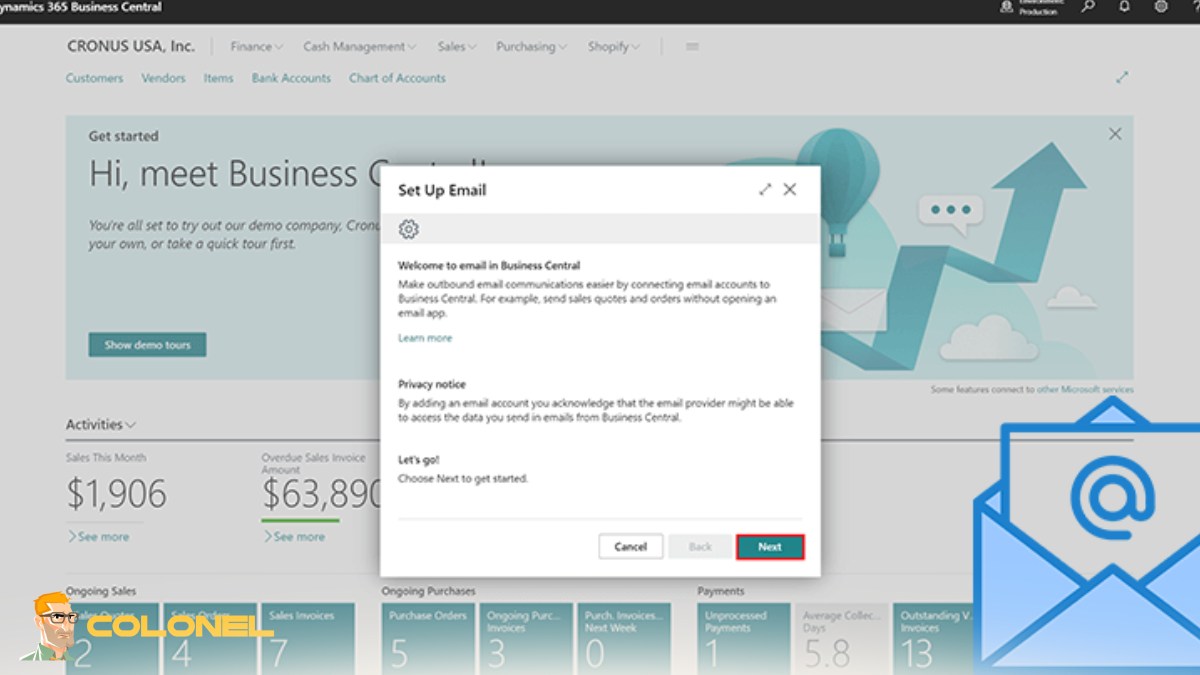
Webmail allows users to access email through a browser without configuring desktop software. Common webmail systems include Roundcube and Horde.
To configure:
- Access your hosting control panel
- Locate the webmail URL (often webmail.yourdomain.com)
- Log in using email credentials
- Enable SSL access
Webmail is convenient for remote teams and temporary access situations.
Setting Up SMTP Authentication
SMTP authentication protects your server from abuse.
Steps include:
- Enable SMTP authentication in your mail server settings
- Use port 587 with TLS encryption
- Require username and password for outgoing mail
- Disable open relay settings
This prevents unauthorized users from sending spam via your domain.
DNS Records for Business Email Configuration
DNS records are essential for directing email traffic and validating authenticity. Without proper DNS configuration, even the best mail server will fail.
Here is a simplified comparison of essential DNS records:
| Record Type | Purpose | Warum es wichtig ist |
|---|---|---|
| Mx | Directs incoming mail | Ensures mail reaches your server |
| Spf | Authorizes sending servers | Prevents spoofing |
| DKIM | Adds digital signature | Confirms message integrity |
| Dmarc | Defines authentication policy | Protects domain reputation |
| PTR (Reverse DNS) | Matches IP to hostname | Reduces spam classification |
Correct DNS configuration is the backbone of any successful Business Email Setup.
MX Records and Mail Routing
Mx (Mail Exchange) records tell the internet where to deliver incoming mail.
They include:
- Mail server hostname
- Priority value
Lower priority numbers are preferred. Zum Beispiel:
- 10 mail1.yourdomain.com
- 20 mail2.yourdomain.com
If the first server fails, the second handles delivery.

SPF Record Setup to Prevent Spoofing
Spf (Sender Policy Framework) is one of the foundational authentication mechanisms in modern email infrastructure. It allows domain owners to explicitly specify which mail servers are authorized to send email on behalf of their domain. Without SPF, anyone could attempt to forge your domain in the “From” address, which is a common technique used in phishing and spoofing attacks.
An SPF record is published in your domain’s DNS as a TXT record. A typical example looks like this:
v=spf1 ip4:192.168.1.1 enthalten:_spf.provider.com -all
This record tells receiving mail servers that only the listed IP address and the included provider are permitted to send mail for the domain. The “-all” mechanism instructs receiving servers to reject any sender not explicitly authorized.
When properly configured, SPF significantly reduces impersonation attempts and improves domain credibility. Jedoch, SPF alone is not enough. It works best when combined with DKIM and DMARC as part of a complete authentication framework within your Business Email Setup.
DKIM Configuration for Email Authentication
DKIM (DomainKeys Identified Mail) strengthens email authentication by attaching a cryptographic signature to each outgoing message. Unlike SPF, which validates the sending server, DKIM verifies that the content of the email has not been altered in transit.
When an email is sent, the mail server generates a digital signature using a private key. The corresponding public key is published in the domain’s DNS records. Upon receiving the email, the recipient’s server retrieves the public key and validates the signature. If the verification succeeds, it confirms two critical points: the message genuinely originated from the stated domain, and its contents remain intact.
This mechanism provides multiple advantages:
- It protects message integrity.
- It builds long-term domain reputation.
- It enhances deliverability by signaling authenticity to mailbox providers.
Most modern hosting control panels automatically generate DKIM keys, simplifying deployment. Still, proper DNS publication and testing are essential to ensure it functions correctly within your Business Email Setup.
DMARC Policy for Domain Protection
Dmarc (Domain-based Message Authentication, Berichterstattung, and Conformance) builds on both SPF and DKIM. While SPF and DKIM verify identity, DMARC instructs receiving servers on how to handle messages that fail authentication checks.
A DMARC policy is also published in DNS and defines one of three actions:
- none – monitor only; no enforcement
- quarantine – send failing messages to spam
- reject – block failing messages entirely
Beyond enforcement, DMARC provides reporting features that allow domain owners to receive feedback about authentication activity. These reports help identify abuse, Fehlkonfigurationen, or unauthorized sending sources.
Als Wolkenflare explains:
“DMARC allows domain owners to protect their domain from unauthorized use, commonly known as email spoofing.”
This emphasizes that DMARC is not merely an optional add-on—it is a critical domain protection layer.
A properly enforced DMARC policy transforms a basic Business Email Setup into a secure, reputation-driven communication system.

Common Business Email Problems and Spam Issues
Even well-established organizations encounter email delivery challenges. Business email systems are sensitive to configuration errors, reputation issues, and evolving spam filter algorithms.
Common issues include messages consistently landing in spam folders, mail server IP addresses being blacklisted, incorrect DNS records, declining IP reputation scores, and missing reverse DNS configurations. These problems can disrupt communication, reduce customer trust, and even result in lost revenue.
What makes email infrastructure particularly fragile is that even a small misconfiguration can compromise an otherwise stable Business Email Setup. Continuous monitoring and maintenance are essential.
Why Emails Go to Spam
Spam filtering engines use sophisticated scoring systems that analyze technical configuration, sender behavior, and message content. When authentication mechanisms such as SPF or DKIM are missing—or misaligned—mail providers immediately reduce trust in the message.
Other contributing factors include poor IP reputation, high complaint rates, inconsistent sending patterns, and the absence of proper reverse DNS records. Content also matters. Overly promotional language, suspicious links, and misleading subject lines can increase spam scores.
Modern spam filters are stricter than ever. Businesses must proactively manage authentication, maintain clean sending practices, and monitor domain health to ensure consistent inbox placement.
Blacklist Issues and How to Fix Them
Being listed on a blacklist can severely impact deliverability. Blacklists track IP addresses and domains associated with spam or malicious activity. Once listed, emails may be blocked outright or filtered aggressively.
If blacklisting occurs, the first step is identifying the source. This requires checking major DNS-based blacklists to determine which one has flagged your IP. Nächste, investigate the root cause—often a compromised account, malware infection, or open relay vulnerability.
After resolving the underlying issue, submit a formal delisting request to the blacklist provider. Jedoch, removal alone is not sufficient. Preventative monitoring must be implemented to avoid recurrence. Ongoing vigilance is a fundamental part of maintaining a reliable Business Email Setup.

Reverse DNS (PTR) Konfiguration
Reverse DNS, also known as PTR (Pointer Record), maps an IP address back to a domain name. While forward DNS maps domain to IP, reverse DNS performs the opposite function.
Zum Beispiel:
IP Adresse: 192.168.1.1
PTR Record: mail.yourdomain.com
Many receiving mail servers automatically distrust messages from IP addresses that lack proper reverse DNS. Zusätzlich, the hostname defined in the PTR record should match the server’s forward DNS entry. When forward and reverse DNS align, it signals legitimacy and professional configuration.
Reverse DNS is often overlooked, yet it plays a critical role in establishing sender credibility.
Improving Email Deliverability
Deliverability determines whether your emails reach inboxes rather than spam folders. It directly affects customer communication, marketing performance, and operational efficiency.
Improving deliverability requires both technical accuracy and responsible sending behavior. New IP addresses should be warmed up gradually by increasing sending volume over time. Mailing lists must be clean and free of inactive or purchased addresses. Bounce rates and complaint metrics should be monitored regularly.
Authentication protocols—SPF, DKIM, and DMARC—must remain properly aligned at all times. Even infrastructure decisions matter. Hosting quality can significantly influence mail server stability and IP reputation. If you are launching both your website and email infrastructure, consider reading Erschwingliches, günstiges Website-Hosting, dem Sie vertrauen können to understand how hosting performance impacts email reliability.
A properly maintained Business Email Setup does not just send messages—it ensures they are delivered consistently and securely.
Security Best Practices for Business Email
Email remains one of the most common entry points for cyberattacks. Phishing, credential theft, ransomware distribution, and business email compromise (BEC) attacks frequently target corporate inboxes.
A secure email environment requires layered protection, not a single defensive measure. Starke Verschlüsselung, access control policies, authentication layers, account monitoring, and system updates must work together as part of a cohesive security framework.
Without proactive security management, even a technically correct Business Email Setup can become vulnerable.
Enabling SSL/TLS Encryption
Encryption protects email data during transmission between clients and servers. SSL/TLS ensures that login credentials and message content cannot be intercepted in plain text.
Webmail access should always use HTTPS. SMTP should be configured with TLS encryption, typically on port 587. IMAP connections should use secure port 993 (IMAPS), and if POP3 is enabled, port 995 should be used.
Encrypted communication not only protects users but also strengthens trust signals for modern mail providers.
Using Strong Password Policies
Weak passwords remain one of the most common causes of account compromise. A strong password policy significantly reduces the risk of brute-force attacks and unauthorized access.
Effective policies require sufficiently long passwords that combine uppercase letters, lowercase letters, numbers, and special characters. Password reuse across multiple services should be prohibited, and administrative accounts should follow stricter standards.
Password strength is not a minor detail—it is a foundational component of email system integrity.

Zwei-Faktor-Authentifizierung (2FA)
Two-Factor Authentication adds an additional verification layer beyond a password. Even if credentials are leaked or stolen, unauthorized access becomes significantly more difficult.
2FA can be implemented through authentication apps, hardware security keys, or secure SMS verification systems. For administrative accounts and high-level users, enabling 2FA should be mandatory rather than optional.
By integrating multi-layer authentication into your Business Email Setup, you dramatically reduce the likelihood of account takeover incidents.
For organizations evaluating secure credential storage solutions, the article Vaultwarden vs Bitwarden: Kann es 1Password wirklich ersetzen?? offers useful insights into enterprise-grade password management options.
Testing and Troubleshooting Your Business Email Setup
Once configuration is complete, comprehensive testing must follow. No Business Email Setup should be considered production-ready without validation.
Testing should confirm that outgoing mail authenticates properly, MX records resolve correctly, reverse DNS matches forward DNS, and spam scores remain within acceptable thresholds. Sending test messages to major providers like Gmail and Outlook allows you to verify authentication results directly within message headers.
Troubleshooting is not a one-time event. Ongoing monitoring ensures that future DNS changes, server updates, or security adjustments do not unintentionally disrupt email performance.
Tools to Check DNS Records
Reliable DNS verification tools are essential for diagnosing configuration issues. These tools allow administrators to confirm MX records, validate SPF syntax, inspect DKIM public keys, analyze DMARC policies, and monitor DNS propagation.
Using these tools after every DNS modification ensures that records are correctly published and accessible worldwide. Accurate DNS propagation is fundamental to maintaining email stability.
Verifying SPF, DKIM, and DMARC
Authentication verification should be performed regularly, not only during initial deployment. Sending a test message to Gmail and viewing the “Show Original” header details reveals whether SPF, DKIM, and DMARC pass successfully.
DMARC aggregate reports provide additional insight by showing which servers send mail on behalf of your domain. Reviewing these reports helps identify unauthorized sources or misconfigured third-party services.
Alignment between SPF and DKIM domains is especially important for passing DMARC checks. Proper alignment significantly improves trust with major mailbox providers.
Email Header Analysis
Email headers contain detailed technical information about the route a message has taken. They reveal the sending IP address, authentication results, spam filtering decisions, and each server involved in transmission.
Analyzing headers is one of the most effective ways to diagnose deliverability issues. By examining authentication outcomes and relay paths, administrators can pinpoint exactly where a failure occurred.
Understanding how to interpret email headers transforms troubleshooting from guesswork into a precise technical process.
Final Checklist for a Successful Business Email Setup
Before considering your configuration complete, confirm that all authentication protocols are active, DNS records are fully propagated, reverse DNS is properly aligned, encryption is enforced, and user accounts are secured with strong passwords and 2FA.
A successful Business Email Setup is not defined by simply sending messages. It is defined by secure authentication, consistent inbox placement, domain reputation protection, und kontinuierliche Überwachung.
When implemented with precision and maintained proactively, business email becomes one of the most reliable and powerful communication channels your organization possesses.