
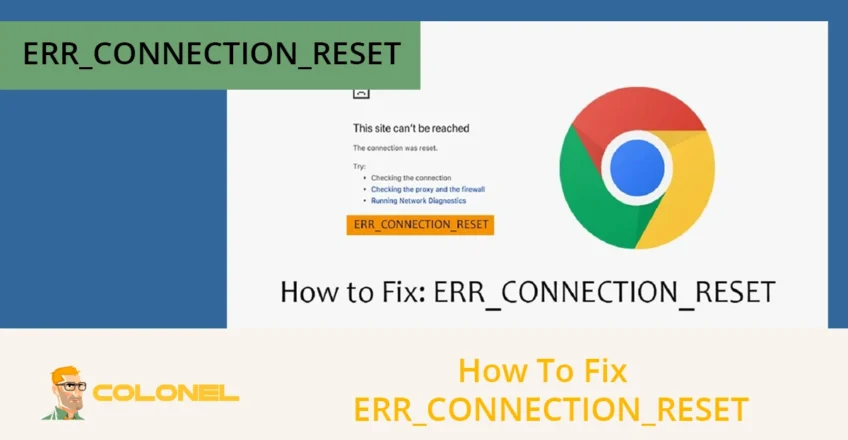

ERR_CONNECTION_RESET is a browser error that occurs when a website connection is unexpectedly interrupted before the page loads. This issue occurs when the browser successfully initiates a connection attempt, but the data transfer is forcibly reset somewhere between the client and the server. The error can affect WordPress websites, custom-built platforms, and standard web pages alike. Because it blocks access to content entirely, learning how to fix ERR_CONNECTION_RESET is essential for both everyday users and website administrators who rely on stable online access.
ERR_CONNECTION_RESET and Its Significance
ERR_CONNECTION_RESET indicates that the browser was unable to maintain a stable TCP connection with the target server. In practical terms, the connection handshake starts correctly, but the communication channel is terminated before completion. This behavior typically indicates a disruption at the network, browser, security, or server level, rather than a simple loading delay.
From a usability standpoint, this error directly prevents users from accessing information, dashboards, or services they may depend on. For businesses, frequent ERR_CONNECTION_RESET occurrences reduce trust, increase bounce rates, and negatively affect conversion performance. Search engines also interpret repeated connection failures as reliability issues, which can indirectly influence crawl behavior and visibility. For this reason, knowing how to fix ERR_CONNECTION_RESET quickly helps protect user experience, operational continuity, and SEO stability at the same time.
Causes of ERR_CONNECTION_RESET
ERR_CONNECTION_RESET is not caused by a single factor, but by a range of connection-level interruptions that break communication between the browser and the server. Identifying the underlying cause is critical because the correct fix depends entirely on where the connection reset occurs. In most real-world cases, the problem originates from:
- Network Instability
- Browser Configuration
- Security Software
- Server-side Constraints
Below are the most common causes that trigger this error, each requiring a different troubleshooting approach to fix ERR_CONNECTION_RESET effectively.

WordPress Web Hosting
Starting From $3.99/Monthly
Network Connectivity Issues
Unstable or interrupted network connections are the most frequent cause of ERR_CONNECTION_RESET errors. When the internet connection drops packets, fluctuates in latency, or temporarily disconnects, the browser may lose its session before receiving a response from the server. This is especially common on weak Wi-Fi signals, overloaded mobile networks, or unreliable ISP routes.
Inconsistent routing between the client and the destination server can also reset TCP connections mid-transfer. Power-cycling network hardware, switching networks, or testing from another connection often confirms whether network instability is the root cause. If the error disappears on a different network, the issue is almost certainly connectivity-related rather than website-specific.
Incorrect Internet Settings
Misconfigured local network settings can directly cause ERR_CONNECTION_RESET by blocking or misrouting outbound traffic. Problems such as incorrect DNS resolvers, outdated IP configurations, or improperly defined proxy settings interfere with normal connection negotiation. When the browser sends requests through invalid routes, the connection fails before the server responds.
In corporate or restricted environments, proxy misconfiguration is a frequent trigger. Similarly, corrupted TCP/IP stacks can prevent reliable packet handling. Resetting network settings often resolves these issues and is a common step when attempting to fix ERR_CONNECTION_RESET on Windows and macOS systems.
Browser-Related Problems
Browser-level issues can interrupt connections before a page finishes loading, resulting in ERR_CONNECTION_RESET. Corrupted cache files, incompatible extensions, or outdated browser versions often interfere with request handling. Extensions that manipulate traffic, inject scripts, or enforce security policies are particularly known for causing sudden connection resets.
Over time, accumulated cache and cookie data may also conflict with updated server responses, leading to handshake failures. When the error occurs only in one browser but not others, browser configuration is almost always the source. Clearing cache data or testing in a clean browser profile usually confirms this diagnosis.

Cheap VPS Server
Starting From $2.99/Monthly
Firewall or Antivirus Interference
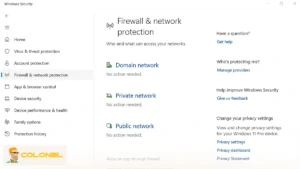
Security software can mistakenly block legitimate connections and force a reset at the transport layer. Firewalls and antivirus tools continuously scan outbound traffic, and overly aggressive rules may terminate connections they misinterpret as threats. This often happens after software updates that silently change filtering behavior.
In such cases, the browser does nothing wrong; the connection is closed locally before the server responds. Temporarily disabling security software is a controlled way to verify whether it is responsible. If confirmed, creating proper exceptions allows users to fix ERR_CONNECTION_RESET without compromising system protection. According to Kaspersky:
“Firewalls and antivirus software may block or interrupt legitimate connections if traffic patterns are misidentified as threats.”
Issues With the Website’s Server
Server-side failures can also cause ERR_CONNECTION_RESET when the server drops the connection unexpectedly. High traffic loads, exhausted resources, misconfigured firewalls, or crashing services may prevent the server from completing requests. In these situations, the reset originates remotely, not from the user’s device.
If the error occurs consistently across multiple devices and networks, the problem is likely server-related. Website owners should review server logs, monitor resource usage, and confirm that the hosting infrastructure is stable. Visitors, on the other hand, usually must wait until the server issue is resolved.

Windows VPS Hosting
Remote Access & Full Admin
How to Fix ERR_CONNECTION_RESET on Your Device
To fix ERR_CONNECTION_RESET, you must first eliminate client-side causes that interrupt the browser’s connection to the server. In most scenarios, the error originates from local configuration issues rather than the website itself. Addressing browser data, network settings, and security software resolves a large percentage of ERR_CONNECTION_RESET cases without advanced technical intervention.
The following solutions should be applied in a logical order, since each step targets a specific layer of the connection process and helps isolate the exact failure point.
Restart Network Equipment
Restarting network hardware refreshes the connection path and resolves temporary routing or packet-handling issues. Routers and modems maintain active sessions that can become unstable over time, especially after long uptimes or ISP-side changes. A restart forces the network to re-establish a clean route between the client and the destination server.
This step is particularly effective when ERR_CONNECTION_RESET appears suddenly across multiple websites. It also helps eliminate transient ISP or gateway issues before deeper troubleshooting begins. Key actions involved in this step to fix ERR_CONNECTION_RESET include:
- Powering off the modem and router completely to clear cached sessions and routing tables.
- Waiting at least 30 seconds to allow residual network memory to reset fully.
- Restarting the modem first, then the router, and finally reconnecting the device to the network.
Clear Browser Cache and Cookies
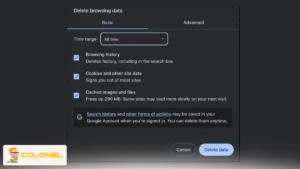
Clearing browser cache removes corrupted or outdated data that may disrupt request handling and trigger ERR_CONNECTION_RESET. Browsers store site assets and cookies to speed up future visits, but when this data becomes inconsistent with the server’s current configuration, connection failures may occur.
This issue often affects a single website rather than all browsing activity, which makes cache corruption difficult to identify without direct testing. Clearing cached data forces the browser to request fresh resources and reinitiate a clean handshake with the server. When performing this fix, users should focus on:
- Removing cached images, files, and cookies associated with the affected domain.
- Restarting the browser after clearing data to ensure changes apply correctly.
- Retesting the website in a new session to confirm whether ERR_CONNECTION_RESET persists.
Disable Browser Extensions Temporarily
Browser extensions can interfere with network requests and cause ERR_CONNECTION_RESET by altering or blocking traffic. Extensions related to ad blocking, VPN tunneling, privacy enforcement, or script injection are common sources of connection instability. Even trusted extensions may conflict with certain websites or server configurations.
Disabling extensions temporarily helps determine whether third-party browser components are responsible for the reset. If the error disappears after extensions are turned off, re-enabling them one by one allows precise identification of the problematic add-on.
Reset TCP/IP and Network Settings
Resetting network configuration restores default communication parameters and resolves hidden protocol-level conflicts. Over time, incorrect DNS settings, damaged TCP stacks, or legacy proxy configurations can interfere with outbound connections and force resets during transmission.
This solution is especially relevant for users who recently changed network settings, installed VPN software, or migrated between different internet environments. A full reset eliminates misconfigurations that are otherwise difficult to diagnose. Common elements of this fix include:
- Flushing the DNS cache to remove invalid or outdated name resolutions.
- Resetting TCP/IP settings to restore default packet-handling behavior.
- Disabling unused proxy configurations that may redirect traffic incorrectly.

Temporarily Disable Firewall or Antivirus Software
Security software may incorrectly identify legitimate traffic as a threat and terminate the connection, resulting in ERR_CONNECTION_RESET. Firewalls and antivirus tools operate at a low network level, meaning they can interrupt connections before the browser receives a response from the server.
Temporarily disabling these tools allows users to confirm whether they are responsible for the issue. If the website loads normally during this test, proper exclusions should be configured instead of leaving security disabled.
Server-Side Solutions for ERR_CONNECTION_RESET
Sometimes, ERR_CONNECTION_RESET occurs due to issues on the server rather than your device or network. When the website’s server is overloaded, misconfigured, or encounters technical problems, your browser connection can be reset during the handshake. Identifying server-side causes ensures you don’t waste time troubleshooting your own setup when the issue is external.
For website administrators or users in communication with site owners, the following actions are essential.
Contact the Website Administrator
If the issue persists despite resolving local and network causes, the website administrator should be informed. Administrators can check server logs, monitor performance, and correct configuration issues. Providing detailed information helps them troubleshoot effectively.
Check Server Status and Logs
Monitoring server performance and logs identifies overloads or errors causing the connection reset. Logs can reveal packet drops, timeout events, firewall rules, or software crashes on the server that block legitimate requests. Administrators or users with access should:
- Review server logs for recent errors corresponding to connection attempts.
- Check server load and memory usage to ensure resources aren’t exhausted.
- Inspect firewall or security rules that may inadvertently block traffic.
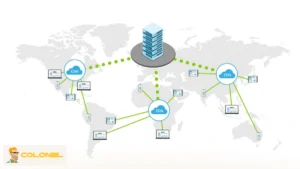
Use a Content Delivery Network (CDN)
A CDN reduces the load on the origin server and ensures reliable connections from multiple locations. Key CDN benefits include:
- Faster content delivery by serving pages from geographically closer servers.
- Reduced risk of server overload due to traffic balancing.
- Improved overall stability and reliability of the website connection.
By distributing content across a network of servers, CDNs minimize traffic spikes that can trigger ERR_CONNECTION_RESET, especially for high-traffic websites.
Advanced Network Diagnostics
Advanced users can utilize command-line tools to pinpoint connectivity issues beyond local configurations. Using utilities such as ping, tracert, and netstat can reveal where packets are lost or connections fail. Here are the steps to perform diagnostics:
- Running ping to verify response times from the server.
- Using tracert or traceroute to map the route packets take and identify failures.
- Employing netstat to monitor active connections and check for unusual resets or blocks.
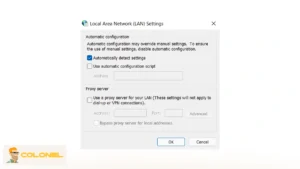
Check for Proxy and VPN Conflicts
Improper proxy or VPN configurations can interfere with internet requests and lead to ERR_CONNECTION_RESET. Even when a VPN works for general browsing, certain servers may reject traffic routed through it, causing connection resets.
Update Software, Drivers, and Antivirus
Outdated software and network drivers can contribute to connection resets. Ensuring all components are updated maintains compatibility with web protocols and prevents erratic resets caused by outdated components or buggy security definitions. Steps to maintain up-to-date software and fix ERR_CONNECTION_RESET are:
- Running OS updates regularly.
- Updating web browser and extensions.
- Checking network card drivers for updates through Device Manager or manufacturer tools.
- Keeping antivirus software current to prevent misidentification of safe traffic.
How to Prevent ERR_CONNECTION_RESET in the Future
Preventing this error involves maintaining both local systems and network infrastructure proactively. Most ERR_CONNECTION_RESET instances can be avoided by consistent monitoring and updates, ensuring long-term browsing reliability. Always consider the following actions to prevent ERR_CONNECTION_RESET:
- Keeping your operating system, browser, and network drivers updated.
- Using high-quality, reliable routers and modems.
- Regularly clear the browser cache and cookies to prevent corruption.
- Monitoring server health and traffic for websites you manage.
- Utilizing trusted antivirus and firewall solutions, with proper exceptions configured.
- Avoid unstable VPNs or proxies that interfere with connectivity.
- Running periodic speed and ping tests to detect connection instability early.
Conclusion
ERR_CONNECTION_RESET occurs when the communication between the browser and the server is interrupted before completion, most commonly due to local network instability, browser-related conflicts, or incorrect system-level configurations. Issues such as corrupted cache, problematic extensions, misconfigured TCP/IP settings, or overactive security software frequently trigger this error and should be addressed first through structured troubleshooting.
If local fixes do not resolve the issue, the root cause often lies on the server side, including overloads, firewall restrictions, or improper traffic handling. In such cases, reviewing server logs, optimizing resource usage, and deploying a CDN help stabilize connections and prevent repeated resets. A layered diagnostic approach ensures the error is resolved efficiently without unnecessary or redundant actions.
FAQs About ERR_CONNECTION_RESET
What is ERR_CONNECTION_RESET?
It occurs when the browser fails to maintain a connection to a website, resulting in a reset during the connection attempt.
Why does this error happen?
It can be caused by network issues, incorrect settings, browser problems, firewall/antivirus interference, VPN/proxy conflicts, or server-side failures.
How can I quickly fix ERR_CONNECTION_RESET?
Start with refreshing the page, restarting your router, testing another device, clearing browser cache, disabling extensions, and temporarily turning off firewalls.
Can VPNs cause this error?
Yes, VPNs may block or misroute traffic, causing connection resets. Disconnecting or changing servers often resolves the issue.
What should I do if the website itself is down?
Use online tools like Down Detector to confirm, and contact the website administrator if necessary.