
These WordPress Plugins Will Save You in 2026

In 2026, managing a WordPress site efficiently will be less about doing more and more about using the right tools. As performance demands, security risks, and user expectations continue to rise, the plugins you choose can make or break your workflow. These WordPress plugins are designed to solve real problems, save time, and keep your site competitive in a fast-changing digital landscape.
List of content you will read in this article:
ToggleWhy Choosing the Right WordPress Plugins Matters in 2026
In 2026, running a successful website is no longer just about having good design or publishing frequent content. The web has become faster, more competitive, more automated, and more demanding than ever before. Users expect instant load times, flawless mobile experiences, airtight security, and personalized interactions. Search engines continuously refine their algorithms, cyber threats evolve daily, and businesses rely on websites as core operational assets rather than simple online brochures. In this environment, the tools powering a website matter as much as the content itself, and every WordPress Plugin you install plays a critical role in shaping performance, stability, and growth.
Why Plugins Are Both a Solution and a Risk
WordPress itself remains flexible and lightweight by design, which is why plugins are essential. They extend functionality without forcing site owners to reinvent the wheel. However, the sheer number of available tools creates a new challenge: choosing wisely. Installing the wrong WordPress Plugin can slow down a site, introduce vulnerabilities, conflict with other components, or lock you into outdated workflows. On the other hand, selecting the right solutions can dramatically improve efficiency, reduce maintenance costs, and future-proof your site against upcoming changes in technology and user behavior.
Long-Term Value Over Short-Term Popularity
In 2026, plugin selection is less about “what’s popular” and more about long-term value. Site owners must consider scalability, developer support, update frequency, integration with modern hosting environments, and compliance with evolving standards such as Core Web Vitals, accessibility guidelines, and data protection laws. A carefully curated stack of plugins ensures that your website remains lean, fast, secure, and adaptable. Each WordPress Plugin should solve a clear problem, justify its resource usage, and align with your broader digital strategy.
Core Plugins Every Serious WordPress Site Needs
The following sections explore five plugins that stand out not because of hype, but because of their proven ability to address real-world challenges in 2026. These tools cover performance, SEO, security, forms, and backups—five pillars that every serious WordPress site must get right.

WordPress Web Hosting
Starting From $3.99/Monthly

WP Rocket – Performance Optimization Without the Headache
Website speed is no longer a luxury; it is a requirement. In 2026, performance directly impacts search rankings, conversion rates, bounce rates, and overall user satisfaction. WP Rocket has established itself as one of the most reliable performance optimization tools available, offering a balance between powerful features and user-friendly configuration. Unlike many caching solutions that require deep technical knowledge, WP Rocket focuses on delivering immediate results with minimal setup.
At its core, WP Rocket improves performance by implementing advanced caching techniques. It generates static HTML versions of pages, reducing the load on the server and delivering content to users much faster. This approach is especially valuable as traffic spikes become more unpredictable due to social media, viral content, and paid campaigns. WP Rocket also includes browser caching, GZIP compression, and cache preloading, ensuring that visitors experience consistently fast load times regardless of location.
Beyond basic caching, WP Rocket addresses modern performance bottlenecks. It allows you to delay JavaScript execution, defer non-critical scripts, and optimize CSS delivery—features that directly improve Core Web Vitals scores. Image optimization, lazy loading, and database cleanup further reduce unnecessary resource usage. In a landscape where milliseconds matter, WP Rocket helps sites stay competitive without requiring constant manual tuning.
One of WP Rocket’s biggest strengths is its compatibility. It works seamlessly with most themes, page builders, and hosting providers. Whether you are running a content-heavy blog, a WooCommerce store, or a corporate site, this WordPress Plugin adapts well to different use cases. Regular updates ensure compatibility with the latest WordPress releases and performance best practices.


Cheap VPS Server
Starting From $2.99/Monthly
WP Rocket – Key Specifications
| Feature | Description |
|---|---|
| Primary Function | Caching and performance optimization |
| Setup Difficulty | Very easy |
| Core Web Vitals Support | Yes |
| Compatibility | Most themes, builders, and hosts |
| Ideal Site Types | Blogs, business sites, eCommerce |
Who WP Rocket Is Best For
WP Rocket is ideal for site owners who want maximum speed improvements without deep technical involvement. Freelancers, agencies managing multiple sites, and business owners focused on conversions benefit greatly from its simplicity. It is particularly suitable for users who value stability and predictable performance over constant experimentation.

Rank Math SEO – Smarter SEO for a More Competitive Web
Search engine optimization in 2026 is more complex than ever. AI-driven search results, voice queries, semantic indexing, and user intent analysis have transformed how content is discovered. Rank Math SEO addresses these challenges by offering a comprehensive, modular approach to optimization that goes far beyond basic meta tags. As a modern WordPress Plugin, it integrates deeply with WordPress while remaining accessible to non-experts.
Rank Math’s setup wizard guides users through essential configuration steps, ensuring that technical SEO foundations are solid from the start. It automatically handles schema markup, XML sitemaps, and indexing preferences, reducing the risk of misconfiguration. For content creators, Rank Math provides real-time analysis and actionable suggestions based on current SEO standards, helping writers optimize content without disrupting their creative flow.
One of Rank Math’s standout features is its support for advanced schema types. Rich snippets, FAQs, product data, and reviews can be added with minimal effort, increasing visibility in search results. In an era where search results pages are crowded with enhanced elements, structured data can significantly improve click-through rates. Rank Math also integrates with analytics platforms, allowing users to track keyword performance and search visibility directly from the dashboard.
Performance is another area where Rank Math excels. Unlike some SEO tools that add unnecessary overhead, it is designed to be lightweight and efficient. This balance is crucial in 2026, where SEO and performance are deeply interconnected. By combining optimization features into a single WordPress Plugin, Rank Math reduces the need for multiple overlapping tools.

Windows VPS Hosting
Remote Access & Full Admin

Rank Math SEO – Key Specifications
| Feature | Description |
|---|---|
| Primary Function | SEO and structured data |
| Built-in Schema | Yes |
| Content Analysis | Real-time |
| Performance Impact | Low |
| Analytics Integration | Yes |
Who Rank Math SEO Is Best For
Rank Math is well suited for bloggers, content marketers, and businesses competing in crowded niches. It is particularly valuable for users who want advanced SEO capabilities without hiring a dedicated specialist. Agencies also benefit from its scalability and consistent interface across multiple projects.

Wordfence Security – Advanced Protection Against Modern Threats
Security threats have become more sophisticated, targeted, and automated in 2026. Websites are no longer attacked randomly; they are scanned, profiled, and exploited based on known vulnerabilities. Wordfence Security addresses this reality by offering a comprehensive defense system designed specifically for WordPress. As a security-focused WordPress Plugin, it combines prevention, detection, and response into a single platform.
Wordfence includes a powerful firewall that identifies and blocks malicious traffic before it reaches your site. It uses regularly updated threat intelligence to protect against zero-day exploits, brute force attacks, and known malware signatures. Unlike generic firewalls, Wordfence understands WordPress-specific attack vectors, making it highly effective in real-world scenarios.
Another critical component is malware scanning. Wordfence continuously scans core files, themes, and plugins for suspicious changes. If an issue is detected, site owners receive detailed alerts with recommended actions. This proactive approach reduces downtime and prevents minor issues from escalating into major breaches. In a time when data breaches can damage brand reputation overnight, this level of visibility is essential.
Wordfence also emphasizes transparency and control. Administrators can view live traffic, monitor login attempts, and enforce strong authentication policies such as two-factor authentication. While security can often feel overwhelming, Wordfence presents information in a clear and actionable way. This makes it a trusted WordPress Plugin for both technical and non-technical users.

Wordfence Security – Key Specifications
| Feature | Description |
|---|---|
| Primary Function | Website security |
| Firewall | Real-time |
| Malware Scanning | Continuous |
| Login Protection | Advanced |
| Threat Intelligence | Regularly updated |
Who Wordfence Security Is Best For
Wordfence is ideal for business websites, eCommerce stores, membership platforms, and any site handling sensitive data. It is especially valuable for users who cannot afford downtime or data loss. Agencies managing client sites also rely on it for centralized monitoring and alerts.

WPForms – Flexible Form Building for Any Use Case
Forms are one of the most underestimated components of a website. In 2026, they serve as critical touchpoints for lead generation, customer support, feedback collection, and transactional processes. WPForms simplifies form creation while offering the flexibility needed for complex workflows. As a user-centric WordPress Plugin, it bridges the gap between ease of use and advanced functionality.
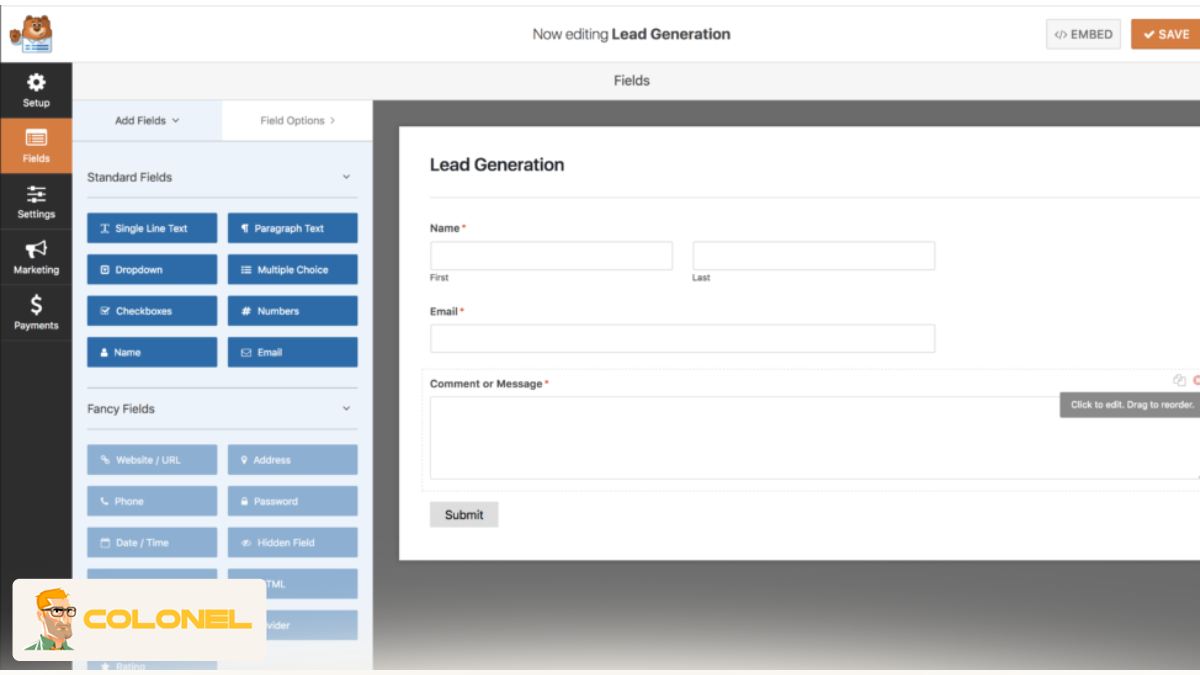
WPForms uses a drag-and-drop builder that allows users to create forms visually, without writing code. Contact forms, surveys, payment forms, and registration forms can be built in minutes. Conditional logic enables forms to adapt dynamically based on user input, creating personalized and efficient experiences. This is particularly important as users expect intuitive interactions that respect their time.
Integration is another major strength. WPForms connects with popular email marketing tools, CRMs, payment gateways, and automation platforms. This allows form submissions to trigger workflows, segment audiences, or process payments seamlessly. In a digital ecosystem where tools must work together, WPForms acts as a reliable connector.
Performance and security are also prioritized. WPForms is designed to load quickly and includes built-in spam protection mechanisms such as honeypots and CAPTCHA alternatives. By consolidating form functionality into a single WordPress Plugin, site owners avoid bloated setups that can slow down pages or create conflicts.
WPForms – Key Specifications
| Feature | Description |
|---|---|
| Primary Function | Form creation |
| Builder Type | Drag and drop |
| Integrations | Email, CRM, payments |
| Spam Protection | Built-in |
| Use Cases | Leads, payments, surveys |
Who WPForms Is Best For
WPForms is suitable for small businesses, marketers, nonprofits, and service providers who rely on forms for communication and conversions. It is also a strong choice for agencies building client sites with varying requirements, thanks to its flexibility and reliability.

UpdraftPlus – Reliable Backups You Can Trust
No website strategy is complete without a robust backup solution. In 2026, websites face risks ranging from cyberattacks to human error and server failures. UpdraftPlus provides a dependable safety net by ensuring that site data can be restored quickly and accurately. As a backup-focused WordPress Plugin, it emphasizes reliability and ease of recovery.
UpdraftPlus allows users to schedule automatic backups of files and databases. These backups can be stored in multiple remote locations, including cloud storage services. This redundancy ensures that data remains accessible even if one storage provider fails. Restoration is straightforward, allowing sites to be brought back online with minimal downtime.
One of the key advantages of UpdraftPlus is its flexibility. Users can choose what to back up, how often, and where to store backups. This level of control is particularly valuable for large or frequently updated sites. In an environment where updates and changes happen constantly, having a trusted rollback option is essential.
UpdraftPlus also integrates well with other tools and hosting environments. Its consistent updates and clear interface make it a dependable WordPress Plugin for long-term use. When something goes wrong—and eventually, something always does—UpdraftPlus provides peace of mind.

UpdraftPlus – Key Specifications
| Feature | Description |
|---|---|
| Primary Function | Backups and restoration |
| Backup Scheduling | Automatic |
| Remote Storage | Multiple options |
| Restoration | One-click |
| Reliability | High |
Who UpdraftPlus Is Best For
UpdraftPlus is ideal for all site owners, from personal bloggers to large organizations. It is especially important for businesses where downtime translates directly into lost revenue. Developers and agencies also rely on it as a standard safeguard during updates and migrations.
Final Summary
In 2026, successful websites are built on smart decisions, not excessive complexity. Each tool you add should strengthen your site rather than weigh it down. The plugins discussed above address core needs—speed, visibility, security, communication, and data protection—without unnecessary overlap. By choosing each WordPress Plugin intentionally and understanding who it is best suited for, you create a stable foundation for long-term growth.
Rather than chasing trends, focus on reliability, performance, and support. A well-chosen WordPress Plugin stack reduces stress, saves time, and allows you to concentrate on what truly matters: delivering value to your audience and achieving your goals in an increasingly demanding digital world.