


Die Implementierung einer robusten Hetzner-Backup-Strategie ist unerlässlich, um sicherzustellen, dass Ihre VPS-Daten sicher bleiben, zugänglich, und sicher. Ein zuverlässiger Backup-Plan schützt nicht nur vor versehentlichem Löschen, Hardwarefehler, und Ransomware-Angriffen, bietet aber auch Administratoren, die kritische Workloads verwalten, Sicherheit. Dieser Leitfaden beschreibt Schritt-für-Schritt-Methoden, Best Practices, und Tools zur effizienten Sicherung Ihres VPS auf Hetzner.
Hetzner Backup-Optionen verstehen
Bevor Sie ein Backup einrichten, Es ist wichtig, die von Hetzner angebotenen Speicherlösungen zu verstehen. Hetzner bietet Storage Boxes und Cloud Object Storage an, jeweils für unterschiedliche Backup-Anforderungen konzipiert. Storage Boxes eignen sich ideal für inkrementelle Backups per SFTP, SCP, oder rsync, während Object Storage S3-kompatible Protokolle für verschlüsselte und deduplizierte Backups mit Tools wie Restic unterstützt.
Die Wahl des richtigen Dienstes stellt sicher, dass Ihre Backups effizient sind, kostengünstig, und skalierbar. Zu den wichtigsten Überlegungen bei der Auswahl der Sicherungsmethoden von Hetzner gehören::
- Speicherart und Kosten: Die Pläne beginnen zu einem sehr niedrigen Preis, ermöglicht eine flexible Erweiterung.
- Unterstützte Protokolle: SFTP, SCP, rsync, Samba/CIFS, und S3-kompatible APIs.
- Automatisierung und Sicherheit: Bewerten Sie die integrierte Verschlüsselung, Snapshot-Unterstützung, und Zugangskontrollfunktionen.

Einrichten Ihrer Hetzner-Aufbewahrungsbox
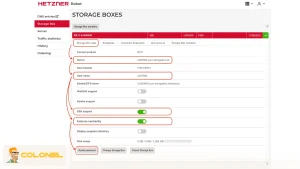
Um mit der Sicherung zu beginnen, Eine ordnungsgemäß konfigurierte Aufbewahrungsbox ist obligatorisch. Zur Einrichtung gehört die Aktivierung des Storage Box-Plans, Aktivieren des SSH- oder SFTP-Zugriffs, und optional das Erstellen von Unterkonten für mehrere Geräte. Diese Schritte sorgen für sichere Verbindungen und ein effizientes Datenmanagement.
Hier sind die Schritte zum Einrichten einer Aufbewahrungsbox:

WordPress-Webhosting
Ab 3,99 $/Monat
- Bestellen Sie eine Aufbewahrungsbox
- Melden Sie sich an Hetzner-Roboter und wählen Sie einen Plan aus.
- Nach der Aktivierung (normalerweise ~3 Minuten), Sie erhalten Anmeldeinformationen (Benutzername, Passwort, Serveradresse).
- Aktivieren Sie den SSH/SCP-Zugriff
- Navigieren Sie zu Ihren Storage Box-Einstellungen und aktivieren Sie SSH und externe Erreichbarkeit.
- Passwörter bei Bedarf zurücksetzen; Dies gewährleistet sichere Verbindungen für rsync oder Restic.
- Erstellen Sie Unterkonten (Optional)
- Nützlich für mehrere Benutzer oder Geräte.
- Beschränken Sie den Zugriff auf bestimmte Verzeichnisse, z.B., subuser1/backups.
- Testverbindung
- Linux/macOS: ssh -p 23 [email protected]
- Windows: Verwenden Sie PowerShell oder PuTTY.
- Stellen Sie sicher, dass Sie zur Eingabeaufforderung gelangen, um den Zugriff zu überprüfen.
Auswählen einer Sicherungsmethode
Hetzner-Backups können mit rsync durchgeführt werden, Restisch, oder SimpleBackups, abhängig von Ihren Anforderungen an die Verschlüsselung, Automatisierung, und Plattformkompatibilität.
Rsync für Linux/macOS
rsync ist ideal für inkrementelle Backups und einfache Ordnersynchronisierung. Es minimiert die Datenübertragung, indem nur geänderte Dateien kopiert werden. Zur Einrichtung und Nutzung:
Installieren Sie rsync:
- sudo apt-get update
- sudo apt-get install -y rsync
Optional: Richten Sie einen SSH-Schlüssel für den passwortlosen Zugriff ein.
Führen Sie ein Backup aus:

Günstiger VPS-Server
Ab 2,99 $/Monat
- rsync -avh –Fortschritt -e ‚ssh -p 23‘ /home/user/data [email protected]:Backups
- Automatisieren Sie mit Cron geplante Backups.

Restic für sichere und verschlüsselte Backups
Restic bietet Verschlüsselung und Deduplizierung, Damit eignet es sich perfekt für sensible oder umfangreiche Backups.
Befolgen Sie die Schritte:
- Restic installieren (Linux/macOS/Windows)
- Konfigurieren Sie den SSH-Zugriff auf die Hetzner Storage Box
Repository initialisieren:
- restic -r sftp:Aufbewahrungsbox:/restic init
Sicherungsdaten:
- restic -r sftp:Aufbewahrungsbox:/restic backup /home/user/data
- Automatisieren Sie mit autorestischen oder benutzerdefinierten Skripts für regelmäßige Backups.
Snapshots und Planung automatisieren
Automatisierung ist der Schlüssel zu einer zuverlässigen Hetzner-Backup-Strategie. Snapshots können manuell erstellt oder über die Hetzner-Konsole automatisiert werden, Gewährleistung mehrerer Wiederherstellungspunkte ohne ständigen manuellen Eingriff. Hier sind die Best Practices für die Planung:

Windows VPS-Hosting
Remote Access & Full Admin
- Tägliche inkrementelle Sicherungen für häufig aktualisierte Daten.
- Wöchentliche vollständige Backups zur Erhaltung eines vollständigen Datensatzes.
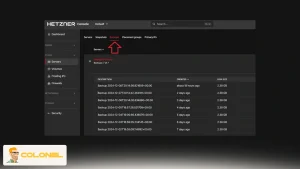
- Bewahren Sie je nach Storage Box-Plan 10–40 Snapshots auf.

Sicherheit und Zugangskontrolle
Ein robuster Backup-Plan muss die Datenintegrität und -sicherheit gewährleisten. Verwenden Sie SSH-Schlüssel anstelle von Passwörtern, Verschlüsseln Sie vertrauliche Dateien, wenn Sie rsync verwenden, und beschränken Sie den Zugriff auf bestimmte Verzeichnisse für Unterkonten. Überwachen Sie Backups regelmäßig, um deren Vollständigkeit zu überprüfen und Beschädigungen frühzeitig zu erkennen.
Verwendung von Hetzner Cloud Object Storage mit Restic
Für Benutzer, die plattformübergreifende und verschlüsselte Backups benötigen, Hetzner Cloud Object Storage in Kombination mit Restic ist eine leistungsstarke Lösung. Object Storage unterstützt S3-kompatible Protokolle, Dies ermöglicht eine nahtlose Integration mit den sicheren und deduplizierten Backups von Restic.
Zu den Implementierungsschritten gehören::
- Objektspeicher einrichten
- Erstellen Sie einen Bucket in der Hetzner Cloud Console.
- Notieren Sie sich Ihren Endpunkt, Zugangsschlüssel, und Geheimschlüssel.
- Konfigurieren Sie Restic-Umgebungsvariablen
- export RESTIC_PASSWORD=Ihr-sicheres-Passwort
- export RESTIC_REPOSITORY=s3:hel1.your-objectstorage.com/bucket-name
- export AWS_ACCESS_KEY_ID=hetzner-access-key-id
- export AWS_SECRET_ACCESS_KEY=hetzner-access-key
- Führen Sie Backups mit erweiterten S3-Optionen aus.
- restic -o s3.bucket-lookup=DNS-Backup /Pfad/zu/Daten
- Automatisieren Sie mithilfe von Wrapper-Skripten
- Aliasieren Sie Restic-Befehle, um sicherzustellen, dass die richtigen Umgebungsvariablen und -optionen automatisch angewendet werden.
Dieses Setup ermöglicht tägliche oder stündliche automatisierte Backups mit Verschlüsselung und Deduplizierung, Gewährleistung minimaler Speichernutzung und maximaler Sicherheit.

Cloudbasierte Automatisierung mit SimpleBackups
Für diejenigen, die eine verwaltete Lösung bevorzugen, SimpleBackups bietet Automatisierung und Überwachung für Hetzner VPS-Server-Hosting Backups. Es reduziert manuelle Eingriffe und ermöglicht gleichzeitig die Planung, Überwachung, und Wiederherstellungsfunktionen.
Schritte zur Konfiguration sind:
- Melden Sie sich an unter SimpleBackups.
- Erstellen Sie ein Speicherziel, das auf Ihre Hetzner-Aufbewahrungsbox zeigt (SFTP).
- Definieren Sie Sicherungsjobs:
- Wählen Sie Dateien aus, Datenbanken, oder vollständige Server-Backups.
- Planen Sie tägliche oder wöchentliche Backups.
- Überwachen Sie Backups über das Dashboard und initiieren Sie bei Bedarf Wiederherstellungen.
Lassen Sie uns nun die Vorteile herausfinden:
| Besonderheit | Rsync/Restic | SimpleBackups |
| Automatisierung | Handbuch/Cron/Skript | Integriertes Dashboard |
| Verschlüsselung | Nur Restic | Verwaltet (hängt von den Einstellungen ab) |
| Plattformübergreifend | Restisch | Ja |
| Benutzerfreundlichkeit | Mäßig | Hoch |
Wiederherstellen von Daten aus Hetzner-Backups
Die Wiederherstellung ist ein wichtiger Bestandteil jedes Backup-Plans. Je nach verwendeter Methode bietet Hetzner flexible Restaurierungsmöglichkeiten.
Rsync-Wiederherstellung:
rsync -avh –Fortschritt -e ‚ssh -p 23‘ [email protected]:Backups /home/user/restored_data
Restische Restaurierung:
restic -r sftp:Aufbewahrungsbox:/Restic Restore spätestens –Ziel /home/user/restored
SimpleBackups-Wiederherstellung:
- Initiieren Sie Wiederherstellungen über das Dashboard; Datei auswählen, Datenbank, oder vollständige Serverwiederherstellung.
Testen Sie Ihren Wiederherstellungsprozess immer regelmäßig, um sicherzustellen, dass die Sicherungen gültig und vollständig sind.
Beheben häufiger Probleme
Auch mit einer gut strukturierten Hetzner-Backup-Strategie, Während der Datenübertragung können weiterhin Betriebsprobleme auftreten, Repository-Initialisierung, oder automatisierte Aufgaben. Diese Probleme werden typischerweise durch Fehlkonfigurationen verursacht, Authentifizierungsfehler, Netzwerkgrenzen, oder falsche Dateipfade. Nachfolgend sind die häufigsten Probleme und die empfohlenen Methoden zu deren Lösung aufgeführt, um stabile und konsistente Sicherungsvorgänge sicherzustellen.
- Verbindung abgelehnt
Dieses Problem weist normalerweise darauf hin, dass die Storage Box nicht über SSH oder SFTP erreichbar ist. Überprüfen Sie immer diesen Port 23 ist offen, Der SSH-Zugriff ist in den Storage Box-Einstellungen aktiviert, und lokale Firewallregeln auf dem VPS blockieren die ausgehende Verbindung nicht. - Zugriff verweigert
Authentifizierungsfehler treten auf, wenn der Benutzername, Passwort, oder der SSH-Schlüssel ist falsch. Bestätigen Sie, dass Ihre Anmeldeinformationen mit denen im Hetzner-Panel übereinstimmen, Generieren Sie das Passwort bei Bedarf neu, und stellen Sie sicher, dass Ihr SSH-Schlüssel ordnungsgemäß registriert ist. Bei Verwendung von Unterkonten, Überprüfen Sie, ob die zugewiesenen Verzeichnisse mit Ihren Sicherungspfaden übereinstimmen.
- Langsame Transfers
Aufgrund der begrenzten Bandbreite kann es zu Leistungsengpässen kommen, hohe Serverlast, oder große Datensätze. Um die Stabilität aufrechtzuerhalten, Sie können die Übertragungsgeschwindigkeit mit drosseln –bwlimit=1000 für rsync oder –Limit-Upload 1000 für Restic. Dies verhindert Verbindungsabbrüche und verbessert die Gesamtzuverlässigkeit bei langen Backup-Sitzungen. - Pfadfehler
Falsche Dateipfade sind eine häufige Ursache für fehlgeschlagene Backups. Stellen Sie sicher, dass das Speicherziel angegeben ist, Unterkonto-Endpunkt, und Verzeichnisstruktur korrekt definiert sind. Restic und rsync erfordern beide genaue Pfadreferenzen, und selbst kleine Fehler können dazu führen, dass das Repository oder der Backup-Job fehlschlägt. - Verbindungslimits überschritten
Hetzner legt Beschränkungen für gleichzeitige Verbindungen zu einer Storage Box oder einem Unterkonto fest. Die gleichzeitige Ausführung mehrerer Rsync- oder Restic-Jobs kann diese Einschränkung auslösen. Der beste Ansatz besteht darin, parallele Übertragungen zu reduzieren und automatisierte Aufgaben zu staffeln, um eine Überlastung des Verbindungslimits zu vermeiden.
Best Practices für zuverlässiges Hetzner-Backup
Die Implementierung eines zuverlässigen Hetzner-Backup-Plans geht über die Auswahl der richtigen Tools hinaus. Es erfordert die konsequente Anwendung bewährter Verfahren. Die folgenden Empfehlungen stellen sicher, dass Ihre Backups sicher sind, effizient, und belastbar:
- Verwenden Sie aus Sicherheitsgründen SSH-Schlüssel: Vermeiden Sie Passwörter, um potenzielle Angriffsvektoren zu minimieren und sensible Daten zu schützen.
- Verschlüsseln Sie sensible Daten: Besonders bei Verwendung von rsync, Die Verschlüsselung stellt sicher, dass Dateien auch dann abgefangen werden, wenn sie abgefangen werden, sie bleiben unlesbar.
- Überwachen Sie regelmäßig Backups: Schnappschüsse überprüfen, Überprüfen Sie die Backup-Integrität, und stellen Sie sicher, dass automatisierte Prozesse ordnungsgemäß ablaufen.
- Segmentsicherungen: Verwenden Sie Unterkonten, um Backups für verschiedene Geräte zu trennen, Anwendungen, oder Zwecke. Dies verbessert die Organisation und verringert das Risiko einer Kreuzkontamination.
- Automatisieren Sie Zeitpläne: Führen Sie tägliche inkrementelle Backups für aktive Daten durch, wöchentliche Voll-Backups für umfassende Abdeckung, und monatliche Backups für die Langzeitspeicherung.
Das Befolgen dieser Praktiken trägt zur Aufrechterhaltung der Sicherheit bei, Zuverlässigkeit, und Seelenfrieden, Sicherstellen, dass Daten im Notfall schnell wiederhergestellt werden können.
Abschließende Empfehlungen für eine zuverlässige Hetzner-Backup-Strategie
Die Implementierung eines zuverlässigen Hetzner-Backup-Plans erfordert sorgfältige Beachtung der Sicherheit, Automatisierung, und Überwachung. In erster Linie, Die Verwendung von SSH-Schlüsseln anstelle von Passwörtern gewährleistet einen sicheren Zugriff auf Ihren Speicher, Dadurch werden potenzielle Angriffsvektoren deutlich reduziert.
Eine regelmäßige Überwachung Ihrer Backups ist unerlässlich. Dazu gehört auch die Überprüfung von Snapshots, Überprüfung der Backup-Integrität, und sicherzustellen, dass automatisierte Prozesse wie geplant ablaufen. Die Segmentierung von Backups durch die Verwendung von Unterkonten für verschiedene Geräte oder bestimmte Zwecke sorgt für eine bessere Organisation und isoliert potenzielle Risiken, wodurch die Verwaltung einfacher wird.
Indem Sie diese Praktiken befolgen, Ihre Hetzner-Backup-Strategie wird sicher sein, effizient, und belastbar, Gewährleistung der Datenverfügbarkeit und Sicherheit.
Häufig gestellte Fragen (FAQ)
Wie wähle ich Hetzner-Backup aus??
Rsync ist ideal für die einfache Linux/macOS-Dateisynchronisierung, Restic bietet verschlüsselte und deduplizierte Backups auf allen Plattformen, und SimpleBackups bietet vollautomatisierte Angebote, cloudbasiertes Backup-Management.
Kann ich Hetzner Object Storage unter Windows verwenden??
Ja, Restic unterstützt Windows, Ermöglicht verschlüsselte S3-kompatible Backups im Hetzner Object Storage.
Wie oft sollte ich Backups auf dem Hetzner VPS durchführen??
Tägliche inkrementelle Sicherungen für aktive Daten, wöchentliche vollständige Backups, Für eine langfristige Sicherheit wird eine monatliche Aufbewahrung empfohlen.
Sind Hetzner-Backups sicher??
Bei Konfiguration mit SSH-Schlüsseln und Verschlüsselung (Restisch), Backups sind vollständig vor unbefugtem Zugriff geschützt.