
Understanding WordPress Pingbacks
WordPress includes several built-in communication features designed to connect websites and bloggers. One of these features is known as a pingback.
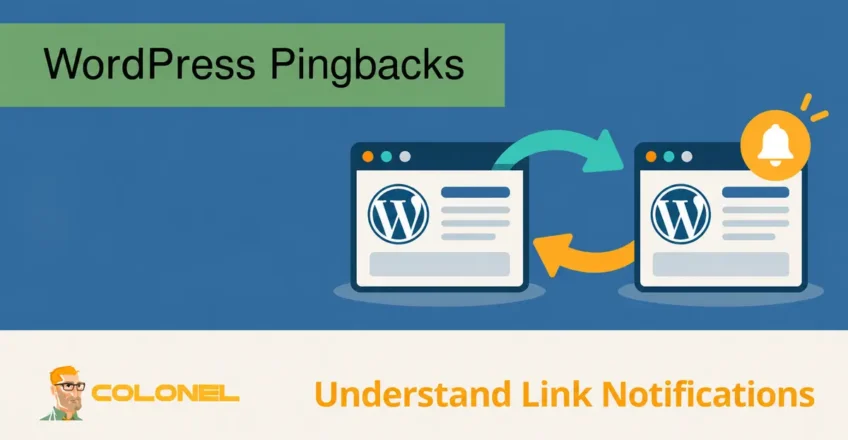
A pingback is an automatic notification sent from one WordPress website to another whenever a published article links to content on the recipient website. The purpose of this system is to inform content creators that another website has referenced their article.
For a pingback to be received, the target website must have pingbacks enabled within its WordPress settings. If the feature is disabled, notifications will not be delivered.
Pingbacks were originally introduced to encourage communication between websites and help content creators discover discussions related to their published work.
How WordPress Pingbacks Work
The pingback process occurs automatically behind the scenes whenever one WordPress site links to another compatible WordPress website.
A typical workflow looks like this:

WordPress-Webhosting
Ab 3,99 $/Monat
- Website A publishes an article.
- The article contains a link pointing to content on Website B.
- WordPress sends a pingback request to Website B.
- Website B verifies the request.
- If accepted, the notification appears in the comments area of the linked article.
The website owner can then review the pingback and decide whether to approve or remove it, depending on their moderation settings.
Im Wesentlichen, pingbacks act as a notification system that lets publishers know when their content is being referenced elsewhere on the web.
Pingbacks vs Trackbacks
Pingbacks are often confused with trackbacks because both features serve a similar purpose.
Their goal is to notify another website that its content has been mentioned or linked.
Jedoch, the way they operate is different.
What Is a Trackback?
A trackback is a manually submitted notification sent to another website.

Günstiger VPS-Server
Ab 2,99 $/Monat
Instead of WordPress automatically detecting the link and sending a notification, the author manually enters the target trackback URL when publishing content.
Trackbacks can also include a short excerpt from the article that contains the link.
What Is a Pingback?
Pingbacks are fully automated.
When a link is published, WordPress handles the communication automatically without requiring any additional action from the author.
Unlike trackbacks, pingbacks only include a notification and a link to the source content. They do not include content excerpts.
Benefits of Using WordPress Pingbacks
Although pingbacks are not as widely used today as they once were, they can still provide certain advantages.
Windows VPS-Hosting
Fernzugriff und vollständige Verwaltung
Improved Content Discovery
Pingbacks help website owners discover when other websites reference their content.
This can reveal:
- New discussions about a topic
- Industry mentions
- Related articles
- Partnership opportunities
Content creators can use these notifications to identify websites operating within the same niche.
Potential SEO Value
When approved, pingbacks typically appear within the comments section of a post and contain a link back to the referring article.
These links can create additional pathways between related content across different websites.
While the SEO impact is generally limited compared to editorial backlinks within article content, pingbacks can still contribute to broader content visibility.
Relationship Building
When websites regularly reference each other’s content, opportunities for collaboration often emerge.
Pingbacks can help identify:
- Industry experts
- Relevant bloggers
- Publishers covering similar topics
- Potential content partners
Building relationships within a niche can lead to future content collaborations and increased audience reach.
Increased Information Value
Linking to useful resources improves the overall quality of content.
Readers benefit from having access to additional information, supporting documentation, and related articles that provide greater context around a topic.
A healthy ecosystem of interconnected resources can improve the user experience and help visitors find answers more efficiently.
Drawbacks of WordPress Pingbacks
Despite their intended purpose, pingbacks have become less popular due to several practical challenges.
Spam Abuse
Spam is the most common issue associated with pingbacks.
Although WordPress attempts to verify pingback requests before accepting them, malicious users often find ways to exploit the system.
This can result in:
- Fake notifications
- Unwanted backlinks
- Automated spam submissions
- Low-quality website references
Without proper moderation, spam pingbacks can quickly clutter a website’s comments section.
Increased Administrative Work
Website owners who enable pingbacks must regularly review incoming notifications.
This moderation process often involves:
- Approving legitimate pingbacks
- Removing spam submissions
- Blocking abusive websites
- Monitoring comment activity
For busy websites, managing pingbacks can become time-consuming.
Potential Security Concerns
Historically, pingbacks have occasionally been exploited in certain types of attacks against WordPress websites.
While modern WordPress Sicherheit measures help reduce these risks, many administrators prefer to disable pingbacks entirely to minimize unnecessary exposure.
Limited Modern Usage
The blogging landscape has evolved significantly since pingbacks were introduced.
Heute, content creators often discover mentions through:
- Suchmaschinen
- Analytics-Plattformen
- Social media monitoring
- SEO tools
- Brand monitoring software
Infolge, many website owners no longer rely on pingbacks for content discovery.
How to Disable WordPress Pingbacks
Many WordPress administrators choose to disable pingbacks and trackbacks to reduce spam and simplify comment moderation.
To disable pingbacks globally:
Schritt 1
Log in to the WordPress admin dashboard.
Schritt 2
Navigieren Sie zu:
Settings → Discussion
Schritt 3
Locate the following options:
Attempt to notify any blogs linked to from the article
Allow link notifications from other blogs (pingbacks and trackbacks)
Schritt 4
Uncheck both options.
Schritt 5
Save the settings.
After saving the changes, WordPress will no longer send or receive pingbacks and trackbacks for future content.
Should You Enable Pingbacks?
Whether pingbacks should remain enabled depends on your website’s goals and management preferences.
Enabling pingbacks may make sense if:
- You actively participate in blogging communities.
- You want to discover content references automatically.
- You regularly collaborate with other publishers.
Disabling pingbacks is often the better choice if:
- Spam moderation is becoming a problem.
- You want tighter control over comments.
- You do not actively use pingback notifications.
- Security and performance optimization are priorities.
For many modern WordPress websites, disabling pingbacks and trackbacks helps reduce unnecessary comment activity while simplifying site management.