
Understanding RAID Storage
RAID, short for Redundant Array of Independent Disks, is a storage technology that combines multiple physical drives into a single logical storage system. Depending on the RAID level used, the configuration can improve performance, increase fault tolerance, or provide a combination of both.
RAID is commonly used in servers, storage appliances, virtualization platforms, and enterprise environments where data availability and storage performance are important.
It’s important to understand that RAID improves redundancy and availability, but it is not a replacement for a proper backup strategy.
What Is Software RAID?
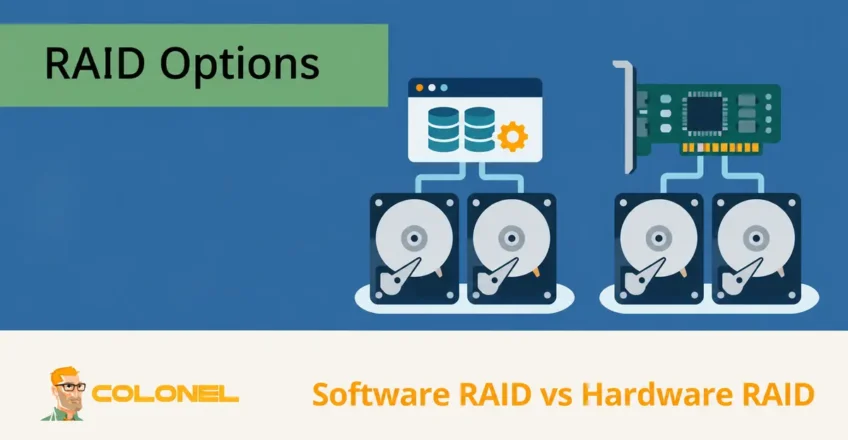
Software RAID is managed entirely by the operating system. Instead of relying on dedicated hardware, RAID functions such as striping, mirroring, and parity calculations are handled by the server’s CPU and software stack.
Most modern operating systems include built-in software RAID capabilities.
Examples include:

WordPress Web Hosting
Starting From €2.99/Monthly
- Linux MDADM
- Windows Storage Spaces
- ZFS RAID configurations
- Btrfs RAID implementations
Because no dedicated controller is required, software RAID is often the more affordable option.
How Software RAID Works
The operating system manages all RAID operations directly.
Tasks such as:
- Data distribution
- Parity calculations
- Disk monitoring
- Rebuild operations
are performed using system resources.
The storage devices connect directly to standard SATA, SAS, or NVMe controllers, while the operating system handles the RAID logic.
What Is Hardware RAID?
Hardware RAID uses a dedicated RAID controller to manage the array independently of the operating system.

Cheap VPS Server
Starting From €8/Monthly
The controller contains its own processor and memory, allowing RAID functions to be performed without heavily relying on the server’s CPU.
Many enterprise RAID controllers also include:
- Dedicated cache memory
- Battery-backed write cache
- Flash-backed cache protection
- Advanced monitoring features
How Hardware RAID Works
The RAID controller presents multiple physical drives as a single logical device to the operating system.
The OS does not directly manage the RAID configuration. Instead, the controller handles:
- Drive management
- Parity calculations
- Data striping
- Array rebuilding
- Cache operations
This offloading can reduce CPU overhead and provide more consistent performance under demanding workloads.
Software RAID vs Hardware RAID: Quick Comparison
| Feature | Software RAID | Hardware RAID |
|---|---|---|
| RAID Processing | Host CPU and OS | Dedicated controller |
| Initial Cost | Lower | Higher |
| CPU Usage | Higher | Lower |
| Flexibility | High | Moderate |
| Portability | Easier | Controller dependent |
| Recovery | OS-based | Controller-based |
| Hardware Requirements | Minimal | Dedicated RAID card |
| Management Complexity | Moderate | Moderate to advanced |
| Enterprise Features | Limited | Extensive |
| Ideal Use Cases | Small businesses, labs, development | Enterprise workloads, databases, virtualization |
Both approaches can deliver excellent results when deployed appropriately.
Windows VPS Hosting
Remote Access & Full Admin
Advantages of Software RAID
Lower Cost
One of the biggest advantages of software RAID is cost savings.
Because no dedicated RAID controller is required, organizations can build redundant storage using standard hardware.
This reduces:
- Initial deployment costs
- Replacement costs
- Infrastructure complexity
Greater Flexibility
Software RAID configurations are generally less dependent on specific hardware components.
In many cases, drives can be moved to another compatible system and imported without requiring identical RAID controllers.
This flexibility can simplify:
- Hardware upgrades
- Server migrations
- Disaster recovery
Easier Hardware Independence
Because the RAID logic resides within the operating system, organizations avoid being locked into a specific controller manufacturer.
Strong Performance on Modern Hardware
Older recommendations often assumed software RAID created a significant performance penalty.
Modern processors have changed this equation.
Today’s multi-core CPUs can handle RAID workloads efficiently, especially for:
- RAID 1
- RAID 10
- NVMe storage environments
In many scenarios, software RAID performance is more than adequate for production workloads.
Disadvantages of Software RAID
Increased CPU Utilization
Software RAID consumes host CPU resources.
This becomes more noticeable when:
- Running parity-based RAID levels
- Handling large storage arrays
- Operating under heavy workloads
Examples include:
- RAID 5
- RAID 6
where parity calculations require additional processing.
Dependence on Operating System
Because the operating system manages the RAID configuration, problems affecting the OS can complicate storage recovery.
Potential issues include:
- OS corruption
- Driver failures
- Configuration errors
Limited Enterprise Features
While software RAID solutions have improved significantly, some advanced enterprise features remain more common in hardware RAID controllers.
Advantages of Hardware RAID
Dedicated Processing Resources
Hardware RAID controllers handle storage operations independently.
This reduces:
- CPU usage
- Operating system overhead
The result is often more predictable performance under heavy workloads.
Consistent Performance
In environments with sustained disk activity, hardware RAID can deliver more consistent throughput and latency.
This is especially beneficial for:
- Database servers
- Virtualization platforms
- Transaction-heavy applications
Advanced Controller Features
Enterprise RAID controllers often provide:
- Write-back cache
- Battery-backed cache protection
- Predictive failure monitoring
- Automatic rebuild management
- Hot spare support
These features can improve both performance and reliability.
Simplified Operating System View
The operating system sees the entire RAID array as a single storage device.
This can simplify deployment and management in some environments.
Disadvantages of Hardware RAID
Higher Cost
Hardware RAID requires dedicated controller hardware.
Additional costs may include:
- RAID controller cards
- Cache modules
- Battery backup units
- Replacement controllers
This increases overall deployment expenses.
Controller Dependency
One of the most overlooked drawbacks of hardware RAID is controller dependence.
If the RAID controller fails, recovery may require:
- The same controller model
- Compatible firmware versions
- Matching replacement hardware
This can complicate disaster recovery efforts.
Vendor Lock-In
Organizations may become dependent on specific controller ecosystems.
Hardware upgrades and migrations can sometimes be more complex than software-based alternatives.
Performance Comparison
Performance comparisons between software RAID and hardware RAID depend heavily on workload characteristics.
Sequential Workloads
For sequential reads and writes:
- RAID 0
- RAID 1
- RAID 10
Modern software RAID often performs very well.
In many cases, differences between software and hardware RAID are relatively small.
Random Workloads
For databases and virtualization environments involving heavy random I/O, hardware RAID may offer advantages through:
- Dedicated cache
- Controller optimization
- Reduced CPU overhead
NVMe Environments
NVMe storage has changed many traditional assumptions about RAID performance.
Modern CPUs often process software RAID operations efficiently enough that controller advantages become less pronounced for certain workloads.
As a result, many organizations now successfully deploy software RAID with NVMe storage systems.
Recovery and Portability Differences
Recovery planning should play a major role in RAID selection.
Software RAID Recovery
Benefits include:
- Easier migration between systems
- Reduced hardware dependency
- Greater flexibility during recovery
In many cases, disks can simply be moved to another compatible system.
Hardware RAID Recovery
Benefits include:
- Advanced rebuild functionality
- Controller-managed recovery
Potential challenges include:
- Dependency on specific controller hardware
- Firmware compatibility requirements
Organizations should consider both drive failures and controller failures when designing recovery plans.
Which RAID Type Fits Your Workload?
Home Labs and Testing Environments
Recommended:
Software RAID
Reasons:
- Low cost
- Easy deployment
- Greater flexibility
Small Business File Servers
Recommended:
Software RAID or Hardware RAID
The best choice depends on:
- Budget
- Performance requirements
- Administrative expertise
Virtualization Hosts
Recommended:
Hardware RAID in many cases
Benefits:
- Consistent performance
- Better rebuild handling
- Reduced CPU overhead
Enterprise Database Servers
Recommended:
Hardware RAID
Benefits:
- Advanced caching
- Predictable performance
- Controller-level management
Portability-Focused Deployments
Recommended:
Software RAID
Benefits:
- Easier migration
- Less hardware dependence
Modern RAID Considerations
Technology has evolved significantly over the last decade.
Many traditional RAID recommendations were developed during a period when:
- CPUs were less powerful
- SSD adoption was limited
- NVMe storage did not exist
Today:
- Multi-core processors handle RAID workloads efficiently
- Software RAID performance has improved significantly
- NVMe storage introduces new performance considerations
Organizations should evaluate current hardware capabilities rather than relying solely on older guidance.
RAID Does Not Replace Backups
One of the most common misconceptions about RAID is that it eliminates the need for backups.
RAID primarily protects against drive failures.
It does not protect against:
- Accidental deletion
- Ransomware
- Malware
- Data corruption
- Insider threats
- Fire
- Flooding
- Complete server loss
A proper backup strategy remains essential regardless of the RAID level used.
Choosing Between Software and Hardware RAID
There is no universally correct answer in the software RAID versus hardware RAID debate. The best choice depends on workload requirements, budget constraints, recovery priorities, and operational preferences.
Software RAID offers affordability, flexibility, and strong performance on modern hardware, making it an excellent choice for many environments. Hardware RAID provides dedicated processing, advanced controller features, and predictable performance that can be valuable for enterprise workloads and high-performance applications.
By evaluating storage requirements, recovery goals, infrastructure budgets, and long-term maintenance considerations, organizations can select the RAID approach that best aligns with their operational needs while ensuring reliable and resilient storage infrastructure.