
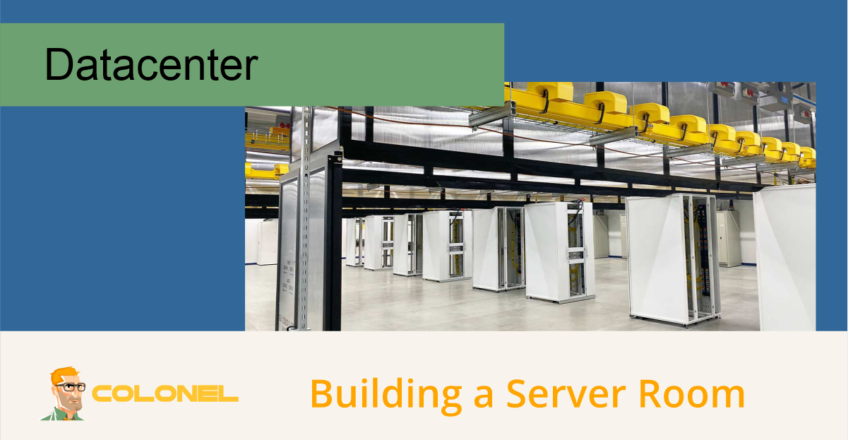
What Is a Server Room?
A server room is a dedicated space designed to house and protect an organization’s IT infrastructure, including servers, storage systems, networking equipment, and supporting hardware.
For many businesses, the server room serves as the central hub for critical operations, supporting applications, communications, Datenbanken, file storage, and network services.
A properly designed server room helps:
- Protect critical infrastructure
- Centralize IT resources
- Improve physical security
- Simplify maintenance
- Reduce downtime risks
- Support future growth
Because modern businesses depend heavily on technology, server room design plays a significant role in operational reliability and business continuity.
Should You Build a Server Room or Use Hosted Infrastructure?
Building an in-house server room is not always the only option.
Many organizations choose to host their infrastructure in professional data centers or use managed hosting services instead.

WordPress-Webhosting
Ab 3,99 $/Monat
Benefits of Building an Internal Server Room
Zu den Vorteilen gehören:
- Volle Hardwarekontrolle
- Local access to equipment
- Custom infrastructure design
- Internal management of systems
Benefits of Outsourcing Infrastructure
Zu den Vorteilen gehören:
- Reduced capital investment
- Professional facility management
- Redundante Stromversorgungssysteme
- Fortschrittliche Kühlsysteme
- Physical security controls
- High-speed network connectivity
- 24/7 Überwachung
Organizations should carefully evaluate operational requirements, staffing resources, compliance needs, and long-term costs before deciding which approach is most suitable.
Planning Your Server Room
Proper planning is one of the most important phases of any server room project.
Mistakes made during design can become expensive and difficult to correct later.
Areas that require careful consideration include:

Günstiger VPS-Server
Ab 2,99 $/Monat
- Space requirements
- Location selection
- Power capacity
- Kühlsysteme
- Security controls
- Future growth
Investing time in planning helps avoid costly redesigns and operational issues.
Schritt 1: Determine Space Requirements
The size of the server room depends on:
- Number of servers
- Network equipment
- Storage systems
- Energieinfrastruktur
- Cooling equipment
- Future expansion plans
A common planning guideline is to estimate power density and equipment load before determining floor space requirements.
Space Planning Considerations
The room should provide:
- Adequate working space around equipment
- Safe access paths
- Maintenance areas
- Expansion capacity
Many organizations maintain at least:
3 feet (approximately 1 meter)
of clearance around racks and critical equipment.

Windows VPS-Hosting
Fernzugriff und vollständige Verwaltung
Additional space should be reserved for future infrastructure growth.
Rack Layout Considerations
Server rack design impacts space requirements.
Common rack styles include:
- Open-frame racks
- Enclosed cabinets
- Wall-mounted racks
- Colocation cabinets
The selected design influences airflow, cable management, and accessibility.
Schritt 2: Choose the Right Location
The physical location of the server room directly affects reliability and long-term operating costs.
Recommended Characteristics
A suitable server room should have:
- Reliable power availability
- Nearby fiber or network connectivity
- Strong structural support
- Controlled environmental conditions
- Adequate ventilation
Avoid Locations With
- Water pipes overhead
- Roof drainage systems
- Bathrooms directly above
- Kitchens nearby
- Flood-prone areas
- Unstable power sources
Water intrusion remains one of the most common causes of physical infrastructure damage.
Building Infrastructure Considerations
Ideally, the room should include:
- Raised flooring
- Dedicated electrical circuits
- Controlled access points
- Proper cable routing paths
These features simplify future maintenance and infrastructure expansion.
Schritt 3: Select Racks and Cable Management Systems
Proper rack and cable management improves both reliability and maintainability.
Common Rack Types
Open Frame Racks
Vorteile:
- Easy access
- Improved airflow
- Lower cost
Enclosed Cabinets
Vorteile:
- Bessere Sicherheit
- Improved cable management
- Enhanced airflow control
Wall-Mounted Cabinets
Geeignet für:
- Small installations
- Network equipment
- Branch offices
Colocation Cabinets
Typically used in data center environments.
Recommended Equipment
A well-organized server room often includes:
- Rack rails
- Rack-mounted power strips
- Cable ladders
- Cable management panels
- Fiber management systems
- Velcro cable ties
- Cable testers
- Patch panels
Cable Organization Best Practices
Use:
- Color-coded cables
- Clear labeling
- Structured pathways
- Documentation
Well-organized cabling simplifies troubleshooting and reduces accidental disconnections.
Schritt 4: Design Power Infrastructure
Reliable power is essential for server room operation.
Even brief outages can disrupt business operations and cause data loss.
Uninterruptible Power Supplies (UPS)
UPS systems provide temporary power during outages and help protect equipment from electrical disturbances.
A server room should include:
- UPS systems
- Surge protection
- Battery backup capacity
Electrical Capacity Planning
Consider:
- Current equipment load
- Future expansion
- Redundant power paths
- Dedicated circuits
Organizations often install dedicated electrical panels for IT infrastructure.
Backup Generators
For critical environments, generators provide extended runtime during utility outages.
Zu den Vorteilen gehören::
- Business continuity
- Reduced downtime
- Protection during prolonged outages
Generator sizing should be based on total infrastructure requirements.
Storage and Backup Systems
Data protection should be part of the power strategy.
Modern backup solutions often utilize:
- SSD-Speicher
- NVMe storage
- External backup systems
- Offsite replication
These systems help protect critical business data.
Schritt 5: Implement Cooling and Environmental Controls
Heat is one of the primary causes of hardware failure.
Proper cooling significantly extends equipment lifespan and improves reliability.
Temperature Recommendations
Most server rooms operate within a range of approximately:
64°F to 80°F
18°C to 27°C
Specific recommendations may vary based on equipment manufacturers.
Cooling Systems
Zu den gängigen Optionen gehören::
- Split-system air conditioners
- Precision cooling systems
- Dedicated HVAC units
Cooling systems should be sized based on total heat output rather than room size alone.
Environmental Monitoring
Monitoring devices should include:
- Temperature sensors
- Humidity sensors
- Water leak detectors
- Smoke detectors
Real-time monitoring allows rapid response to environmental issues.
Humidity Control
Excessive humidity can cause:
- Corrosion
- Condensation
- Equipment damage
Insufficient humidity may increase static electricity risks.
Balanced environmental control is critical.
Schritt 6: Implement Physical Security
Physical security is just as important as cybersecurity.
Unauthorized access can result in:
- Equipment theft
- Data breaches
- Infrastructure sabotage
- Service interruptions
Access Control Systems
Recommended controls include:
- Keycard access
- PIN authentication
- Biometric systems
- Multi-Faktor-Authentifizierung
Access should be restricted to authorized personnel only.
Surveillance Systems
Install:
- CCTV cameras
- Motion detection systems
- Recording systems
- Security alerts
Video surveillance helps monitor access activity and investigate incidents.
Intrusion Detection
Additional protection may include:
- Door sensors
- Motion sensors
- Alarm systems
- Environmental alerts
Both audible and silent alarms can improve response capabilities.
Document Everything
Documentation simplifies maintenance, upgrades, und Fehlerbehebung.
Maintain records for:
- Rack layouts
- Power circuits
- Network diagrams
- Equipment inventories
- Cable maps
- Access permissions
Good documentation reduces operational complexity and improves incident response.
Server Room Maintenance Best Practices
Building the room is only the beginning.
Ongoing maintenance is essential for reliability.
Maintain Equipment Inventories
Track:
- Servers
- Switches
- Firewalls
- Storage devices
- Power equipment
Accurate inventories simplify lifecycle management.
Organize Cabling
Use:
- Labels
- Color coding
- Cable pathways
- Documentation
Avoid unmanaged cable growth over time.
Monitor Environmental Conditions
Continuously monitor:
- Temperature
- Humidity
- Power usage
- Cooling performance
Automated alerts can help identify issues early.
Implement a Cleaning Schedule
Dust accumulation affects cooling efficiency.
Regular cleaning helps maintain:
- Airflow
- Equipment reliability
- Cooling effectiveness
Cleaning procedures should be documented and scheduled.
Test Backup and Recovery Plans
Backup systems should be verified regularly.
Test:
- Data restoration
- Disaster recovery procedures
- Power failover systems
Testing ensures systems perform as expected during emergencies.
Create a Disaster Recovery Plan
Every server room should have a documented disaster recovery strategy.
Plans should address:
- Hardware failures
- Power outages
- Cybersecurity incidents
- Environmental emergencies
- Natural disasters
The plan should include:
- Recovery procedures
- Contact information
- Escalation paths
- Backup locations
Preparation significantly reduces recovery times during incidents.
Building a Reliable Server Room
A well-designed server room combines proper planning, reliable power infrastructure, effective cooling, strong physical security, structured cabling, environmental monitoring, and ongoing maintenance. By considering both current requirements and future growth, organizations can build an environment that supports business operations while minimizing downtime risks and protecting critical infrastructure.
For businesses that choose to maintain infrastructure in-house, investing in proper design and management practices helps ensure long-term reliability, Sicherheit, and operational efficiency.
