
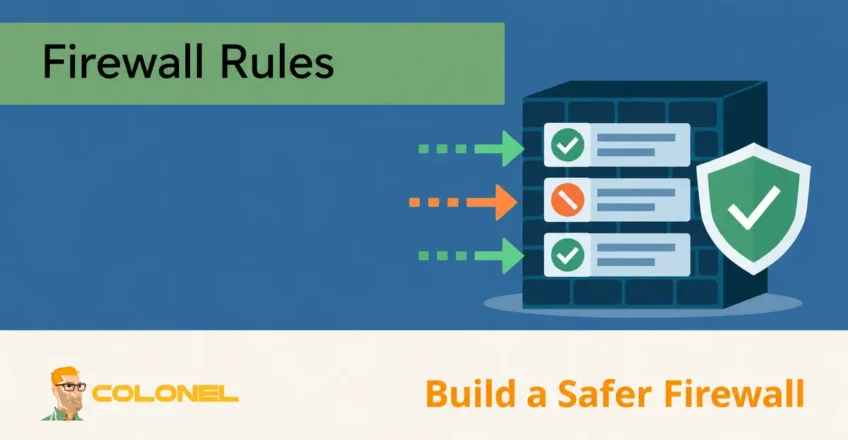
What Are Firewall Rules?
Firewall rules are security policies that determine which network traffic is allowed, blockiert, rejected, or logged when attempting to enter, leave, or traverse a network, Server, Anwendung, or cloud environment.
Each rule evaluates specific criteria such as:
- Source IP address
- Destination IP address
- Port number
- Protocol type
- Traffic direction
- Network zone
When traffic matches a rule, the firewall performs the action defined by that rule.
Firewall rules serve as one of the first layers of defense against unauthorized access, böswillige Aktivität, and accidental exposure of services.
Why Firewall Rules Matter
A firewall is only as effective as its rule set.
Poorly designed firewall rules can lead to:

WordPress-Webhosting
Beginnend mit €2.99/Monatlich
- Sicherheitslücken
- Service outages
- Unnecessary exposure
- Excessive logging
- Compliance failures
- Troubleshooting difficulties
Well-designed rules help organizations:
- Reduce attack surfaces
- Control network access
- Protect sensitive systems
- Support compliance requirements
- Improve visibility into network activity
Effective firewall management requires more than simply opening and closing ports. Rules must be documented, tested, reviewed, and maintained over time.
How Firewall Rules Work
Every packet entering or leaving a network is evaluated against firewall policies.
The firewall compares traffic attributes such as:
Source IP
Destination IP
Port
Protocol
Direction
against configured rules.
If a match is found, the firewall applies the configured action.

Günstiger VPS-Server
Beginnend mit €8/Monatlich
Zu den üblichen Aktionen gehören::
- Allow
- Leugnen
- Reject
- Log
Many firewall platforms process rules sequentially, which makes rule order extremely important.
The first matching rule is typically applied, and processing stops immediately afterward.
1. Start With a Default-Deny Policy
One of the most important firewall security principles is:
Default Deny
A default-deny policy blocks all traffic unless an explicit rule allows it.
Rather than trying to block every possible threat individually, administrators define only the traffic that is required.
Windows VPS-Hosting
Fernzugriff und vollständige Verwaltung
Vorteile
- Reduzierte Angriffsfläche
- Better security posture
- Fewer accidental exposures
- Simpler auditing
A typical firewall rule set ends with a final rule such as:
Deny All Traffic
which acts as a catch-all control.
2. Apply the Principle of Least Privilege
Every firewall rule should provide only the minimum level of access required.
This principle applies to:
- Benutzer
- Server
- Anwendungen
- Dienstleistungen
- Administrators
Good Example
Allow:
Source: Office VPN
Destination: Management Server
Port: 22
Protocol: TCP
Poor Example
Allow:
Any Source
Any Destination
Any Port
Broad access creates unnecessary risk and should be avoided whenever possible.
3. Understand Rule Order
Firewall rules are usually processed from top to bottom.
Because of this behavior, ordering directly impacts security.
Best Practices
- Place specific rules above general rules
- Keep deny-all rules at the bottom
- Remove duplicate rules
- Identify shadowed rules
A shadowed rule is a rule that never executes because an earlier rule already matches the traffic.
Regular audits help identify these issues.
4. Design Rules Around Network Zones
Firewall policies should be built around logical trust boundaries.
Beispiele hierfür sind:
- Internet
- DMZ
- Internal network
- Management network
- VPN network
- Database network
Instead of focusing only on ports, administrators should document how applications communicate between zones.
Example Flow
Internet
   ↓
Load Balancer
   ↓
Web Server
   ↓
Database Server
This approach simplifies management and improves security visibility.
5. Use Meaningful Names and Objects
Large firewall environments can contain hundreds or thousands of rules.
Using descriptive names improves maintainability.
Beispiele
web_servers
database_cluster
admin_vpn_users
trusted_office_ips
Zu den Vorteilen gehören::
- Faster troubleshooting
- Easier audits
- Reduced configuration errors
Administrators should be able to understand a rule’s purpose without additional investigation.
6. Restrict Inbound Traffic
Inbound traffic represents one of the most common attack vectors.
Only services that must be publicly accessible should be exposed.
Common Public Services
| Service | Hafen |
|---|---|
| HTTPS | 443 |
| HTTP | 80 |
| SMTP | 25 |
| DNS | 53 |
Administrative Services
Administrative services should generally be restricted.
Beispiele hierfür sind:
- SSH
- RDP
- Bedienfelder
- Datenbankverwaltungstools
These services should ideally be accessible only through:
- VPN connections
- Jump hosts
- Trusted IP addresses
7. Control Outbound Traffic
Many organizations focus exclusively on inbound filtering.
Outbound filtering is equally important.
Compromised systems often attempt to:
- Download malware
- Contact command-and-control servers
- Exfiltrate sensitive data
Outbound policies should restrict unnecessary communication and monitor suspicious behavior.
Vorteile
- Improved threat containment
- Reduced malware activity
- Better visibility
8. Implement Anti-Spoofing Protection
Attackers sometimes forge source addresses to impersonate trusted systems.
Anti-spoofing rules help prevent this behavior.
Common private IP ranges include:
10.0.0.0/8
172.16.0.0/12
192.168.0.0/16
Traffic arriving from the public Internet that claims to originate from these ranges should typically be blocked.
This reduces the risk of spoofing attacks and unauthorized access attempts.
9. Avoid Overly Broad Rules
Convenient rules often become security liabilities.
Risky Rule Examples
| Risky Rule | Better Alternative |
|---|---|
| Any → Any | Specific source and destination |
| Open SSH to Internet | VPN or trusted IPs |
| Allow all outbound traffic | Restrict to required services |
| Permanent temporary rule | Add expiration date |
| Duplicate rules | Consolidate and review |
Overly permissive rules frequently become the source of security incidents.
Services That Should Rarely Be Publicly Exposed
Some services should almost never be directly accessible from the Internet.
Beispiele hierfür sind:
- SSH
- RDP
- Redis
- Elasticsearch
- OpenSearch
- Kubernetes API
- Docker daemon
- phpMyAdmin
- Webmin
- Jenkins
- Database ports
- Hosting control panels
Where remote access is required, VPN-based access is generally safer.
10. Document Every Firewall Rule
Every rule should have a clear business purpose.
Documentation should include:
- Rule owner
- Business justification
- Creation date
- Review date
- Change request reference
- Verfallsdatum (if temporary)
Proper documentation simplifies:
- Audits
- Reaktion auf Vorfälle
- Fehlerbehebung
- Compliance reviews
11. Establish Formal Change Management
Firewall changes can create downtime if implemented incorrectly.
A structured change process should include:
Before Changes
- Business justification
- Risikobewertung
- Approval process
- Rollback plan
During Changes
- Controlled deployment
- Validation testing
After Changes
- Verification
- Documentation updates
Formal processes reduce operational risk and improve consistency.
12. Test Firewall Changes Thoroughly
Testing is essential before and after modifying firewall policies.
Validation Checklist
- Confirm allowed services function correctly
- Confirm blocked traffic remains blocked
- Verify administrator access
- Review logging behavior
- Validate application functionality
- Test rollback procedures
Testing should occur from actual source networks whenever possible.
13. Log Important Events
Logging provides visibility into network activity.
Useful events include:
- Denied connections
- Administrative access attempts
- Policy changes
- Critical service activity
Logging helps support:
- Security investigations
- Compliance reporting
- Operational troubleshooting
Jedoch, excessive logging can generate noise and make analysis more difficult.
Balance is important.
14. Centralize Firewall Logs
Centralized logging improves visibility across infrastructure.
Logs should ideally be forwarded to:
- SIEM platforms
- Central log servers
- Überwachung systems
Zu den Vorteilen gehören::
- Correlation across systems
- Long-term retention
- Alert generation
- Faster investigations
Centralized logging also supports many regulatory requirements.
15. Secure Firewall Administration
The firewall itself must be protected.
Recommended Measures
- Disable Telnet
- Disable insecure HTTP administration
- Use HTTPS
- Use SSH
- Require MFA
- Restrict administrator IPs
- Apply role-based access controls
Administrative access should be limited to trusted networks whenever possible.
Firmware and software updates should also be applied regularly.
16. Understand Multi-Layer Firewall Security
Modern environments often contain multiple firewall layers.
Beispiele hierfür sind:
Network Firewalls
Protect entire networks.
Server Firewalls
Protect individual systems.
Cloud Firewalls
Control access to cloud workloads.
Webanwendungs-Firewalls (WAF)
Protect web applications from application-layer attacks.
Control Panel Firewalls
Restrict access to hosting management services.
Administrators should understand which layer they are modifying before making changes.
Firewall Rule Review Schedule
Firewall rules require ongoing maintenance.
Täglich
Rezension:
- Sicherheitswarnungen
- Failed access attempts
- Critical service logs
Wöchentlich
Rezension:
- New rule changes
- Temporary access requests
- Unusual outbound activity
Monatlich
Rezension:
- Unused rules
- Duplicate rules
- Broad permissions
- Expired rules
Quarterly
Perform:
- Full rule audits
- Owner verification
- Compliance validation
- Rule organization reviews
After Major Changes
Rezension:
- New applications
- Infrastructure migrations
- IP changes
- Policy updates
Regular reviews help prevent rule sprawl and reduce long-term risk.
Common Firewall Mistakes to Avoid
Organizations frequently encounter similar firewall issues.
Common Mistakes
- Using Any-Any rules
- Leaving temporary rules indefinitely
- Failing to document changes
- Ignoring outbound filtering
- Neglecting rule reviews
- Exposing administrative services publicly
- Not testing rule changes
Avoiding these mistakes significantly improves security posture and operational reliability.
Building a Secure Firewall Strategy
Effective firewall security requires more than simply blocking traffic. A strong firewall strategy combines default-deny policies, least-privilege access, clear documentation, structured change management, Protokollierung, Überwachung, and regular audits. By implementing layered controls and continuously reviewing firewall policies, organizations can significantly reduce exposure to cyber threats while ensuring legitimate business traffic continues to flow safely and efficiently.
Well-maintained firewall rules remain one of the most effective security controls available for protecting servers, Anwendungen, Cloud-Infrastruktur, and entire networks from unauthorized access and malicious activity.