
What Is Ansible?
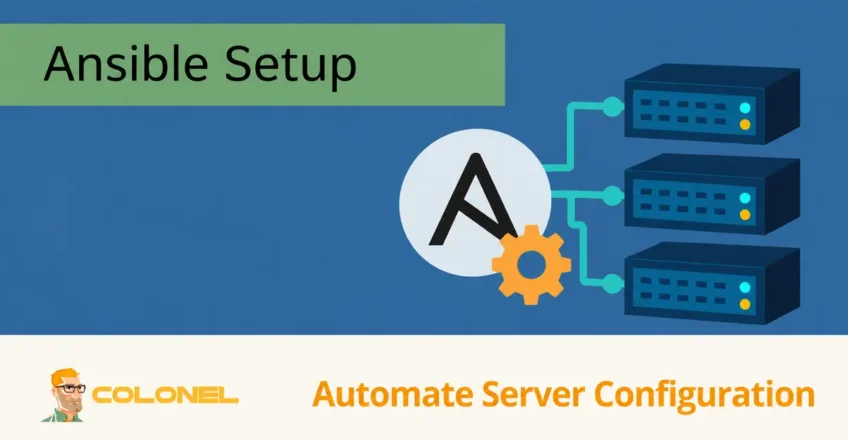
Ansible is an open-source automation platform designed to simplify infrastructure management, application deployment, configuration management, and operational tasks. It is widely used by system administrators, DevOps-ingenieurs, and IT teams to automate repetitive processes and manage large-scale environments more efficiently.
As an Infrastructure as Code (IaC) solution, Ansible allows administrators to define infrastructure and configuration requirements in code, making deployments more consistent, repeatable, and easier to maintain.
Ansible operates from a central control node and communicates with managed systems over standard protocols such as SSH. Unlike many automation tools, Ansible does not require agents to be installed on remote systems, reducing complexity and maintenance overhead.
How Ansible Works
Ansible uses a controller-managed architecture.
Control Node
The control node is the system where Ansible is installed and from which automation tasks are executed.
The control node:

WordPress-webhosting
Vanaf $ 3,99/maandelijks
- Stores playbooks
- Executes automation tasks
- Maintains inventory files
- Connects to managed hosts
Managed Nodes
Managed nodes are the servers or devices controlled by Ansible.
These systems can include:
- Linux servers
- Windows servers
- Cloud instances
- Containers
- Network devices
Ansible typically connects to Linux systems through SSH and to Windows systems through supported remote management protocols.
Playbooks
The core automation mechanism in Ansible is the playbook.
Playbooks are YAML-based files that define:
- System configurations
- Package installations
- Service management
- Deployment tasks
- Security configurations
A playbook acts as a reusable automation blueprint that can be executed repeatedly across multiple systems.

Goedkope VPS-server
Vanaf $ 2,99/maandelijks
Benefits of Ansible
Ansible has become one of the most popular automation tools because of its simplicity and flexibility.
Agentless Architecture
Unlike many configuration management platforms, Ansible does not require a client agent on managed systems.
Voordelen zijn onder meer:
- Simplified maintenance
- Reduced resource consumption
- Easier upgrades
- Snellere implementatie
Easy to Learn
Ansible uses YAML syntax, which is relatively easy to read and understand.
Even administrators with limited programming experience can begin automating tasks quickly.
Cross-Platform Support
Ansible supports:
Windows VPS-hosting
Toegang op afstand en volledig beheer
- Ubuntu
- Debian
- AlmaLinux
- Rotsachtige Linux
- CentOS
- Red Hat Enterprise Linux
- Windows-server
- Cloudplatforms
This flexibility makes it suitable for heterogeneous environments.
Infrastructure as Code
Infrastructure definitions can be stored in version control systems, allowing teams to:
- Track changes
- Roll back configurations
- Collaborate more effectively
- Standardize deployments
Limitations of Ansible
Although Ansible is powerful, it is not without limitations.
SSH Dependency
Most Linux automation relies on SSH connectivity.
If a connection is interrupted during execution, a system may be left in a partially configured state.
Performance Considerations
Large environments containing hundreds or thousands of hosts may require optimization to achieve maximum performance.
Common optimization techniques include:
- Parallel execution tuning
- Inventory optimization
- Fact caching
- SSH multiplexing
Ansible Requirements
Before installing Ansible, verify that the following requirements are met.
Ubuntu Requirements
- Ubuntu 18.04 of nieuwer
- Sudo or root access
- Internet connectivity
- Python 2.7 or Python 3.5+
AlmaLinux Requirements
- AlmaLinux 8 of nieuwer
- Sudo or root access
- Internet connectivity
- Python 2.7 or Python 3.5+
Windows Requirements
- Windows-server 2012 of nieuwer
- Administrative privileges
- PowerShell 3.0+
- Python 3.5+
- Internet connectivity
Installing Ansible on Ubuntu
Stap 1: Connect to the Server
Connect to your Ubuntu system using SSH.
ssh username@server-ip
Stap 2: Update Package Lists
Update package information before installing new software.
sudo apt update
Stap 3: Install Repository Utilities
sudo apt install software-properties-common -y
This package provides repository management utilities required for the Ansible repository.
Stap 4: Add the Official Ansible Repository
sudo apt-add-repository --yes --update ppa:ansible/ansible
This adds the Ansible package repository to the system.
Stap 5: Install Ansible
sudo apt install ansible -y
Ubuntu will download and install Ansible along with all required dependencies.
Stap 6: Verify Installation
Confirm that Ansible is installed correctly.
ansible --version
You should see version information and installation details.
Installing Ansible on AlmaLinux
Stap 1: Update the System
Begin by updating all installed packages.
sudo dnf update -y
Stap 2: Install EPEL Repository
Ansible packages are available through the Extra Packages for Enterprise Linux repository.
sudo dnf install epel-release -y
Stap 3: Install Ansible
sudo dnf install ansible -y
This installs Ansible and all required dependencies.
Stap 4: Verify Installation
ansible --version
If installation was successful, version information will be displayed.
Installing Ansible on Windows
Although Ansible itself is primarily designed to run from Linux control nodes, it can also be installed in certain Windows environments.
Stap 1: Install Python
Download and install the latest Python release from the official Python website.
During installation:
Add Python to PATH
should be enabled.
Stap 2: Install PIP
Open PowerShell as Administrator and run:
python -m ensurepip --default-pip
Stap 3: Install Ansible
Install Ansible using PIP:
pip install ansible
Stap 4: Verify Installation
ansible --version
The command should return version information.
Configuring Ansible
Na installatie, several components must be configured before managing remote systems.
Inventory Files
Ansible uses inventory files to define managed systems.
Example inventory:
[webservers]
192.168.1.10
192.168.1.11

[databases]
192.168.1.20
Hosts can be grouped according to role or purpose.
Testing Connectivity
Use the ping module to verify communication.
ansible all -m ping
Successful output confirms that Ansible can communicate with the managed hosts.
Configuring Windows Hosts
When managing Windows systems, additional configuration is required.
Create an Inventory Group
Voorbeeld:
[windows]
192.168.1.100
192.168.1.101
Install OpenSSH
Install OpenSSH Server on the Windows hosts to allow remote connections.
Configure SSH Access
Edit the SSH configuration file and ensure listening addresses are enabled.
Voorbeeld:
ListenAddress 0.0.0.0
Restart the OpenSSH service after making changes.
Test Windows Connectivity
Loop:
ansible windows -i inventory -m win_ping
Successful responses confirm connectivity.
Common Ansible Commands
Display Version Information
ansible --version
Test All Hosts
ansible all -m ping
Display Inventory Hosts
ansible-inventory --list
Run a Command on All Hosts
ansible all -a "hostname"
Execute a Playbook
ansible-playbook site.yml
These commands form the foundation of daily Ansible administration.
Best Practices for Ansible Deployments
Use Version Control
Store:
- Playbooks
- Inventory files
- Configuration templates
inside Git repositories.
Organize Inventories
Separate hosts into logical groups to simplify management.
Use Variables
Avoid hardcoding values whenever possible.
Variables improve flexibility and reusability.
Test Before Production Deployment
Always validate playbooks in staging environments before applying them to production systems.
Veilige SSH-toegang
Gebruik:
- SSH keys
- Restricted accounts
- Firewall controls
to protect managed infrastructure.
Keep Ansible Updated
Regular updates provide:
- Bug fixes
- Security patches
- New modules
- Improved compatibility
Automating Infrastructure with Ansible
Ansible provides a powerful and efficient way to automate infrastructure management across Linux, Ramen, wolk, and hybrid environments. Its agentless architecture, straightforward syntax, and extensive module ecosystem make it one of the most widely adopted Infrastructure as Code platforms available today.
By deploying Ansible correctly and following automation best practices, organizations can reduce manual administration, improve consistency, accelerate deployments, and manage complex infrastructure with greater confidence and reliability.