
Why High Availability Matters
Modern websites, SaaS platforms, APIs, and business applications cannot afford prolonged downtime. A single server failure can result in lost revenue, reduced customer trust, and interrupted services.
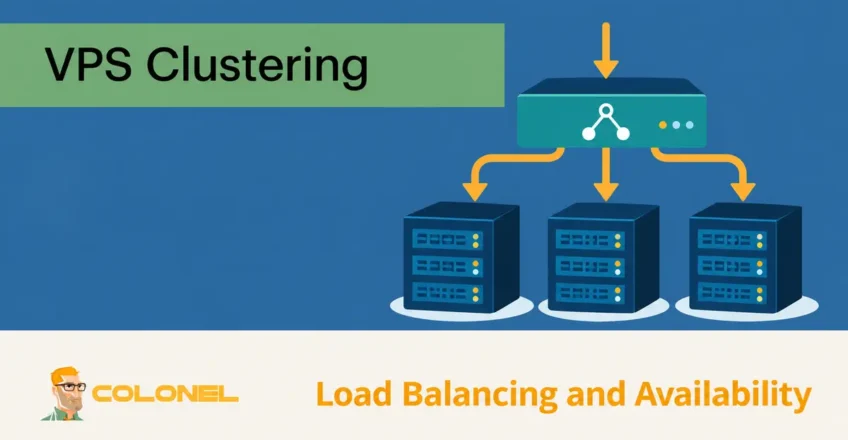
A carefully designed VPS cluster can reduce single points of failure by distributing workloads across multiple virtual servers. Combined with load balancing, this architecture improves reliability, scalability, and overall performance while ensuring services remain available even when individual nodes experience problems.
Understanding VPS Clustering
A VPS cluster is a group of virtual private servers working together as a unified platform. Instead of relying on a single server, workloads are distributed across multiple nodes that can share traffic, resources, and responsibilities.
The foundation of VPS clustering consists of three key technologies:
Virtualization
Virtualization allows multiple isolated virtual machines to operate on a single physical server. Each VPS functions independently with its own operating system, applications, and allocated resources.
Hypervisors
A hypervisor manages virtual machines and allocates hardware resources such as:

WordPress Web Hosting
Starting From $3.99/Monthly
- CPU
- Memory
- Storage
- Netwerkbandbreedte
Popular hypervisors include:
- KVM
- VMware
- Hyper-V
Resource Allocation
Proper resource allocation ensures each VPS node has sufficient capacity to handle traffic spikes and failover events without affecting overall cluster performance.
Benefits of VPS Clustering
Building a clustered VPS environment provides several advantages:
Improved Uptime
If one server fails, other nodes continue serving traffic without disrupting users.
Better Performance
Traffic is distributed across multiple servers instead of overloading a single machine.
Easier Scalability
Additional VPS nodes can be added as traffic grows.

Cheap VPS Server
Starting From $2.99/Monthly
Enhanced Reliability
Redundant systems reduce the impact of hardware failures, software crashes, and maintenance events.
Business Continuity
Applications remain available even during unexpected outages.
Core Components of a Highly Available VPS Cluster
A reliable VPS cluster typically includes:
- Multiple VPS nodes
- Load balancer
- Shared storage solution
- DNS configuration
- Monitoring system
- Backup infrastructure
- Failover mechanisms
Each component plays an important role in maintaining service availability.
Step 1: Select a Reliable VPS Provider
The success of any cluster begins with quality infrastructure.
When evaluating VPS providers, consider:

Windows VPS Hosting
Remote Access & Full Admin
Uptime-garanties
Choose providers offering at least 99.99% uptime.
Fast Storage
NVMe SSD storage delivers significantly better performance than traditional hard drives.
Netwerkkwaliteit
Low-latency network connectivity improves application responsiveness.
Security Features
Look for:
- DDoS protection
- Firewalls
- Network isolation
- Security monitoring
Scalability
Resources should be easy to upgrade as demand increases.
Step 2: Deploy Multiple VPS Nodes
Place nodes on independent physical hosts or failure domains where the provider supports it. A lone load balancer, database or NAS remains a single point of failure. Use redundant ingress and an explicit database failover design with quorum or fencing to avoid split-brain. The table below is a component sketch, not a complete highly available deployment.
Create at least two VPS servers for redundancy.
A typical entry-level cluster may include:
| Server | Purpose |
|---|---|
| VPS-1 | Application Node |
| VPS-2 | Application Node |
| VPS-3 | Database or Backup Node |
| Load Balancer | Traffic Distribution |
For larger deployments, additional application nodes can be added.
All servers should use:
- The same operating system
- Identical application versions
- Matching configurations
Consistency simplifies management and failover operations.
Step 3: Install a Load Balancer
A load balancer sits between visitors and your VPS nodes.
Its responsibilities include:
- Distributing incoming traffic
- Monitoring server health
- Removing failed nodes
- Routing users to healthy servers
Popular load balancing solutions include:
HAProxy
Bekend om:
- High performance
- Extensive configuration options
- Enterprise-level reliability
NGINX
Offers:
- Reverse proxy capabilities
- Load balancing
- Web server functionality
Cloud-Based Load Balancers
Services such as Cloudflare can provide:
- Global traffic distribution
- DDoS protection
- Additional caching benefits
Step 4: Configure Traffic Distribution
Several balancing methods are available.
Round Robin
Traffic is distributed equally across all nodes.
Best for:
- General websites
- Balanced workloads
Least Connections
Traffic is sent to the server with the fewest active connections.
Best for:
- Dynamic applications
- Variable workloads
IP Hash
Users consistently connect to the same server based on their IP address.
Best for:
- Session-based applications
Step 5: Enable Health Checks
Health checks ensure traffic only reaches functioning servers.
The load balancer continuously verifies:
- HTTP responses
- Application availability
- Server responsiveness
- Resource status
If a node becomes unavailable, traffic is automatically redirected to healthy servers.
This process minimizes downtime and improves user experience.
Step 6: Configure Shared Storage
Decide how uploads, sessions and database writes remain available during failure. Replication can lag and can replicate deletion or corruption; it is not a backup. Test failover under load and measure actual data loss and recovery time.
Many clustered environments require shared storage to keep data synchronized.
Common options include:
Network Attached Storage (NAS)
A centralized storage device accessible by all nodes.
Distributed Storage Systems
Examples include:
- Ceph
- GlusterFS
Database Replication
Database servers can replicate data between nodes to maintain consistency.
Shared storage ensures all nodes can access the same files and application data.
Step 7: Configureer DNS correct
DNS records should direct visitors to the load balancer rather than individual VPS nodes.
Typical setup:
- A Record → Load Balancer IP
- Additional failover records if required
For improved resilience, consider using managed DNS providers with automatic failover capabilities.
Step 8: Implement Monitoring
Continuous monitoring is essential for maintaining availability.
Monitor:
- CPU usage
- RAM utilization
- Disk space
- Network traffic
- Reactietijden
- Application status
Populaire monitoringtools zijn onder meer:
- Netwerkgegevens
- Zabbix
- Prometheus
- Grafana
- Uptime Kuma
Early detection often prevents larger outages.
Active-Active vs Active-Standby Clusters
There are two common clustering approaches.
Active-Active
All servers actively process traffic.
Advantages:
- Maximum resource utilization
- Better scalability
- Hogere prestaties
Disadvantages:
- More complex configuration
Active-Standby
One server handles traffic while another remains ready for failover.
Advantages:
- Simpler management
- Easier troubleshooting
Disadvantages:
- Unused standby resources
The best choice depends on workload requirements and operational goals.
Security Best Practices
A highly available cluster should also be secure.
Harden SSH Access
- Disable root login
- Use SSH keys
- Restrict access by IP
Enable Firewalls
Only allow required ports.
Keep Systems Updated
Regularly patch:
- Operating systems
- Web servers
- Databases
- Applications
Deploy DDoS Protection
Traffic filtering helps protect services during attacks.
Use SSL Certificates
Encrypt traffic between users and applications.
Back-up en noodherstel
High availability is not a substitute for backups.
Implement:
- Daily backups
- Offsite backup storage
- Database backups
- Configuration backups
Regularly test restoration procedures to ensure recovery is possible when needed.
When to Scale the Cluster
Consider adding additional nodes when:
- CPU usage remains consistently high
- Memory usage approaches limits
- Traffic growth affects performance
- Failover capacity becomes insufficient
Horizontal scaling allows clusters to grow without significant downtime.
Common Mistakes to Avoid
Avoid these common errors:
- Using only one VPS node
- Skipping health checks
- Ignoring monitoring
- Storing backups locally only
- Using outdated software
- Overlooking security hardening
- Not testing failover procedures
Final Thoughts
A highly available VPS cluster with load balancing provides a strong foundation for modern applications. By combining multiple VPS nodes, intelligent traffic distribution, continuous monitoring, and proper failover mechanisms, organizations can achieve significantly higher uptime and performance.
Whether you are hosting business applications, eCommerce platforms, SaaS products, or high-traffic websites, a well-designed VPS cluster ensures your infrastructure remains responsive, scalable, and resilient as your organization grows.
