


Securing Clawdbot on a VPS requires eliminating public exposure, enforcing identity-based access, and hardening the underlying server so that the gateway remains private, authenticated, and resilient against automated attacks. This Colonel guide explains how to secure Clawdbot on a VPS using Cloudflare Tunnel, Cloudflare Access, and SSH hardening, with a practical security model suitable for real-world deployment.
Preparing Your Environment Before Configuration
Before securing Clawdbot on a VPS, several prerequisites must be in place to ensure a stable and maintainable setup. Skipping these fundamentals often leads to fragile deployments that break during updates or reboots.
At a minimum, your domain must be managed by Cloudflare so that DNS routing and Access policies can be applied. The VPS should run a modern Linux distribution such as Ubuntu LTS to ensure long-term compatibility with Cloudflare tooling and Clawdbot dependencies. Clawdbot itself should already be running and reachable locally, bound only to 127.0.0.1.
It is also important to plan for operational continuity. Running Cloudflare Tunnel as a system service ensures that secure access persists across reboots and does not depend on interactive sessions.
Securing ClawdBot Gateway with Cloudflare Tunnel (Stap voor stap)
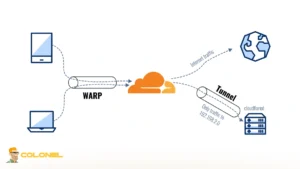
Cloudflare Tunnel creates an outbound-only, encrypted connection from your local machine to Cloudflare’s edge network. Instead of exposing port 18789 to the internet, Cloudflare acts as an access broker and reverse proxy.
The ClawdBot Gateway remains bound to localhost, while Cloudflare Tunnel securely forwards authorized traffic to it. No inbound ports are opened, eliminating direct attack vectors. Core security advantages include:

WordPress-webhosting
Vanaf $ 3,99/maandelijks
- Zero exposed ports
- Built-in DDoS mitigation
- Identity-aware access policies
- TLS encryption by default
Now let’s take a look at securing Clawdbot on a VPS steps.
Stap 1: Install cloudflared
Cloudflare Tunnel is implemented through the cloudflared daemon, which establishes an outbound, encrypted connection from your local machine to Cloudflare’s edge network. Because this connection is outbound-only, no inbound ports need to be opened on your server or workstation.
Installation varies by operating system and should always be performed using an official package source to avoid tampered binaries.
- Linux (Debian / Ubuntu):
sudo apt update
sudo apt install cloudflared
- macOS (Zelf brouwen):
brew install cloudflare/cloudflare/cloudflared
- Ramen (PowerShell):
winget install Cloudflare.cloudflared
Na installatie, always verify that the binary is available in your PATH and reports a valid version:
cloudflared --version
If this command fails, do not proceed. The tunnel cannot function without a correctly installed daemon.

Goedkope VPS-server
Vanaf $ 2,99/maandelijks
Stap 2: Authenticate cloudflared with Cloudflare
Authentication binds the local cloudflared instance to your Cloudflare account and authorizes it to create and manage tunnels. This step is mandatory and must be completed once per machine. Run the following command:
cloudflared tunnel login
This command opens a browser window where Cloudflare asks you to authenticate and select a domain that already exists in your Cloudflare account. No DNS changes are made at this stage.
Eenmaal voltooid, cloudflared stores an authentication certificate locally, usually under:
~/.cloudflared/cert.pem
This certificate is sensitive. Anyone with access to it can create tunnels under your account.
Stap 3: Create a Named Tunnel
A named tunnel creates a persistent identity for the connection between your machine and Cloudflare. This allows the tunnel to survive restarts and system reboots. Create the tunnel:
cloudflared tunnel create clawdbot-gateway

Windows VPS-hosting
Remote Access & Full Admin
The output includes:
- A Tunnel UUID
- A credentials file, typically stored at:
~/.cloudflared/<TUNNEL-UUID>.json
This credentials file is required to run the tunnel. Do not rename or delete it, and do not commit it to version control.
Stap 4: Configure Tunnel Routing
The tunnel must know how to route incoming HTTPS requests from Cloudflare to your local ClawdBot Gateway. Create the configuration file:
nano ~/.cloudflared/config.yml
Here’s a configuration example:
tunnel: <TUNNEL-UUID>
credentials-file: /home/user/.cloudflared/<TUNNEL-UUID>.json

ingress:
  - hostname: clawdbot.example.com
service: http://localhost:18789
  - service: http_status:404
Keep these points in mind:
- hostname must exist as a DNS record in Cloudflare
- Traffic is terminated at Cloudflare and forwarded internally to localhost
- The final http_status:404 rule prevents accidental exposure of undefined routes
At this point, no service is exposed yet. The configuration only defines routing logic.
Stap 5: Run ClawdBot Securely on Localhost
This is the most critical security step in the entire process. The ClawdBot Gateway must listen only on the loopback interface, never on a public IP. Otherwise, the tunnel becomes pointless.
Start the Gateway like this:
clawdbot gateway --bind 127.0.0.1 --port 18789
By binding to 127.0.0.1, the Gateway becomes unreachable from the network, even if firewall rules are misconfigured. Only the Cloudflare Tunnel can reach it.
Opmerking: If you see 0.0.0.0 here, stop immediately and fix it.
Stap 6: Start the Cloudflare Tunnel
With ClawdBot running locally and the configuration in place, you can now start the tunnel.
cloudflared tunnel run clawdbot-gateway
Once running:
- No ports are open on your machine
- All access flows through Cloudflare’s edge
- The Gateway is reachable only via the configured hostname
For production use, this command should be managed by a process supervisor such as systemd of pm2 to ensure automatic restarts.
Stap 7: Apply Cloudflare Access Policies (Strongly Recommended)
Standaard, Cloudflare Tunnel only hides your service. It does not authenticate users. Cloudflare Access adds an identity layer in front of the tunnel. Common policy options include:
- Email-based authentication (Googlen, GitHub, OTP)
- IP allowlists for trusted locations
- Device posture checks for managed devices
Once Access is enabled, even if someone discovers the hostname, they cannot reach the Gateway without passing identity verification.
This transforms ClawdBot from an exposed local service into a zero-trust protected endpoint.
Hardening SSH as the Final Security Layer
Even with Cloudflare protecting the application layer, the VPS itself must be secured to prevent infrastructure-level compromise. SSH hardening is critical because VPS servers are continuously targeted by automated login attempts.
- Disabling root login and password-based authentication ensures that brute-force attacks cannot succeed.
- Restricting SSH access to key-based authentication dramatically reduces the attack surface.
- In aanvulling, enabling a firewall such as UFW ensures that only explicitly allowed ports are reachable.
For environments where IP addresses change frequently, tools like fail2ban provide automatic banning of repeated failed login attempts. This reduces noise in logs and prevents sustained attacks from degrading system performance when securing Clawdbot on a VPS.

Why Exposed ClawdBot Gateways Are a Serious Threat?
Exposing port 18789 directly to the public internet introduces a critical attack surface. Internet-wide scanners such as Shodan actively index open ports, making ClawdBot instances easily discoverable within minutes of exposure. The most common security risks which makes securing Clawdbot on a VPS necessary include:
- Unauthorized Gateway Access: Any third party can connect and send commands to the bot without restriction.
- Conversation Data Leakage: Private conversations across connected messengers may be intercepted or logged.
- API Key Exposure: Claude API keys loaded into the runtime environment can be extracted or abused.
- Bot Hijacking: Attackers can redirect the bot, impersonate it, or use it to spread malicious content.
These attacks often occur because users prioritize convenience and expose the Gateway using the following pattern:
clawdbot gateway --bind 0.0.0.0 --port 18789
Without a firewall, reverse proxy, or authentication layer, this configuration leaves the system completely unprotected.
Are Traditional Firewalls Enough?
While firewall rules can limit access by IP, they do not scale well for dynamic environments or mobile access. Managing allowlists manually becomes error-prone and does not provide identity-based access control. Aanvullend, firewalls do not protect against protocol-level abuse or provide application-layer visibility.
This limitation is the primary reason Cloudflare Tunnel is a more suitable solution for securing ClawdBot. Cloudflare documentation emphasizes the importance of private connectivity and identity-based access for self-hosted services:
“Cloudflare Tunnel allows you to connect applications securely to Cloudflare without exposing them directly to the Internet.”
Why is the Cloudflare Tunnel the Right Foundation?
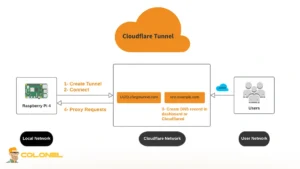
Cloudflare Tunnel is the correct primitive for securing Clawdbot on a VPS because it reverses the traditional exposure model. Instead of opening inbound ports and attempting to defend them, the VPS establishes an outbound connection to Cloudflare, keeping the gateway private.
With Cloudflare Tunnel, the Clawdbot dashboard listens only on localhost, typically 127.0.0.1:18789. Traffic reaches it through an authenticated Cloudflare edge, not through a publicly reachable IP and port. This makes the VPS IP far less valuable to attackers and removes it from common scanning workflows.
Ook, Cloudflare Tunnel handles HTTPS termination and supports WebSockets cleanly, which is essential for Clawdbot’s gateway behavior. This allows secure, encrypted communication without exposing TLS configuration complexity on the VPS itself.
Is Cloudflare Tunnel Alone Enough?
Although Cloudflare Tunnel eliminates public exposure, it does not authenticate users by itself. Without additional controls, anyone who knows the dashboard URL could still attempt to access the service, even though they cannot bypass Cloudflare.
This is why Cloudflare Access is a mandatory component when securing Clawdbot on a VPS. Tunnel provides private connectivity, but Access enforces identity. Without Access, shared secrets such as tokens become the primary gate, which is risky due to leakage and reuse.
Benefits of Using Cloudflare Tunnel for ClawdBot
Cloudflare Tunnel provides several security and operational advantages that align well with ClawdBot’s architecture. The most important pros of securing Clawdbot on a VPS are:
- No Public Port Exposure
The Gateway remains bound to localhost, eliminating direct access to port 18789 from the internet. - Automatic HTTPS and TLS Handling
Cloudflare manages certificates and encryption without manual configuration. - Ingebouwde DDoS-bescherming
Traffic is filtered and rate-limited before it ever reaches the Gateway. - Granular Access Control
When combined with Cloudflare Access, the dashboard can be restricted by identity, location, and authentication strength. - Zero Cost for Core Security Features
Cloudflare Tunnel and basic Access policies are available without paid plans, making secure deployment accessible.

How Traffic Flows in a Secure Clawdbot Setup
In a properly secured configuration, traffic flow changes fundamentally compared to a direct exposure model. Instead of the browser connecting straight to the VPS, all access passes through Cloudflare’s infrastructure. The effective flow when securing Clawdbot on a VPS becomes:
Browser → Cloudflare Access → Cloudflare Tunnel → Clawdbot gateway on localhost
This architecture ensures that unauthenticated requests never reach the VPS. Identity checks, TLS termination, and policy enforcement occur before any traffic is forwarded to Clawdbot. From the gateway’s perspective, it is serving a trusted internal client rather than the open internet.
Securing ClawdBot on a VPS the Right Way
Securing ClawdBot on a VPS requires more than hiding a port or adding basic firewall rules. Because the ClawdBot Gateway was designed for local use and lacks native authentication, exposing it directly to the internet creates an immediate and critical security risk.
By combining Cloudflare Tunnel with Cloudflare Access, the exposure model is fundamentally reversed. When implemented correctly and combined with basic VPS hardening at the SSH level, Cloudflare Tunnel provides a robust foundation for running ClawdBot securely.
Veelgestelde vragen (Veelgestelde vragen)
Is it safe to expose ClawdBot directly to the internet?
Nee. The ClawdBot Gateway has no built-in authentication, which means anyone who discovers the open port can connect, access conversations, or hijack the bot.
Does Cloudflare Tunnel replace the need for a firewall?
Cloudflare Tunnel significantly reduces reliance on firewalls by removing public port exposure, but basic firewall rules are still recommended for infrastructure hardening.
Is Cloudflare Access mandatory when using Cloudflare Tunnel?
Yes for production use. Tunnel hides the service, but Access enforces identity and authentication, which is essential for preventing unauthorized usage.
Can this setup work on a VPS without a static IP?
Ja. Cloudflare Tunnel works entirely over outbound connections and does not require a static IP or inbound connectivity.
Does Cloudflare Tunnel support WebSockets used by ClawdBot?
Ja. Cloudflare Tunnel fully supports WebSocket traffic, which is required for ClawdBot Gateway communication.