
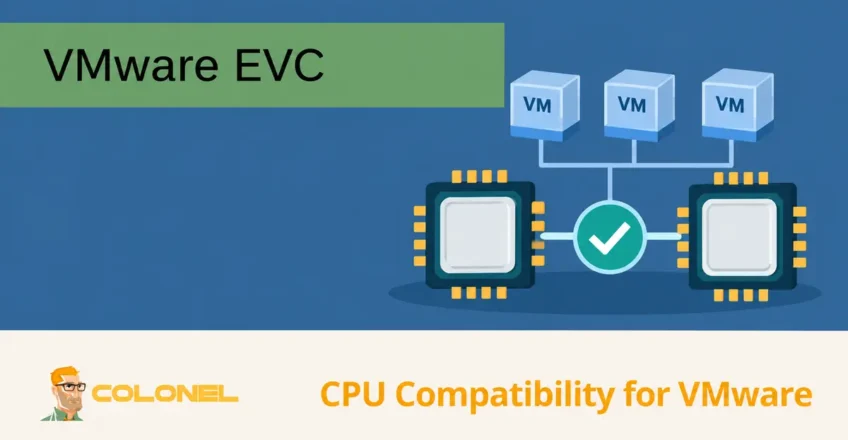
Understanding VMware Enhanced vMotion Compatibility (EVC)
VMware Enhanced vMotion Compatibility (EVC) is a feature within VMware vSphere that allows virtual machines (VMs) to move between ESXi hosts with different CPU generations without requiring the virtual machines to be powered off.
In many virtualized environments, clusters often contain servers with processors from different generations. Normaal gesproken, this can cause CPU compatibility issues during vMotion operations because virtual machines may rely on CPU instructions that are not available on every host in the cluster.
EVC solves this challenge by presenting a consistent CPU feature set to all virtual machines within a cluster. This allows administrators to perform live migrations between compatible hosts while maintaining application availability and minimizing operational disruption.
Why CPU Compatibility Matters
Virtual machine migration depends on CPU compatibility between source and destination hosts.
Problems can occur when:
- New servers are introduced into an existing cluster
- Hosts use different CPU generations
- Hardware refresh projects are underway
- Clusters contain mixed processor models
Without EVC, administrators may encounter errors when attempting to perform vMotion operations between hosts with different CPU capabilities.

WordPress-webhosting
Vanaf €2.99/Maandelijks
Common issues include:
- Failed migrations
- Compatibility warnings
- Increased maintenance complexity
- Reduced workload mobility
EVC helps eliminate these problems by creating a standardized CPU presentation across the cluster.
How VMware EVC Works
EVC uses CPU identification information to determine the capabilities available across all hosts within a cluster.
VMware analyzes processor features using the CPUID instruction, which provides information about supported CPU instructions and capabilities.
Once EVC is enabled:
- VMware determines the selected EVC baseline.
- CPU features that exceed that baseline are hidden from virtual machines.
- All VMs see the same virtual CPU feature set regardless of the physical host they run on.
By masking newer CPU instructions when necessary, VMware ensures that workloads remain compatible throughout the cluster.

Goedkope VPS-server
Vanaf €8/Maandelijks
This allows virtual machines to move freely between hosts without encountering CPU-related compatibility errors.
CPU Baselines and Feature Masking
EVC does not change the physical processor.
In plaats van, it controls which CPU features are visible to guest operating systems.
Bijvoorbeeld:
Host A = Intel Xeon Generation 1
Host B = Intel Xeon Generation 3
Without EVC:
VM running on Host B may use CPU features
that do not exist on Host A.
With EVC enabled:
Windows VPS-hosting
Toegang op afstand en volledig beheer
Both hosts expose only the CPU features
supported by the selected EVC baseline.
Als resultaat, virtual machines remain portable between hosts.
Intel and AMD Support
VMware EVC supports both major processor vendors:
- Intel
- AMD
Echter, EVC does not provide compatibility between Intel and AMD processors within the same cluster.
Clusters should contain processors from the same vendor family when EVC is used.
Administrators can select an EVC baseline appropriate for the CPU family deployed within the environment.
Benefits of VMware EVC
Simplified Maintenance
One of the biggest advantages of EVC is maintenance flexibility.
Administrators can:
- Patch ESXi hosts
- Upgrade firmware
- Replace hardware
- Perform troubleshooting
while migrating virtual machines to other hosts using vMotion.
Applications remain online throughout the process.
Easier Hardware Refresh Projects
Data centers frequently introduce newer server hardware.
Without EVC, newer processors may create compatibility issues with older hosts.
EVC enables organizations to:
- Add new servers gradually
- Maintain mixed-generation clusters
- Reduce migration complexity
- Extend hardware lifecycle planning
Improved Operational Flexibility
When EVC is configured correctly, workloads can move freely across the cluster.
Voordelen zijn onder meer:
- Better resource balancing
- Faster incident response
- Easier workload relocation
- Greater operational agility
Transparent to Guest Operating Systems
EVC operates entirely at the virtualization layer.
Guest operating systems require:
- No modifications
- No drivers
- No configuration changes
Applications continue running normally without awareness of EVC.
Consistent VM Deployment
New virtual machines automatically inherit the cluster’s EVC configuration.
This ensures consistent CPU compatibility across all workloads.
How to Enable VMware EVC
Enabling EVC is typically straightforward when performed during cluster creation.
Stap 1: Verify Hardware Compatibility
Confirm that all hosts support the desired EVC baseline.
Beoordeling:
- CPU vendor
- CPU-generatie
- VMware compatibility documentation
Stap 2: Create a Cluster
Within vCenter:
Datacenter
  → New Cluster
Create a cluster that will use EVC.
Stap 3: Add ESXi Hosts
Add all participating hosts to the cluster.
Stap 4: Review Existing Virtual Machines
Check the current CPU compatibility status of any existing workloads.
Some VMs may need to be powered off before changing EVC settings.
Stap 5: Configure EVC
In the vSphere Client:
Cluster
 → Configure
 → VMware EVC
 → Edit
Selecteer:
- Intel EVC mode
of - AMD EVC mode
Choose the desired baseline level.
Stap 6: Apply Changes
Save the configuration.
VMware will validate compatibility before applying the settings.
Stap 7: Power On Virtual Machines
Once configuration is complete, workloads can be powered on and migrated freely within the cluster.
Common EVC Use Cases
Host Maintenance
Administrators can migrate workloads away from a host before:
- ESXi upgrades
- Hardware-onderhoud
- Firmware updates
Data Center Expansion
Organizations adding newer servers can maintain compatibility with existing workloads.
Hardware Replacement
Aging hardware can be phased out gradually rather than replaced all at once.
Disaster Recovery Environments
EVC simplifies migration between compatible hosts at recovery locations.
Cluster Consolidation
Multiple clusters using different CPU generations can often be unified more easily when EVC is properly configured.
Potential Drawbacks of EVC
While EVC provides significant operational benefits, there are trade-offs.
Reduced Access to New CPU Features
Because EVC masks newer processor instructions, virtual machines cannot use features beyond the selected baseline.
Bijvoorbeeld:
CPU supports Feature X
EVC baseline hides Feature X
VM cannot use Feature X
This may prevent workloads from benefiting from newer processor enhancements.
Prestatieoverwegingen
In some environments, masking advanced CPU instructions can result in:
- Reduced optimization opportunities
- Lower performance gains from newer hardware
- Underutilized processor capabilities
The impact varies depending on workload type.
Additional Configuration Complexity
EVC introduces another layer of cluster management.
Administrators must:
- Understand CPU generations
- Select appropriate baselines
- Monitor compatibility during upgrades
Compatibility Planning
If CPU upgrades occur without updating EVC settings, virtual machines may become constrained by outdated baseline configurations.
Regular reviews help ensure clusters continue benefiting from newer hardware capabilities when appropriate.
When EVC May Not Be Necessary
Not every environment requires EVC.
You may not need EVC if:
- All hosts use identical processors
- Hardware generations are consistent
- Workloads rarely migrate between hosts
- Clusters remain static over time
In homogeneous environments, standard vMotion functionality may be sufficient.
Best Practices for VMware EVC
Use the Lowest Practical Baseline
Select a baseline that supports all hosts while minimizing unnecessary feature masking.
Plan Hardware Refresh Cycles
Review EVC settings whenever new hardware is introduced.
Standardize CPU Vendors
Avoid mixing Intel and AMD processors within the same EVC cluster.
Test vóór productie-implementatie
Validate migration behavior in a testing environment before implementing changes in production.
Review Baselines Periodically
As older hosts are retired, raise the EVC baseline when possible to unlock newer CPU capabilities.
Using EVC to Improve VMware Operations
VMware Enhanced vMotion Compatibility is designed to simplify workload mobility across hosts with different CPU generations. By creating a consistent virtual CPU feature set, EVC enables seamless vMotion operations, reduces maintenance complexity, and supports gradual hardware refresh strategies without requiring downtime.
For organizations running VMware vSphere environments with mixed hardware generations, EVC remains one of the most valuable features for maintaining flexibility, improving operational efficiency, and ensuring that virtual machines can move freely throughout the cluster while remaining fully compatible with the underlying infrastructure.