

Protecting your website is the foundation of credibility, and organic growth, and WordPress security plays a crucial role in how well your site withstands modern cyberattacks. When your platform is secure, you prevent data loss, protect customer trust, and preserve search visibility. In deze gids, you will learn a professional approach to safeguarding your WordPress environment using proven defensive strategies.
Why WordPress Security Matters More Than Ever
Securing your WordPress site is essential because attackers continuously search for vulnerable installations, weak configurations, or outdated plugins that open the door to exploitation. A compromised website can redirect users to malicious pages, leak sensitive information, or even be removed from search results entirely. These consequences affect:
- brand reputation
- operational continuity
- long-term SEO stability
Effective WordPress security defense requires more than a strong password; it depends on a multi-layered architecture involving server-level protection, application-level hardening, secure code practices, en voortdurende monitoring.
Common Causes of WordPress Vulnerabilities
Understanding how attackers infiltrate websites is the starting point of a robust defense strategy. Most WordPress security failures originate from predictable weaknesses, which makes them preventable with proper architecture and operational discipline.
These weaknesses often include outdated components, poorly coded plugins, and weak authentication practices, all of which can be exploited by automated tools scanning the web for easy targets.

WordPress-webhosting
Vanaf $ 3,99/maandelijks
Attackers rarely choose a specific victim; in plaats van, they exploit sites that are simply unprotected. This means that any WordPress installation lacking updates, firewall-bescherming, or proper access controls becomes a high-risk environment.
The Most Frequent Entry Points
Before you improve your defensive strategy, it is important to understand where attacks typically begin. Here are the most common vectors exploited in real-world intrusions:
- Compromised Passwords:
Weak or reused passwords remain a leading cause of breaches because automated bots can test thousands of combinations per second. Without strong, unique credentials, login pages become the easiest path into a WordPress installation. - Vulnerable Plugins or Themes:
Outdated components or nulled premium plugins often contain known vulnerabilities or hidden backdoors. Once these are installed, attackers may bypass authentication, inject code, or escalate privileges inside your system. - Poor Security Hygiene:
Unnecessary user accounts, excessive permissions, and unmaintained installations all contribute to predictable exploitation. When operational policies are weak, attackers require far less sophistication to compromise your environment.
Choosing a Secure Hosting Provider
Your hosting provider acts as your first technical security partner, and your WordPress security strategy depends heavily on the infrastructure that supports your site. Colonel’s secure WordPress hosting provider reduces exposure to server-level vulnerabilities, mitigates brute-force attempts, and provides built-in features that help you recover quickly after incidents.
High-quality WordPress hosts provide security-centric architecture such as isolated environments, proactive patching, real-time firewalls, and scalable resource allocation. These features contribute to better performance, faster incident response, and fewer opportunities for malicious activity.
What to Look for in a Secure WordPress Host
After evaluating numerous hosting standards, the following attributes consistently reflect a secure and modern environment:

Goedkope VPS-server
Vanaf $ 2,99/maandelijks
- Automated Off-Site Backups:
Backups stored outside the primary server environment reduce the risk of losing your entire system after a breach or hardware failure. - SSL Certificates Included:
Encrypted traffic protects user data, prevents credential interception, and improves credibility for both customers and search engines. - Firewall and Malware Scanning:
A built-in firewall combined with file-system scanning helps identify and block threats before they escalate to deeper system layers. - 24/7 Technische ondersteuning:
Rapid response teams accelerate recovery time and guide you through necessary remediation steps after an incident. - Strong Reputation and Industry Reviews:
Verified user feedback and professional evaluations help determine whether the provider consistently delivers secure and stable hosting.
Advanced WordPress Security Measures
To truly harden your website against sophisticated attacks, you need to implement advanced security measures that monitor and protect every layer of your site. These measures are critical for websites handling sensitive data, eCommerce transactions, or high traffic volumes.
Implement a Web Application Firewall (WAF)
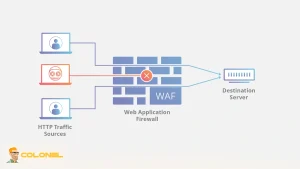
A WordPress firewall acts as a shield, filtering incoming traffic to prevent malicious requests from reaching your server. Unlike generic server-level firewalls, a WAF is specifically tailored to WordPress vulnerabilities, protecting against SQL injections, XSS attacks, and automated brute-force attempts.
- Real-time threat detection: Monitors suspicious activity and blocks attackers immediately.
- Traffic filtering: Prevents malicious bots from overwhelming your site.
- Custom rules: Allows advanced users to define security rules tailored to their website’s structure.
Investing in a robust WAF ensures your website is defended continuously, reducing the risk of downtime and data theft.
Monitor Site Activity and User Roles
Maintaining a detailed activity log is crucial for detecting suspicious behavior early. By tracking changes, logins, and plugin updates, you can quickly identify unauthorized actions before they escalate into full-scale breaches.
- Activity logging: Captures who made changes and when, providing a forensic trail.
- User role management: Restrict access based on responsibility—administrators, editors, and contributors should only access what they truly need.
- Alerts and notifications: Instant email or dashboard notifications when critical changes occur.
Proper monitoring and user role management help prevent internal threats and accidental misconfigurations, which are often overlooked in basic security setups.

Windows VPS-hosting
Remote Access & Full Admin
Regular Security Audits
Even with strong plugins and firewall protection, your website should undergo routine security audits. These audits identify vulnerabilities, outdated components, and misconfigurations that automated systems may miss.
- Plugin and theme reviews: Ensure all components are up-to-date and from trusted sources.
- File integrity checks: Detects unauthorized modifications to core files.
- Scannen op kwetsbaarheden: Identifies potential security loopholes before hackers exploit them.
Regular audits act as a preventive measure, giving you insights into potential risks and allowing for timely corrective actions.
Recovering and Maintaining a Secure WordPress Site
Even a well-secured website can be compromised if maintenance is neglected. This section focuses on recovery strategies, back-ups, and maintaining continuous protection.
Set Up Off-Site and Real-Time Backups
Backups are your last line of defense if a breach occurs. By keeping copies off-site and in real time, you minimize data loss and downtime.
- Cloud storage: Store backups externally to ensure site restoration even if the server is compromised.
- Real-time backups: Capture every change, including posts, pagina's, and sales transactions.
- Easy restoration: Reliable plugins like Jetpack Backup allow one-click restores, reducing technical complexity.
A backup strategy ensures business continuity, especially for eCommerce stores or websites with frequent updates.
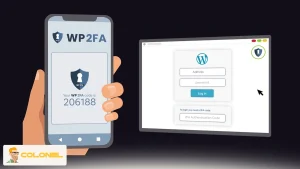
Implement Two-Factor Authentication (2FA)
Two-factor authentication adds an additional layer of security to your WordPress login. Even if a password is compromised, hackers cannot access the site without the second verification factor.
- Admin accounts: Apply 2FA to all admin-level users for maximum protection.
- Third-party access: Require temporary 2FA credentials for developers or marketing teams.
- Plugin integration: Most premium security plugins include 2FA setup for easy implementation.
2FA significantly reduces the risk of unauthorized access and strengthens overall WordPress security.
Response Plan for Hacked Sites
Even with precautions, a breach can still occur. Having a defined response plan ensures swift recovery and minimizes damage.
- Identify the breach: Use activity logs and malware scans to detect the scope of compromise.
- Isolate affected areas: Temporarily disable compromised plugins or user accounts.
- Restore from backup: Quickly recover to a clean version of your site.
- Update security: Change passwords, remove suspicious users, and apply all updates.
- Professional assistance: Consider hiring security experts if the breach is severe.
A clear response plan reduces downtime, preserves reputation, and protects visitor data.
Long-Term WordPress Security Maintenance
Maintaining WordPress security is an ongoing responsibility. Even after implementing advanced protection measures, continuous monitoring and proactive updates are essential. A secure site not only prevents attacks but also preserves SEO rankings, user trust, and operational stability.
Continuous Plugin and Theme Management
Outdated or unused plugins and themes are frequent entry points for hackers. Regularly reviewing your WordPress environment minimizes vulnerabilities.
- Remove unused components: Unused plugins or extra themes should be deleted to reduce attack surfaces.
- Update frequently: Regularly update all active plugins and themes, prioritizing those that receive security patches.
- Audit plugin sources: Only use plugins and themes from reputable developers to avoid backdoors in nulled or free versions.
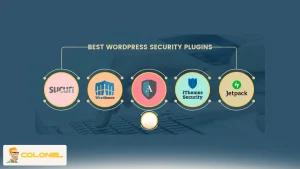
By maintaining a lean and updated environment, you reduce the likelihood of exploit-based breaches significantly. Volgens Jetpack:
“A security plugin gives you protection without needing to manage complex server settings. It scans for malware, blocks bad traffic, monitors your site files, and alerts you if something changes.”
Ongoing Malware and Threat Scanning
Even a well-protected site can be targeted by sophisticated malware or zero-day vulnerabilities. Automated scanning tools help detect issues early, allowing for quick mitigation.
- Scheduled scans: Run regular scans for malware, suspicious code, and potential vulnerabilities.
- Realtime monitoring: Alerts administrators immediately if malicious activity is detected.
- Automated fixes: Many security plugins can resolve common threats without manual intervention.
Proactive scanning ensures that threats are addressed before they escalate into damaging breaches.
Secure User and Administrator Practices
Human error is often the weakest link in WordPress security. Strong policies for users and administrators are essential for long-term safety.
- Restrict access: Only give administrative privileges to trusted users.
- Enforce strong passwords: Require complex, unique passwords and periodic updates.
- Educate users: Train team members on phishing attacks, malware awareness, and secure login practices.
A combination of technical controls and educated users creates a holistic defense against potential attacks.
Disaster Recovery Planning
Even with robust security, incidents can occur. A disaster recovery plan ensures your WordPress site can quickly recover from a breach or failure.
- Backup verification: Regularly test backups to ensure they are complete and restorable.
- Emergency protocols: Define steps for isolating and restoring compromised components.
- Communication plan: Inform stakeholders and users appropriately while handling security incidents.
Having a clear and tested disaster recovery plan reduces downtime, limits damage, and protects both your data and reputation.
Regular Security Audits and Reports
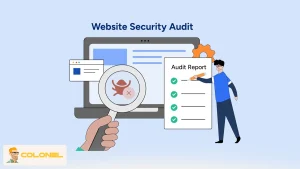
Long-term security relies on consistent assessment. Conducting periodic audits allows you to refine your security measures and adapt to new threats.
- Security audits: Review file permissions, plugin integrity, en serverinstellingen.
- Activity logs analysis: Track anomalies in user activity to detect potential breaches.
- Reporting: Generate periodic reports for administrators to make informed security decisions.
Audits provide a roadmap for improvement and help ensure that WordPress security remains robust over time.
Strengthen Your WordPress Security Today
Securing your WordPress site is not a one-time task but a continuous effort that requires vigilance and proactive measures. From choosing a reliable hosting provider to implementing strong passwords, two-factor authentication, en regelmatige back-ups, every step contributes to a fortified website.
Ignoring WordPress security risks can lead to severe consequences, including lost revenue, damaged reputation, stolen data, and SEO penalties. By following these best practices and leveraging trusted security tools, you can safeguard your website, maintain user trust, and ensure an uninterrupted online presence.
Veelgestelde vragen (Veelgestelde vragen) About WordPress Security
What is the most common way WordPress sites get hacked?
The most frequent entry points are outdated WordPress core files, plug-ins, and themes. Weak passwords, reused usernames like “admin,” and poor hosting security further increase risk.
Do I need a WordPress security plugin?
Ja. Security plugins provide continuous protection by scanning for malware, monitoring site activity, and blocking malicious traffic.
How does WordPress security affect SEO and Google rankings?
A hacked site can harm SEO rankings through blacklisting, spam content injection, slow page loads, and loss of user trust. Google favors secure sites (HTTPS) and may penalize or remove sites compromised by malware or spam.
Is two-factor authentication (2FA) necessary for WordPress security?
Absoluut. 2FA adds an extra layer of protection by requiring a second verification step, making unauthorized access extremely difficult even if passwords are stolen.
How can I detect if my WordPress site has been hacked?
Signs include security warnings, unusual redirects, malware alerts from plugins, suspicious lines of code, unexpected slow performance, and sudden downtime.