
SOAP-activering is een essentieel proces om communicatie tussen applicaties mogelijk te maken via gestructureerde webservices, waardoor systemen veilig en efficiënt gegevens kunnen uitwisselen. In een stap-voor-stap handleiding voor SOAP-activatie, gebruikers leren hoe ze de vereiste instellingen kunnen configureren, verifieer service-eindpunten, en zorg voor een goede authenticatie voor een soepele integratie. Als u elke fase van de SOAP-activering begrijpt, kunt u veelvoorkomende verbindingsfouten voorkomen, verbetert de betrouwbaarheid van het systeem, en ondersteunt naadloze gegevensoverdracht tussen servers, ondernemingsplatforms, en toepassingen van derden in zowel kleine als grootschalige zakelijke omgevingen.
Wat is SOAP-activering en waarom is het belangrijk?
SOAP-activering is een fundamenteel concept in webservicecommunicatie dat de gestructureerde uitwisseling van gegevens tussen gedistribueerde systemen mogelijk maakt. Hiermee kunnen applicaties communiceren via op XML gebaseerde berichtenuitwisseling, ervoor te zorgen dat informatie in een standaard wordt overgedragen, platformonafhankelijke manier. In moderne bedrijfsomgevingen, SOAP-activatie speelt een cruciale rol bij de integratie van oudere systemen met nieuwere applicaties, waardoor interoperabiliteit tussen verschillende technologieën en infrastructuren mogelijk wordt.
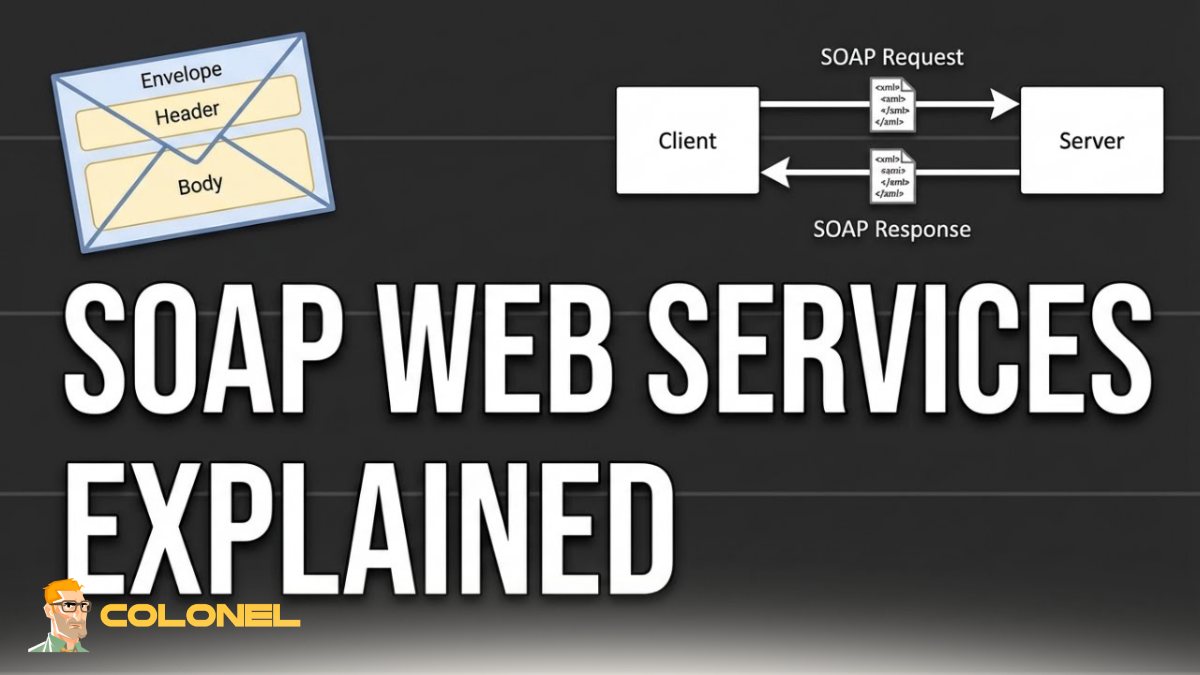
Wat is SOAP-activering?
In wezen, SOAP-activatie verwijst naar het proces van het activeren en configureren van op SOAP gebaseerde services, zodat ze op de juiste manier berichten kunnen verzenden en ontvangen. Dit zorgt ervoor dat services vindbaar zijn, toegankelijk, en functioneel in een netwerkomgeving. Zonder de juiste configuratie, systemen kunnen mogelijk niet communiceren, resulterend in gegevensverlies of integratiefouten.
De krachtige ondersteuning voor beveiligingsprotocollen zoals WS-Security
Een van de redenen waarom SOAP-activering nog steeds op grote schaal wordt gebruikt, is de sterke ondersteuning van beveiligingsprotocollen zoals WS-Security, die encryptie bieden, authenticatie, en berichtintegriteit. Bedrijven die gevoelige gegevens verwerken, vertrouwen vanwege deze robuustheid vaak op op SOAP gebaseerde services.
Betrouwbaarheid
Een ander belangrijk aspect is betrouwbaarheid. SOAP-activering zorgt ervoor dat berichten in een consistent formaat worden afgeleverd, het verminderen van dubbelzinnigheid en het verbeteren van de systeemstabiliteit. Dit is vooral belangrijk in het bankwezen, gezondheidszorg, en enterprise resource planning-systemen.

WordPress-webhosting
Vanaf $ 3,99/maandelijks
Kortom, SOAP-activering is niet alleen een technisch installatieproces – het is de ruggengraat van veel veilige en gestructureerde digitale communicatiesystemen.
Vereisten voorafgaand aan SOAP-activering
Het is erg belangrijk om de juiste omgeving op te zetten voordat u met het configuratieproces begint. Voor een succesvolle SOAP-activatie, het is essentieel om ervoor te zorgen dat alle vereiste systeemcomponenten gereed zijn.
Ten eerste, het besturingssysteem moet webservices kunnen hosten. Normaal gesproken kan dit worden gedaan met behulp van Windows Server.
Ten tweede, het is cruciaal om de benodigde softwarepakketten te installeren. De meeste SOAP-services werken binnen een bepaalde versie van .NET Framework, die als motor fungeert.
Ten derde, het is belangrijk dat u Internet Information Services installeert en configureert (IIS). IIS werkt als hostingplatform voor SOAP-applicaties.
Hieronder vindt u een kort overzicht van de belangrijkste vereisten:

Goedkope VPS-server
Vanaf $ 2,99/maandelijks
| Vereiste | Doel | Belang |
|---|---|---|
| Windows Server-besturingssysteem | Biedt een hostingomgeving | Essentieel |
| .NET-framework | Voert SOAP-gebaseerde applicaties uit | Kritisch |
| IIS geïnstalleerd | Host webservices | Kritisch |
| Beheerderstoegang | Staat configuratiewijzigingen toe | Vereist |
| Netwerkconnectiviteit | Maakt servicecommunicatie mogelijk | Belangrijk |
Een goede voorbereiding zorgt ervoor dat de SOAP-activering soepel verloopt, zonder onverwachte onderbrekingen of configuratiefouten.
Inzicht in SOAP-services en SOAP-eindpunten
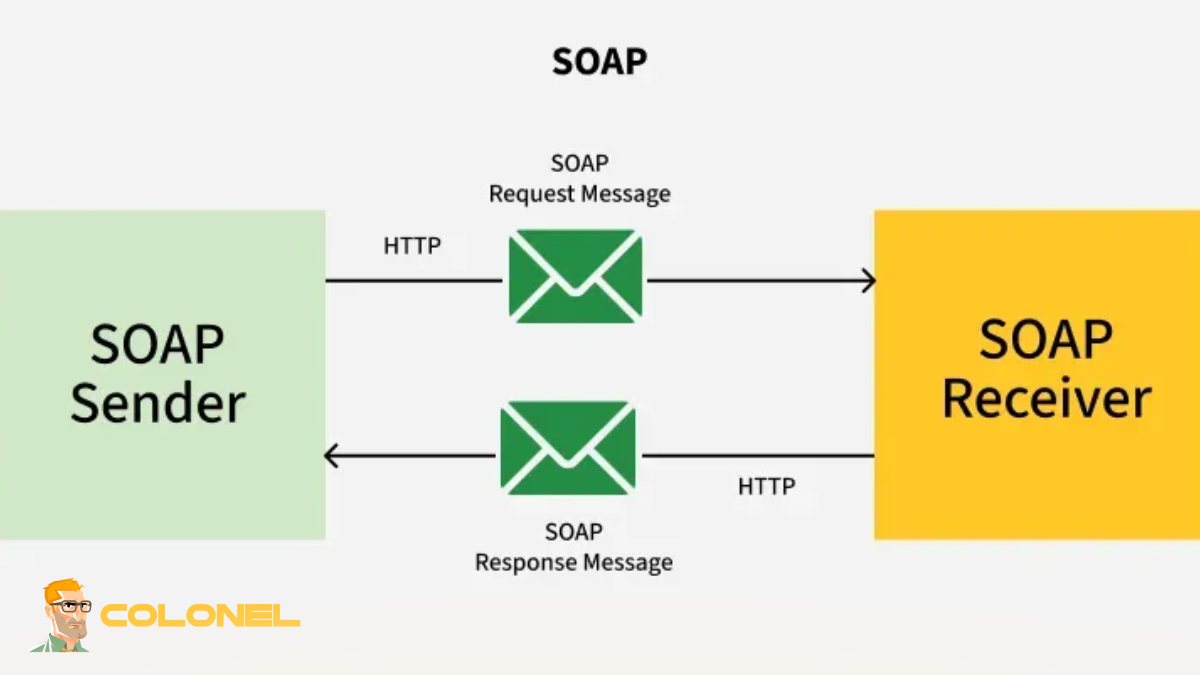
Een SOAP-service is een van de meest prominente communicatiemodellen die gebruik maken van specifieke eindpunten. In het algemeen, een eindpunt betekent dat het een webadres is dat u kunt gebruiken om SOAP-berichten te verzenden en te ontvangen.
Een SOAP-service wordt gemaakt volgens een WSDL (Definitietaal van webservices) bestand. Deze bestanden bevatten alle mogelijke details over de functionaliteit van de dienst. Elke keer dat u verbinding maakt met een dienst, u krijgt toegang tot deze gegevens die in het contract zijn vastgelegd.
Vanuit het oogpunt van implementatie, SOAP-activering zorgt voor een goede registratie van het SOAP-eindpunt en zorgt ervoor dat dit gemakkelijk via het netwerk toegankelijk is.
Het communicatieprotocol is gebaseerd op een bericht dat bestaat uit een envelop inclusief header en een body.

Windows VPS-hosting
Toegang op afstand en volledig beheer
Dus, als er problemen zijn met de structuur van uw verzoek of antwoord, het wordt mogelijk niet afgeleverd of gelezen.
SOAP activeren binnen Windows-functies
De activering van SOAP-gerelateerde services in Windows OS is een cruciale procedure om het besturingssysteem voor te bereiden op het uitvoeren van de service. Dit omvat het activeren van relevante componenten met behulp van Windows-functies.
Eenmaal correct geactiveerd, Door de activering van SOAP kan het besturingssysteem alle SOAP-gerelateerde verzoeken verwerken.
- Stappen om SOAP te activeren binnen Windows-functies
- Ga naar het Configuratiescherm en klik op “Schakel Windows-functies in of uit”
- Vinden “Internetinformatiediensten (IIS)”
- Klik op Webbeheertools en World Wide Web Services
- Activeer ASP.NET en .NET Extensibility
Als deze stappen voltooid zijn, het besturingssysteem activeert automatisch alle vereiste componenten. In sommige gevallen moet u de computer opnieuw opstarten om het activeringsproces te voltooien.
IIS configureren voor SOAP-activering
Internetinformatieserver (IIS) is een van de belangrijkste hulpmiddelen die nodig zijn om de SOAP-services te hosten. Het is uiterst cruciaal om het correct te configureren, om de beschikbaarheid en functionaliteit van de dienst te behouden.
Ten eerste, Houd er rekening mee dat IIS fungeert als interface tussen de SOAP-server en externe verzoeken. Eventuele verkeerde configuraties kunnen tot problemen leiden, zoals storingen of serviceonderbrekingen.
Begin met het maken van een applicatiepool voor uw SOAP-server. Daarna, voeg alle servicegerelateerde bestanden toe aan de virtuele map in IIS.
Ten tweede, men moet de autorisatiemodus configureren op basis van hun behoeften. De meest voorkomende modi zijn basisverificatie en Windows-verificatie.
Ten slotte, zorg ervoor dat u de juiste poortbindingen toewijst om toegang te krijgen tot uw service van buiten het netwerk. Op dit punt, SOAP-activering is klaar voor gebruik in IIS.
Installatie van benodigdheden vanuit .NET Framework
De installatie van het .NET Framework is verplicht om de op SOAP gebouwde applicaties uit te voeren, omdat het de vereiste componenten bevat.
Voordat u doorgaat met het activeringsproces via SOAP, zorg ervoor dat de juiste versie van het raamwerk is geïnstalleerd en wordt ondersteund door IIS, anders mislukt het activeringsproces van de services.
Om de registratie van het raamwerk in IIS te voltooien, Er moet een ASP.NET-registratietool worden gebruikt. Alle services moeten kunnen functioneren onder het geïnstalleerde raamwerk.
Het is ook noodzakelijk om de compatibiliteit van de geïnstalleerde versie van het raamwerk met uw SOAP-service te garanderen, aangezien verschillende versies van het raamwerk specifieke configuraties vereisen.
In dit stadium, u bent klaar met het installeren van alle componenten die nodig zijn om SOAP te gebruiken.
Verificatie van SOAP-activering na configuratie
Zodra alle configuraties zijn voltooid, testen is een essentieel onderdeel van het verifiëren of alles goed is geconfigureerd of niet. Dit wordt gedaan door een verzoek naar de service-URL te sturen en de uitvoer ervan te onderzoeken.
Dit kan binnen een paar minuten worden gedaan met behulp van testtools van derden, zoals Postman, of de standaardtestfunctie die beschikbaar is voor de WSDL-URL. Het juiste antwoord geeft de succesvolle activering van de SOAP-service aan.
Tijdens het testen, zorg ervoor dat:
- Antwoord-XML is correct opgemaakt
- Authenticatie wordt correct afgehandeld
- Eindpunt is toegankelijk
- Er zijn geen serverfouten opgetreden
In geval van een fout, bekijk de foutmeldingen in de IIS- en toepassingsgebeurtenislogboeken.
Veelvoorkomende SOAP-activeringsproblemen en oplossingen
Hoewel aan alle voorwaarden is voldaan, het betekent niet altijd dat SOAP-activering zal slagen. De reden is dat er zowel tijdens als na het activeren van de dienst problemen kunnen optreden. Deze problemen hebben betrekking op de configuratie zelf of op de omgeving waarin SOAP draait.
Een van de meest voorkomende problemen is dat van 404 Niet gevonden-status, wat betekent dat het eindpunt verkeerd is geconfigureerd in IIS. Een ander veelvoorkomend probleem is een authenticatieprobleem wanneer SOAP geen verbinding kan maken.
Mismatches in de versies van het .NET-framework kunnen tijdens runtime tot een uitzondering leiden, wat betekent dat het raamwerk opnieuw moet worden geïnstalleerd of bijgewerkt.
Als laatste maar daarom niet minder belangrijk, Firewall-instellingen kunnen voorkomen dat SOAP succesvol wordt uitgevoerd, omdat sommige poorten geblokkeerd kunnen zijn.
Naast het verbeteren van uw foutopsporingsvaardigheden, het zou heel nuttig zijn om meer te leren over het oplossen van netwerkproblemen. Bijvoorbeeld, hier is een interessante gids om u te helpen leren hoe DNS-problemen op te lossen met dig en nslookup.
Als u eerder met interessante SOAP-gerelateerde problemen bent geconfronteerd, voel je vrij om je ervaring hieronder te beschrijven in het opmerkingengedeelte.
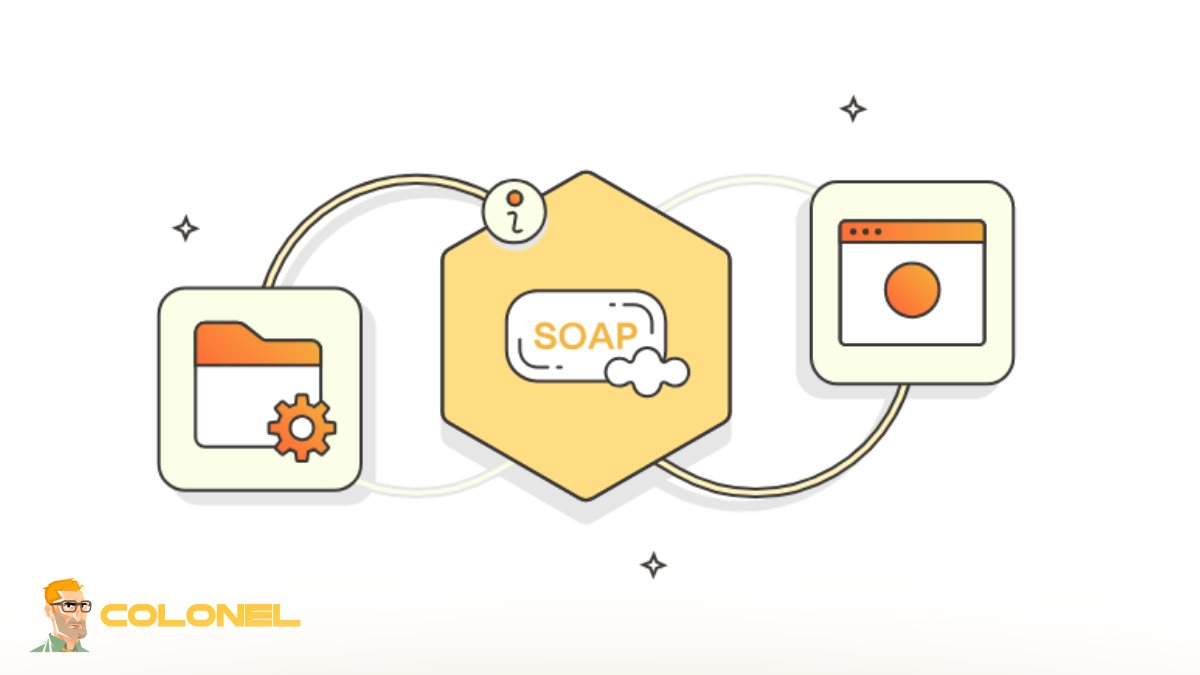
Controlelijst voor SOAP-activatie
Om stabiliteit en veiligheid te garanderen bij het activeren van SOAP, het is belangrijk om je op elke stap te concentreren, vanaf de initiële configuratie tot het testen ervan. Een goed geactiveerde SOAP garandeert een succesvolle systeem-tot-systeemcommunicatie, robuust beveiligingsbeheer, en effectieve gegevensoverdracht tussen bedrijfsapplicaties.
Door de noodzakelijke voorwaarden te begrijpen, IIS op de juiste manier configureren, en het verifiëren van uw diensten, u kunt voorkomen dat eventuele problemen uw bedrijfsprocessen verstoren. SOAP-architectuur blijft grote mogelijkheden bieden voor bedrijven die op zoek zijn naar efficiënte communicatie.
In een voortdurend evoluerend technologisch landschap, expertise op het gebied van SOAP-activering biedt een solide basis voor het beheer van hybride omgevingen die moderne API's en oudere systemen bevatten.
