


React is a JavaScript library for building dynamic and interactive user interfaces. It enables developers to create reusable components that efficiently manage data and respond to user interactions. React’s approach to UI development has revolutionized how web applications are built, making it faster and easier to maintain large-scale projects. Keep reading to know What Is React and how to use it.
Understanding React
React is a declarative JavaScript library for building user interfaces and managing user interactions. Kent C. Dodds says:
“React is a JavaScript library for creating user interfaces and managing user interactions.”
Unlike traditional DOM-centric approaches, React focuses on describing what the UI should look like for a given state, not how to update the UI step by step. This abstraction allows developers to reason about interfaces as pure outputs of data rather than sequences of DOM mutations.
React is not a framework. It does not prescribe routing, state architecture, or data fetching by default. In plaats van, it specializes in the view layer, which makes React flexible enough to integrate into existing systems or scale into full application architectures.


WordPress-webhosting
Vanaf $ 3,99/maandelijks
How React Works
React operates on the principle of a Virtual DOM, a lightweight representation of the real DOM stored in memory. When data changes, React calculates the differences between the previous Virtual DOM and the new one, updating only the necessary parts of the real DOM. This process optimizes performance by reducing unnecessary re-renders.
JSX, React’s JavaScript syntax extension, allows developers to write HTML-like code directly within JavaScript. It simplifies the creation and structuring of components while keeping the code readable. Bijvoorbeeld:
const element = <button onClick={() => console.log(‘clicked!’)}>Click me!</button>;
This JSX code is transformed into standard JavaScript during compilation, enabling browsers to render it efficiently. React’s use of JSX and Virtual DOM together ensures highly interactive and performant web applications.
JSX and How to Write HTML Code Within JavaScript
JSX is a syntax extension that blends JavaScript and HTML-like markup, enabling developers to define UI structures in an expressive and readable way. Before browsers can interpret JSX, it must be compiled into standard JavaScript using tools like Babel. This process ensures that developers can write intuitive code while benefiting from modern JavaScript capabilities.
JSX also enforces a secure way to embed dynamic content, mitigating risks like Cross-Site Scripting (XSS).

Goedkope VPS-server
Vanaf $ 2,99/maandelijks
Example of JSX usage:
const element = <button onClick={() => console.log(‘clicked!’)}>Click me!</button>;
This single line replaces multiple calls to React.createElement, improving readability and maintainability while still generating efficient JavaScript objects representing UI elements.

Advantages of Using React
React is widely adopted by major companies like Netflix, Airbnb, and American Express due to its simplicity, prestatie, en flexibiliteit. Developers often choose React for its ability to create highly interactive, data-driven interfaces while keeping the codebase maintainable and scalable.
In addition, React’s active ecosystem and extensive documentation make it easier to learn and troubleshoot compared to other front-end technologies. What is React key benefits?

Windows VPS-hosting
Remote Access & Full Admin
- Reusability of Components
Components in React can be reused across different parts of an application, reducing development time and ensuring consistency. Developers can create modular, self-contained units that can be maintained independently. - Declarative Syntax
React uses a declarative approach, meaning developers describe what the UI should look like for a given state. React then handles rendering and updating the UI automatically, eliminating manual DOM manipulations. - Performance Optimization
With the virtual DOM and efficient diffing algorithm, React updates only the parts of the UI that change. This minimizes unnecessary re-renders, which is especially beneficial for complex applications. - SEO-Friendly
React supports server-side rendering, allowing search engines to crawl content more effectively. This improves web performance, reduces load time, and enhances SEO for single-page applications. - Large Ecosystem and Community Support
React integrates easily with libraries such as Redux, Recoil, Axios, and Tailwind CSS. Its large community ensures constant updates, tutorials, and plugins to solve common challenges.
React Components and Props
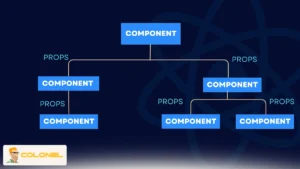
Components are the building blocks of React applications. They encapsulate UI logic and rendering, making it possible to build modular applications. Props are inputs passed to components, allowing dynamic data flow and customization. Bijvoorbeeld:
function Greeting(props) {
return <h1>Hello, {props.name}</h1>;
}
Here, Greeting is a reusable component receiving a name prop. React uses this concept extensively to create complex interfaces without duplicating code. Components can also handle their internal state to manage dynamic data efficiently.
How to Use React in Practice
To start building applications with React, follow these key steps. Each step ensures your code is maintainable and scalable:
- Install Node.js and npm
React requires Node.js and npm. Verify installation with:
node -v
npm -v
If missing, download Node.js from the official website.
- Create a React App (Visit Shared Linux Hosting Service)
Use the Create React App tool to scaffold a project:
npx create-react-app my-react-app
- Navigate and Start Development Server
Move into the project directory:
cd my-react-app
npm start
Your app is now accessible at http://localhost:3000 with live reloading enabled.
- Explore Project Structure
Key directories:
- src – contains all application code.
- public – holds static assets and HTML templates.
- Build Components
Create your first component in src/App.js:
import React from ‘react’;
function App() {
return <h1>Hello, React!</h1>;
}
export default App;
- Render Components
Render your component in src/index.js:
import ReactDOM from ‘react-dom’;
import App from ‘./App’;
ReactDOM.render(<App />, document.getElementById(‘root’));
- Manage State and Props
Use hooks like useState to handle dynamic UI changes, and pass props to components to make them reusable and modular.
Gerelateerde dienst: Europe Secure Cloud Servers Hosting
Deploying a React Application
Deploying a React app makes it accessible to users worldwide. Using a VPS with Node.js and NGINX is a common approach:
- Create a production build:
npm run build
- Upload build/ contents to your server.
- Configure NGINX for serving static files and reverse proxy to Node.js if needed.
- Restart NGINX to make the app live.
Visit Managed Dedicate Server
React Hooks Beyond useState
Hooks introduced a paradigm shift in how React components handle state and lifecycle logic. Beyond useState, hooks like useEffect, useMemo, and useCallback allow developers to manage side effects, memoize expensive calculations, and optimize rendering.
- useEffect handles side effects such as data fetching, subscriptions, and DOM manipulations.
- useMemo caches expensive computations to avoid redundant recalculations.
- useCallback memoizes functions to prevent unnecessary re-renders when passed as props.
Understanding and leveraging these hooks is essential for building high-performance, maintainable React applications.
Advanced State Management Techniques in React
Beyond basic useState, React developers often need to manage complex state interactions in larger applications. Advanced state management libraries like Redux and Recoil provide centralized mechanisms to store and update state efficiently.
Redux employs a single, immutable store for the entire application, ensuring predictable state transitions and easier debugging. It uses actions and reducers to define how the state evolves, which is ideal for applications with multiple interconnected components.
Recoil, anderzijds, allows components to subscribe to atomic pieces of state. This approach minimizes unnecessary re-renders, simplifies sharing state between components, and is often more beginner-friendly. Choosing the right state management solution depends on application size, complexity, and team preferences.
Context API for Simplifying Prop Drilling
React’s Context API is an efficient alternative for passing data deeply through component trees without manually sending props at every level. It’s particularly useful for global settings like theme, authentication status, or language preferences.
By wrapping components in a Context Provider, any descendant can access the shared data using useContext without prop drilling. This approach improves code readability and maintainability, especially in applications where multiple nested components require the same state.
Voorbeeld:
const ThemeContext = React.createContext(‘light’);
function App() {
return (
<ThemeContext.Provider value=”dark”>
<Toolbar />
</ThemeContext.Provider>
);
}
function Toolbar() {
const theme = React.useContext(ThemeContext);
return <div>Current theme: {theme}</div>;
}

React Performance Optimization Strategies
Performance is critical for complex applications. React provides several tools and techniques such as below to optimize performance beyond the Virtual DOM.
- Lazy Loading Components: Using React.lazy and Suspense, developers can load components only when needed, reducing the initial bundle size.
- Code Splitting: Dividing the application into smaller bundles ensures faster page load and better user experience.
- Avoiding Unnecessary Re-renders: Using React.memo for functional components or shouldComponentUpdate for class components prevents rendering components when props or state haven’t changed.
These strategies, combined with the Virtual DOM, help maintain smooth interactions even in large, dynamic applications.
Server-Side Rendering (SSR) and SEO
React applications can leverage server-side rendering (SSR) using frameworks like Next.js. SSR pre-renders HTML on the server, improving page load times, user experience, and search engine indexing.
This approach solves one of the biggest challenges of single-page applications: JavaScript-heavy pages often load slowly for search engine crawlers. SSR allows search engines to see fully rendered content, enhancing visibility and SEO. Volgens Next.js documentation:
“Server-side rendering ensures that your React application content is available for SEO indexing and faster initial load times.”
Integrating APIs and Data Fetching
Modern React applications often interact with external APIs. Hooks like useEffect and libraries such as Axios or React Query streamline asynchronous data fetching.
- useEffect triggers a data fetch when the component mounts or when dependencies change.
- React Query offers caching, background updates, and state synchronization for remote data, reducing boilerplate and improving application responsiveness.
Effective API integration ensures applications remain dynamic and interactive, maintaining a smooth user experience.
React Applications Security
Securing React applications is critical. Developers should follow best practices like:
- Escaping dynamic content to prevent XSS attacks (JSX converts expressions safely by default).
- Avoid dangerouslySetInnerHTML unless absolutely necessary.
- Using HTTPS for API calls and storing sensitive tokens securely, often in environment variables.
React’s ecosystem, combined with careful coding practices, ensures robust and secure web applications.

What is React Native?
React Native is a framework built on top of React that enables developers to create cross-platform mobile applications for iOS and Android. Unlike React.js, which renders HTML in browsers, React Native uses native UI components. This means apps have the look and feel of true native applications while sharing most of the JavaScript codebase between platforms.
React Native leverages platform-specific APIs, allowing developers to access device features like cameras, GPS, and push notifications. The combination of React’s component-based architecture with native rendering provides both performance and consistency across devices.
React.js vs React Native
To clarify the difference, here’s a structured comparison:
| Aspect | React.js | React Native |
| Platform | Web applications | Mobile applications (iOS/Android) |
| Rendering | HTML, CSS via DOM | Native components |
| Navigation | Browser-based navigation | Native navigation |
| Prestatie | Web-optimized | Near-native performance |
| UI Components | Standard HTML + React | Native mobile components |
React Native maintains React’s core benefits while expanding its applicability to mobile environments, making it a popular choice for cross-platform development.
The Power of React
Understanding “what is React?” equips developers with the tools to build fast, interactive, and maintainable user interfaces across web and mobile platforms. React’s component-based architecture, efficient state management, and declarative rendering allow for scalable applications that perform seamlessly and adapt to evolving user needs.
By mastering React, developers can create reusable components, optimize performance with Virtual DOM, integrate with modern APIs, and even extend their skills to cross-platform mobile development with React Native, making it an essential library for modern software development.
Veelgestelde vragen (FAQ)
What is React used for?
React is used to build interactive and dynamic user interfaces for web and mobile applications, leveraging reusable components.
Is React a framework or a library?
React is a JavaScript library focused on rendering views. It is not a full framework, which allows developers to combine it with other tools as needed.
What is JSX in React?
JSX is a JavaScript syntax extension that allows HTML-like code to be written within JavaScript, making UI development easier and more readable.
How does React differ from React Native?
React builds web applications using the DOM, whereas React Native builds cross-platform mobile apps using native components.
How can I deploy a React app?
React apps can be deployed using VPS servers, cloud hosting, or platforms like Netlify and Vercel, often involving a production build and web server configuration.