
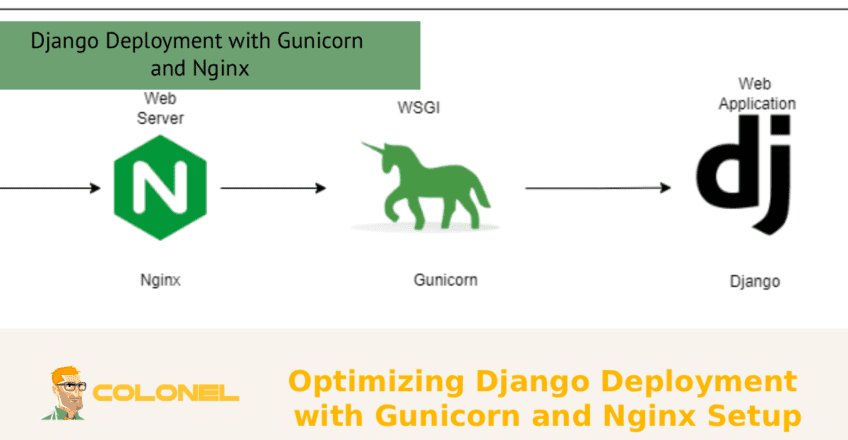

Django-implementatie met Gunicorn en Nginx is een betrouwbare en veelgebruikte oplossing om uw applicatie over te zetten van de ontwikkelingsfase naar productie. In aanvulling, het gebruik van Gunicorn als een zeer capabele WSGI-applicatieserver en Nginx als een krachtige reverse proxy garandeert betere prestaties, increased security, and improved client request management. Notably, the deployment solution is crucial for ensuring your Django application performs efficiently, especially with regards to load balancing and traffic management.
Introduction to Django Deployment and Its Importance
Deployment of a Django project involves placing the application in such a way that allows the users to access the website online securely and efficiently. Although development usually takes place within the developer’s computer using Django’s server, production deployment needs a different and more complex environment that ensures scalability and stability. This makes Django Deployment Using Gunicorn and Nginx very important.
Proper deployment of Django is critical since it determines how the website operates and performs online. Poor deployment will make your website slow, unreliable, or vulnerable to cyber-attacks. Echter, through proper deployment, you will guarantee efficiency in request processing, effective distribution of load, and other aspects.
Introduction to Gunicorn as WSGI Server
Gunicorn is a highly efficient, lichtgewicht, and fast WSGI HTTP server created explicitly for Python web applications. Gunicorn is used to connect the Django application to the web server and manage requests.
In de meeste gevallen, a Django application is deployed using a combination of Gunicorn and Nginx. In this scenario, Gunicorn manages multiple worker processes that can handle simultaneous requests. This helps improve the efficiency of the web application since Gunicorn performs better than the Django default server.

WordPress-webhosting
Vanaf $ 3,99/maandelijks
It is also easy to integrate Gunicorn into a Django project. Daarnaast, it can scale horizontally by adding worker processes to improve performance.
Understanding the Use of Nginx in Django Deployment
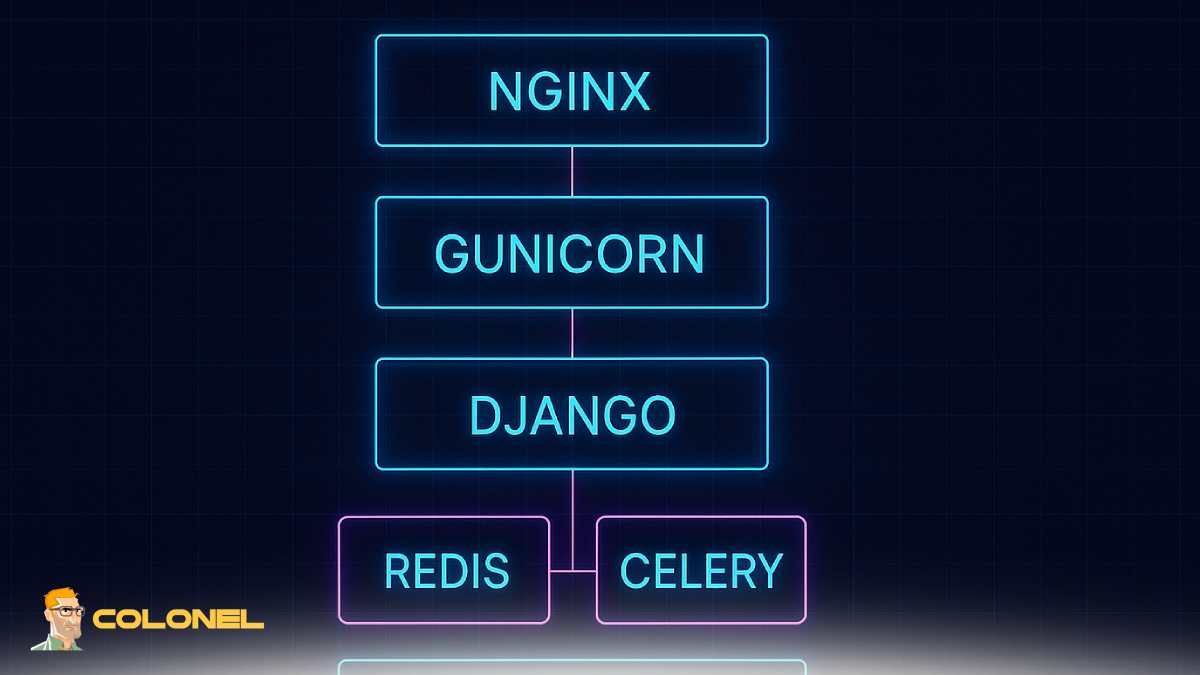
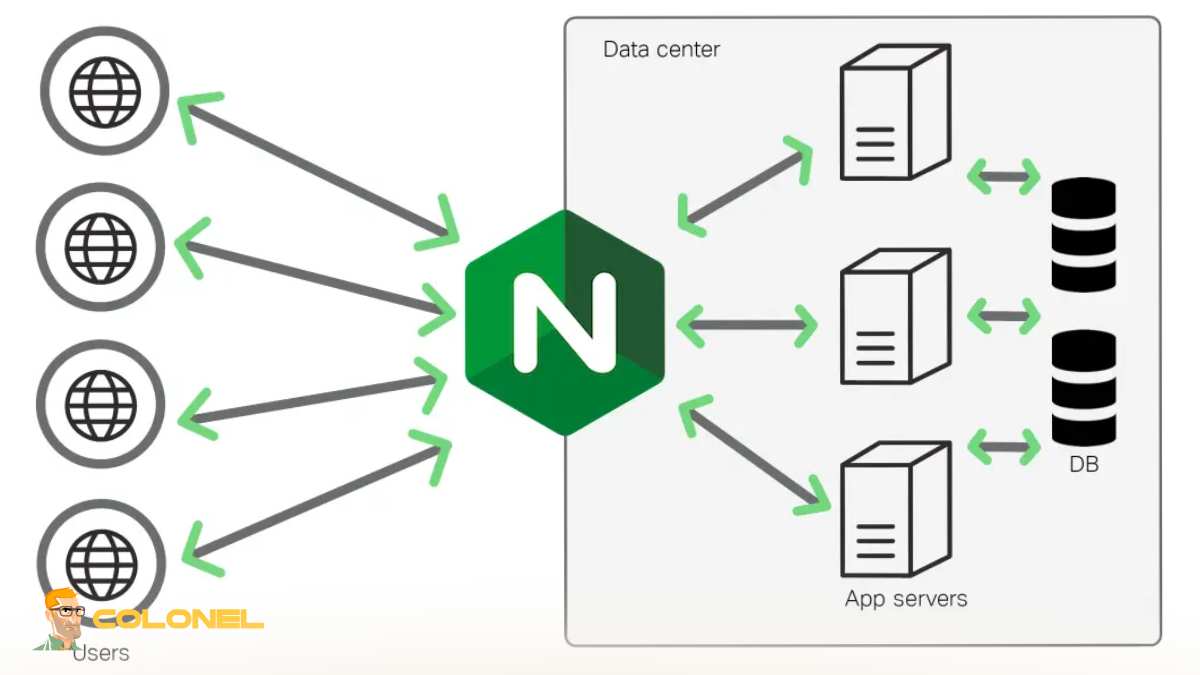
Nginx is a highly efficient web server and a reverse proxy server that acts before Gunicorn. It receives client requests and sends them to the backend application.
There are several reasons why Nginx can be advantageous for Django Deployment using Gunicorn and Nginx:
- It delivers static content (CSS, JS, afbeeldingen) directly and thus decreases the workload for Gunicorn
- It is used as a reverse proxy server, sending requests to the application running on Gunicorn
- It enhances system security and ensures proper SSL/TLS encryption
For further information about how Nginx works, check out the article “Wat is Nginx? Een duidelijke kijk op hoe deze webserver werkt.”
Prerequisites for Django Deployment Using Gunicorn and Nginx
Before proceeding with the deployment of Django using Gunicorn and Nginx, you must meet certain prerequisites. This guarantees that the implementation process goes smoothly without any hitches.

Goedkope VPS-server
Vanaf $ 2,99/maandelijks
For successful deployment of Django using Gunicorn and Nginx, the following should be in place:
- A server (Virtuele privéserver [VPS] or dedicated server)
- Linux-based operating system
- Installation of Python and pip
- Creation of a virtual environment for your Django application
- Basic understanding of Linux command line interface
- Access to your domain
Your Django application should be thoroughly tested in a development environment prior to deploying it.
Steps to Configure Gunicorn for Django Project
The configuration of Gunicorn is an essential part of launching your Django application. It requires you to install Gunicorn, configure it, and run it as a service.
Eerst, you should install Gunicorn via pip in your virtual environment. Afterward, test the installation by running your Django app with Gunicorn.
Main stages to follow
Once you learn about Gunicorn, you need to perform the following actions:
- Install Gunicorn
- Run Gunicorn together with your Django application
- Configure systemd for managing Gunicorn as a service
- Create socket files for communication between Gunicorn and Nginx
With this approach, you will be able to have Gunicorn working permanently in the background and automatically restart it if necessary.

Windows VPS-hosting
Remote Access & Full Admin

Using Nginx as Reverse Proxy for Django Application
After deploying Gunicorn, the next phase will involve configuring Nginx to operate as a reverse proxy server. Nginx will be receiving the request and then pass it to Gunicorn.
For typical Django deployment with Gunicorn and Nginx, Nginx configuration is required to set up server blocks, specify proxy settings, and connect to the Gunicorn socket.
Key Configurations
Some of the essential configurations when working with Nginx include:
- Server block – domain and port configurations
- Proxy pass – Passes request to the Gunicorn
- Static files – Serve static files directly
- Errors pages – Custom error page configurations
Handling Static and Media Files in Production
It is important for developers to be able to serve static and media files correctly. While in development, Django takes care of static files, in production, Echter, this task is usually delegated to Nginx.
According to Django Deployment with Gunicorn and Nginx, the collectstatic command is used to collect static files into a special directory. The static files are then handled by Nginx.
Below is a simple comparison to understand the difference:
| Functie | Django Dev Server | Production with Nginx |
|---|---|---|
| Static File Handling | Django handles | Nginx handles |
| Prestatie | Laag | Hoog |
| Schaalbaarheid | Beperkt | Hoog |
| Beveiliging | Basis | Geavanceerd |
This setup ensures faster content delivery and a better user experience.
Best Practices for Deploying Django Using Gunicorn and Nginx
Deployment involves a set of measures to ensure your application works safely and optimally in a production environment.
If you use Django Deployment with Gunicorn and Nginx, then there are a number of best practices you should take into account:
Ten eerste, let’s note that the concept of security means something more than installation. It should be a constantly developing process.
- Implement HTTPS protocol with SSL certificate usage.
- Disable Django debugging mode.
- Configure a robust firewall.
- Keep your server up to date.
- Use environment variables to store confidential information.
Regarding optimization techniques:
- Gzip compression should be enabled for Nginx.
- Static file caching.
- Database query optimization.
- Use logging to monitor your application performance.
As it was stated by DigitaleOceaan,
“Utilization of reverse proxy such as Nginx in front of Gunicorn may significantly boost performance and security.”
Building a Reliable Django Production Setup
Deploying a Django application for production isn’t just about getting it online—it’s about choosing the right combination of tools and configuring them in a way that ensures stability and performance. Using Gunicorn alongside Nginx gives you a well-balanced setup that handles both application processing and traffic management effectively.
What makes the difference is how well you understand each component’s role. When Gunicorn is properly configured to run your app and Nginx is optimized to handle requests, static files, en beveiligingslagen, your deployment becomes much more resilient.
In practical terms, mastering this setup means you can move beyond development environments and run Django applications in a way that’s ready for real users, higher traffic, en groei op lange termijn.